EasyManua.ls Logo

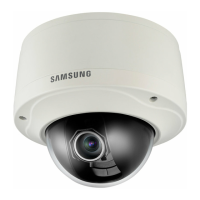
Samsung SNV-5080 - User Manual

Samsung SNV-5080
144 pages
Print Icon
To Next Page IconTo Next Page
Loading...
NETWORK CAMERA
User Manual
SNB-5000/SND-5080/
SND-5080F/SNV-5080

Table of Contents

Other manuals for Samsung SNV-5080

Questions and Answers

  • K
    Kari SolomonSep 12, 2025
    Why can't my Samsung Security Camera record into the SD memory card?
    • C
      Christopher MartinSep 13, 2025
      If your Samsung Security Camera cannot record into the SD memory card: 1. Check if the memory card is defective. 2. Check if the write protection tab of the memory card is set to 'Lock'.
  • D
    Danny RodriguezAug 25, 2025
    Why I can’t access my Samsung Security Camera from a web browser?
    • Y
      yeseniapalmerAug 25, 2025
      If you cannot access the camera from a web browser, verify the camera’s Network settings are correct. Also, check that all network cables are properly connected. If using DHCP, ensure the camera can obtain dynamic IP addresses. For DDNS, confirm the MAC address is correctly entered. If the camera is connected to a router, check that port forwarding is properly configured.
  • N
    Norman MaysAug 25, 2025
    What to do if my Samsung Security Camera viewer got disconnected during monitoring?
    • W
      William GuerreroAug 26, 2025
      If the viewer disconnects during monitoring, it may be due to changes in camera or network configurations. Check all network connections. If the camera is connected over a PPPoE network, poor network conditions may also cause disconnections.
  • N
    Nicholas ChanSep 23, 2025
    Why of Samsung SNV-5080 Security Camera is set to , but no notification e-mail reaches me?
    • C
      Caleb HoffmanSep 23, 2025
      If you are not receiving notification emails from your Samsung Security Camera when an analysis event occurs, verify the following settings in sequence: 1. Check settings. 2. The should be set to . 3. Check if the option of menu is checked to use.
  • J
    juliahernandezSep 13, 2025
    Why doesn't the SD memory indicator turn on when I insert an SD card into my Samsung SNV-5080 Security Camera?
    • M
      Megan CoxSep 13, 2025
      If the SD memory indicator does not turn on even when the SD memory card is inserted into your Samsung Security Camera: * Check if the memory card is defective. * Check if the Record option is selected in the Setup > Event > SD Record menu.
  • I
    Ian CooleySep 23, 2025
    How to fix Samsung Security Camera images overlap?
    • J
      Jennifer TaylorSep 23, 2025
      If images from your Samsung Security Camera overlap, check whether two or more cameras are set to a single multicast address instead of different addresses.
  • W
    wolfetiffanySep 6, 2025
    What to do if Samsung Security Camera does not operate properly with SD memory card?
    • R
      Rodney WagnerSep 6, 2025
      If your Samsung Security Camera isn't operating properly with an SD memory card inserted, first, check if the memory card is inserted in the correct direction. If it is, and the card was formatted by another device, format the memory card again using the camera's ? ? menu.
  • B
    bartonchaseSep 7, 2025
    Why doesn't SD memory indicator turn on for Samsung SNV-5080?
    • G
      Gerald LeonSep 7, 2025
      If the SD memory indicator does not turn on even when the SD memory card is inserted into your Samsung Security Camera, check if the memory card is defective. Also, check if the is checked in the ? ? menu.
  • J
    julia14Sep 23, 2025
    What to do if I cannot format the SD memory card of my Samsung SNV-5080?
    • P
      pfreemanSep 23, 2025
      If you cannot format the SD memory card of your Samsung Security Camera, check if the write protection tab of the memory card is set to 'LOCK'.
  • M
    mckenziealanAug 31, 2025
    How to fix the issue when I cannot format the SD memory card in my Samsung SNV-5080?
    • D
      danasmithAug 31, 2025
      If you cannot format the SD memory card, check if the write protection tab of the memory card is set to “Lock.”

Samsung SNV-5080 Specifications

General IconGeneral
BrandSamsung
ModelSNV-5080
CategorySecurity Camera
LanguageEnglish

Related product manuals