English _31
● LIVE
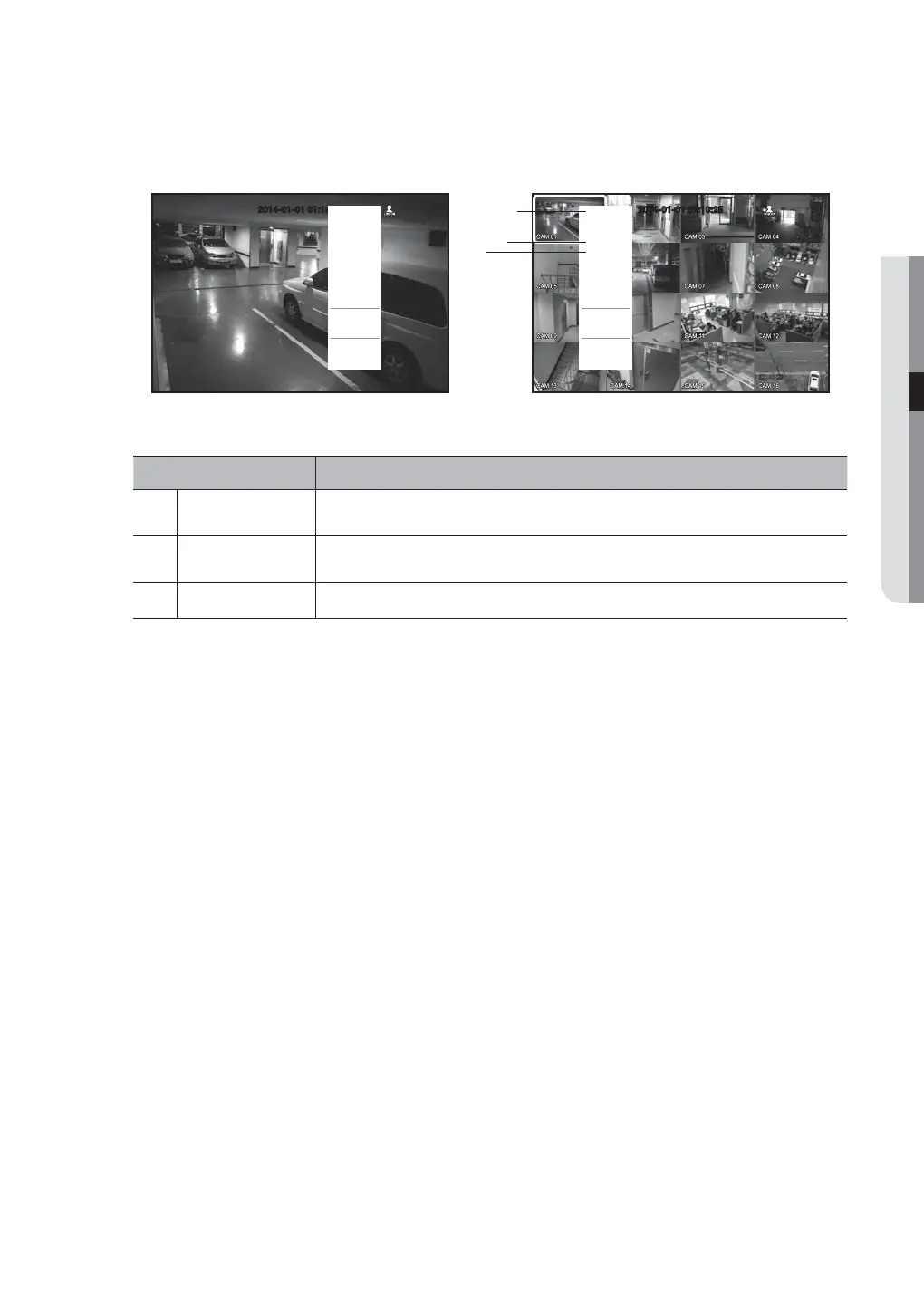
Single Mode Menu
The single mode menu is available only in Single Mode.
The menu, which appears as <Screen Mode> on a single screen, appears as <Full Screen> after selecting
only one channel on a split screen.
Menu Functions
Full Screen
Select and click a desired channel in Split mode to switch to the full screen of the selected
channel.
b
PTZ Control
Accesses the PTZ Control menu.
The PTZ menu is activated only in One-Channel Live mode. (Page 79)
c
Zoom In Enlarges the selected image. (Page 36)
2014-01-01 01:10:25
Full Screen
Spot Out 1
Spot Out 2
PTZ Control
Zoom In
Audio
Freeze
Stop Alarm
Record
Play
Search
Backup
Main Menu
Shutdown
Hide Launcher
Logout
b
c
< Menu after selecting one channel
on the split screen >
< Single Mode Menu >
2014-01-01 01:10:25
Scene Mode
Spot Out 1
Spot Out 2
PTZ Control
Zoom In
Audio
Freeze
Stop Alarm
Record
Play
Search
Backup
Main Menu
Shutdown
Hide Launcher
Logout


 To Next Page