Watching TV Channels
After Tuning is completed, you can watch TV
channel.
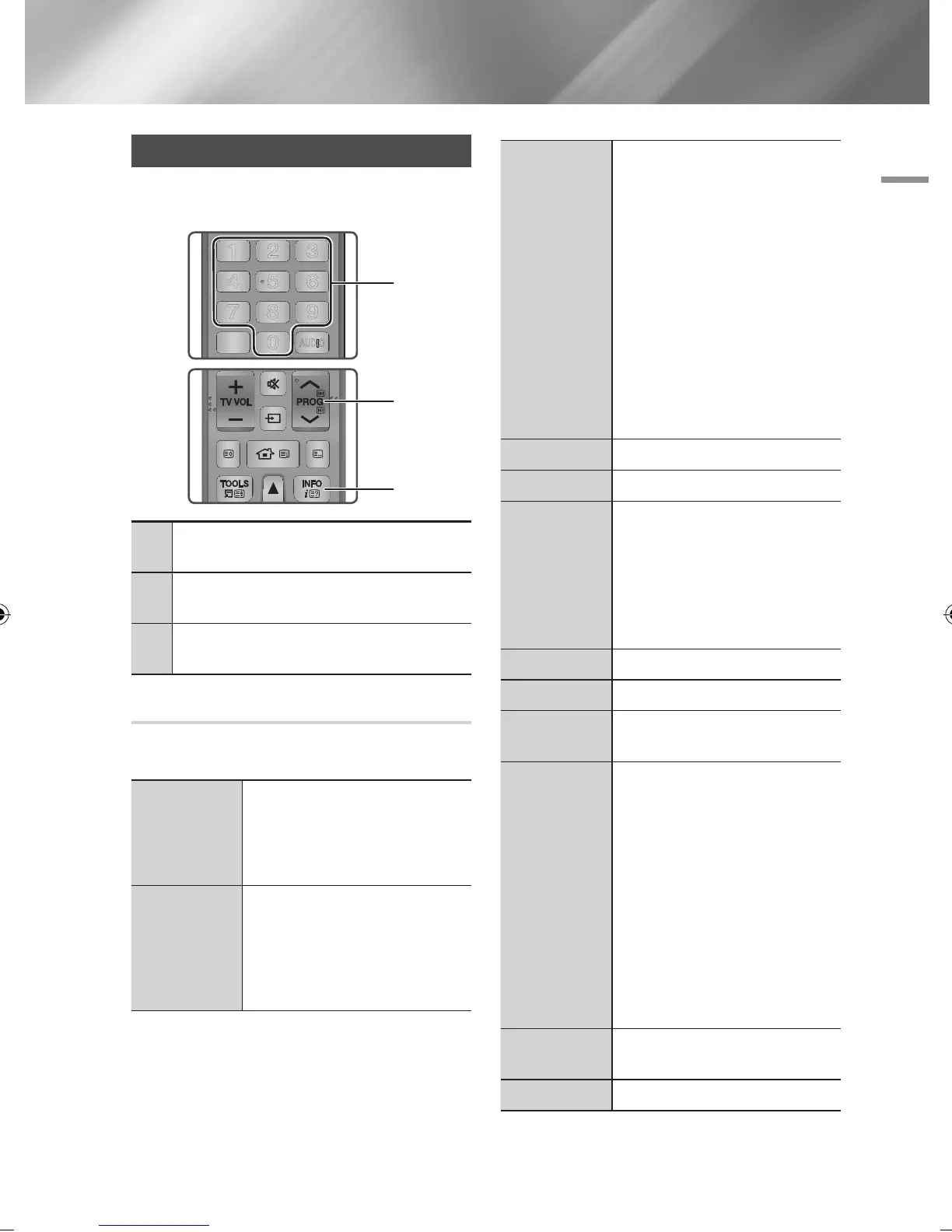
1
NUMBER buttons : To move TV channel directly,
press the channel numbers of desired TV channel.
2
PROG
buttons : Press this button to change TV
channels.
3
INFO buttons : Press this button to display detailed
information of selected channel.
Using the Tools Menu
Press the TOOLS button while you are viewing a
channel.
3D Perspective
Select to adjust the 3D perspective.
| NOTE |
\
This menu can be displayed when
convert 2D contents into 3D.
3D Depth
Select to adjust the 3D depth of 2D to
3D conversions.
| NOTE |
\
This menu can be displayed when
convert 2D contents into 3D.
Picture Mode
Select this to set the picture mode.
- Dynamic : Choose this setting to
increase Sharpness.
- Standard : Choose this setting for
most viewing applications.
- Movie : This is the best setting for
watching movies.
- User : Lets you adjust the sharpness
and noise reduction function
respectively.
| NOTE |
\
This menu can not be displayed
when you use the BD wise function.
Audio Language
Select to set the desired audio language.
Dual I II
Select to set the desired audio.
Lock Current
Channel
You can lock a TV channel by setting
PIN.
| NOTE |
\
This menu can be displayed when
the country set to Netherlands and
brodcast signal is cable.
Arial
Select to change a signal.
Edit Favourites
Select to Edit Favourites.
Signal
Information
Select to check the signal information.
PIP
Select to display PIP screen.
- PIP : If you select On, you can use
PIP function.
- Air/Cable : Select to change
broadcast signals.
- Channel : Select to change channels
- Size : Select to set PIP screen size.
- Position : Select to set PIP screen
position.
- Sound Select : Select one of Main
or Sub which you want to hear the
sound.
Audio
Description
Select to add a verbal description to the
main audio to help the visually impaired.
Subtitle
Select to set the desired subtitle.
DTV Functions
TITLE MENU
FUNCTION
TV SOURCE
POWER
RECEIVER
DIGITAL
SUBTITLE
INPUT
1 2 3
4 5 6
7 8 9
PANDORA SUBTITLE
SUBTITLE
INPUT
AD/SUBTITLE
0
AUDIO
A B C D
SMART HUB
SEARCH
SOCIAL REC REC PAUSE
TV
TV MUTE
TV SOURCE
CH LIST HOME GUIDE
2D 3D
3
2
TITLE MENU
FUNCTION
TV SOURCE
POWER
RECEIVER
DIGITAL
SUBTITLE
INPUT
1 2 3
4 5 6
7 8 9
PANDORA SUBTITLE
SUBTITLE
INPUT
AD/SUBTITLE
0
AUDIO
A B C D
SMART HUB
SEARCH
SOCIAL REC REC PAUSE
TV
TV MUTE
TV SOURCE
CH LIST HOME GUIDE
2D 3D
1
English 47
|
02230W-STB-E7900-EN-ENG.indd 47 2012-04-13 오후 3:47:11



 To Next Page