3. When all the connections are completed, connect the power cords for the monitor and
DVD (or the device connected to the digital output terminal).
4. Select "HDMI" using the 'SOURCE [ ]' button.
Note
If you just connect using the DVI to HDMI cable without connecting to the sound source,
you cannot hear sound.
Connecting the audio output terminal of a digital device to the
[R-AUDIO-L]
of
[COM-
PONENT IN]
of the monitor using an audio cable will not give you sound. Make sure to
connect to the
[HDMI / PC/DVI-D AUDIO IN]
terminal of the monitor.
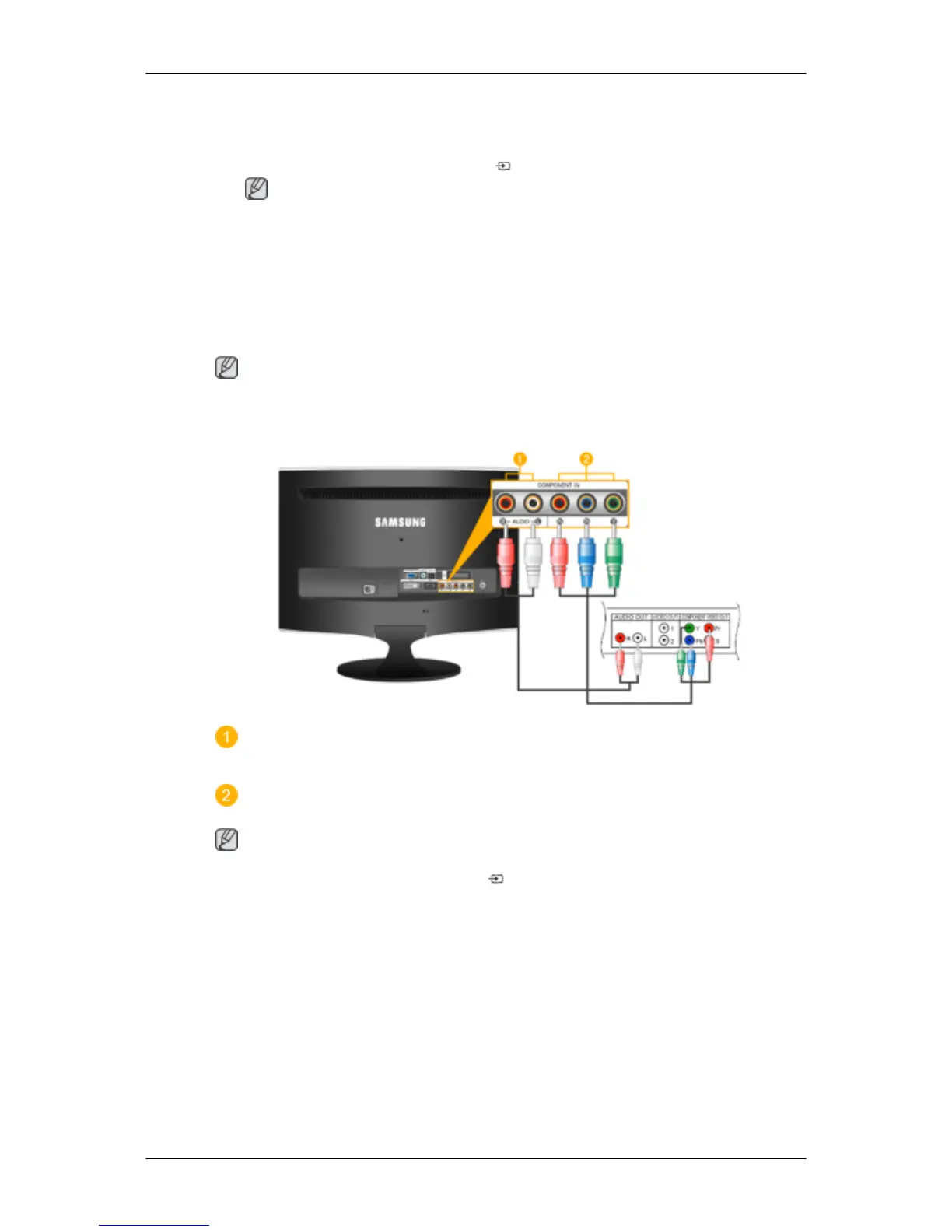
Connecting a Component cable
Note
Connect
to the DVD / DTV Set Top Box input if the device has a [COMPONENT IN] connector.
You can watch Component simply by hooking up the Component with the monitor as long as
the power is on.
Connect the port of the DVD, VCR (DVD / DTV Set-Top Box) to the
[R-AUDIO-L]
port of
the monitor.
Connect the VIDEO OUT port of the DVD / DTV Set-Top Box to the
[P
R
, P
B
,Y]
input ports
using a component video cable (P
R
, P
B
,Y).
Note
Select "Component" using the 'SOURCE [ ]'
If
you connect the P
R
, P
B
, and Y component cables to the incorrect terminals, the screen will
be displayed in red or blue.
For single-family houses, install an UHF antenna to receive digital broadcasting.
Connections













 To Next Page