Status Bar
The Status bar at the top of the
Home screen provides device
information (such as network
status, battery charge, and time)
on the right side and notification
alerts on the left.
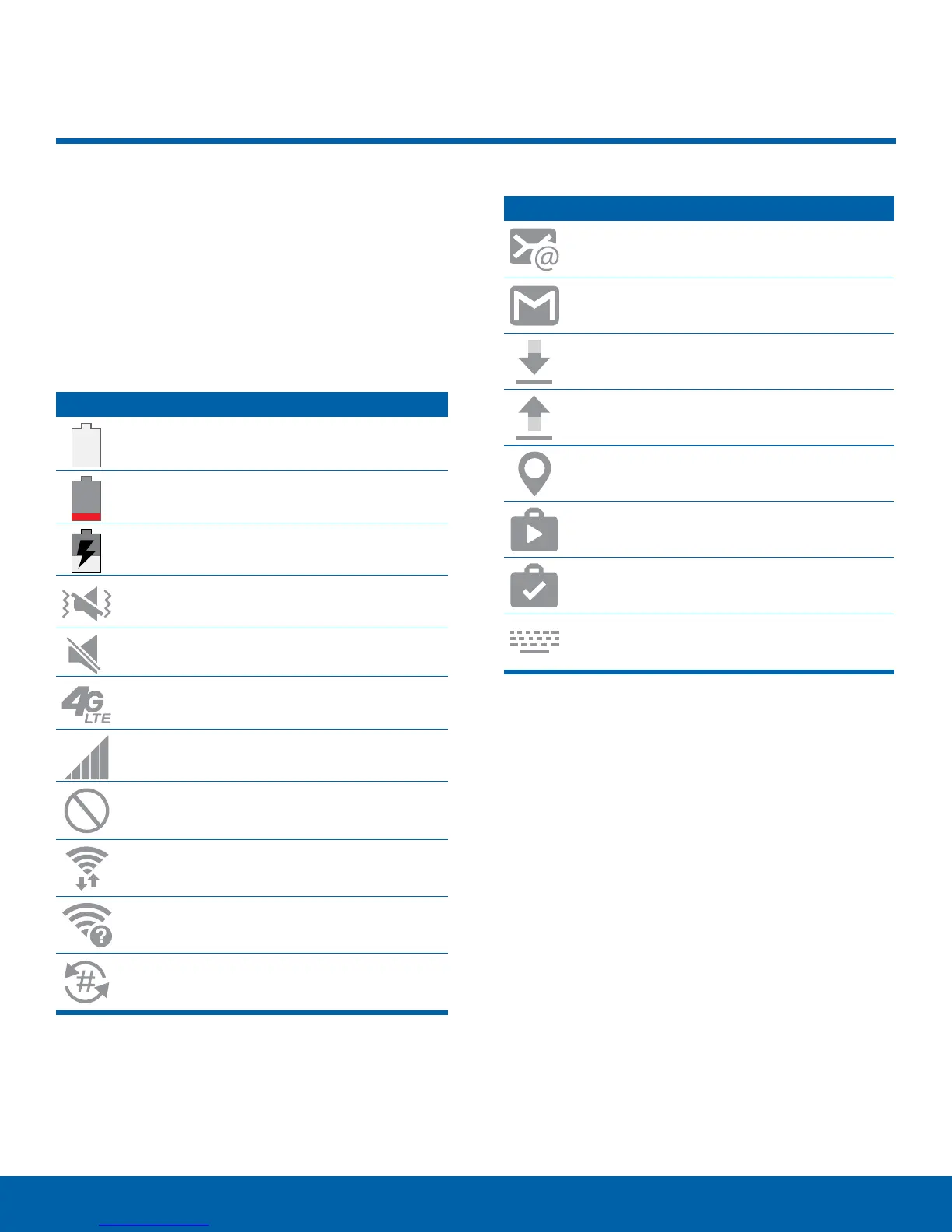
Status Icons
Battery full: Battery is fully charged.
Battery low: Battery is low.
Battery charging: Battery is charging.
Vibrate mode: Vibrate mode is enabled.
Mute mode: Mute mode is enabled.
4G LTE active: The device is connected to
a 4GLTE wireless network.
Signal strength: Cellular network signal
strength.
Network not available: No wireless
network is available.
Wi-Fi active: Wi-Fi is active.
Wi-Fi available: A Wi-Fi network is
available.
NumberSync: NumberSync is enabled.
Notification Icons
New email: New email has arrived.
New Gmail: New Gmail has arrived.
File download in progress: Download of
a file or app is in progress.
File upload in progress: File is being
uploaded or sent.
GPS active: Location service (GPS) is
active and acquiring a signal.
App updates available: App updates are
available from the Google Play store.
App updates complete: App installation
or updates are complete.
Keyboard in use: Keyboard is in use.
12
Status Bar















 To Next Page