SPECIAL FEATURES ]
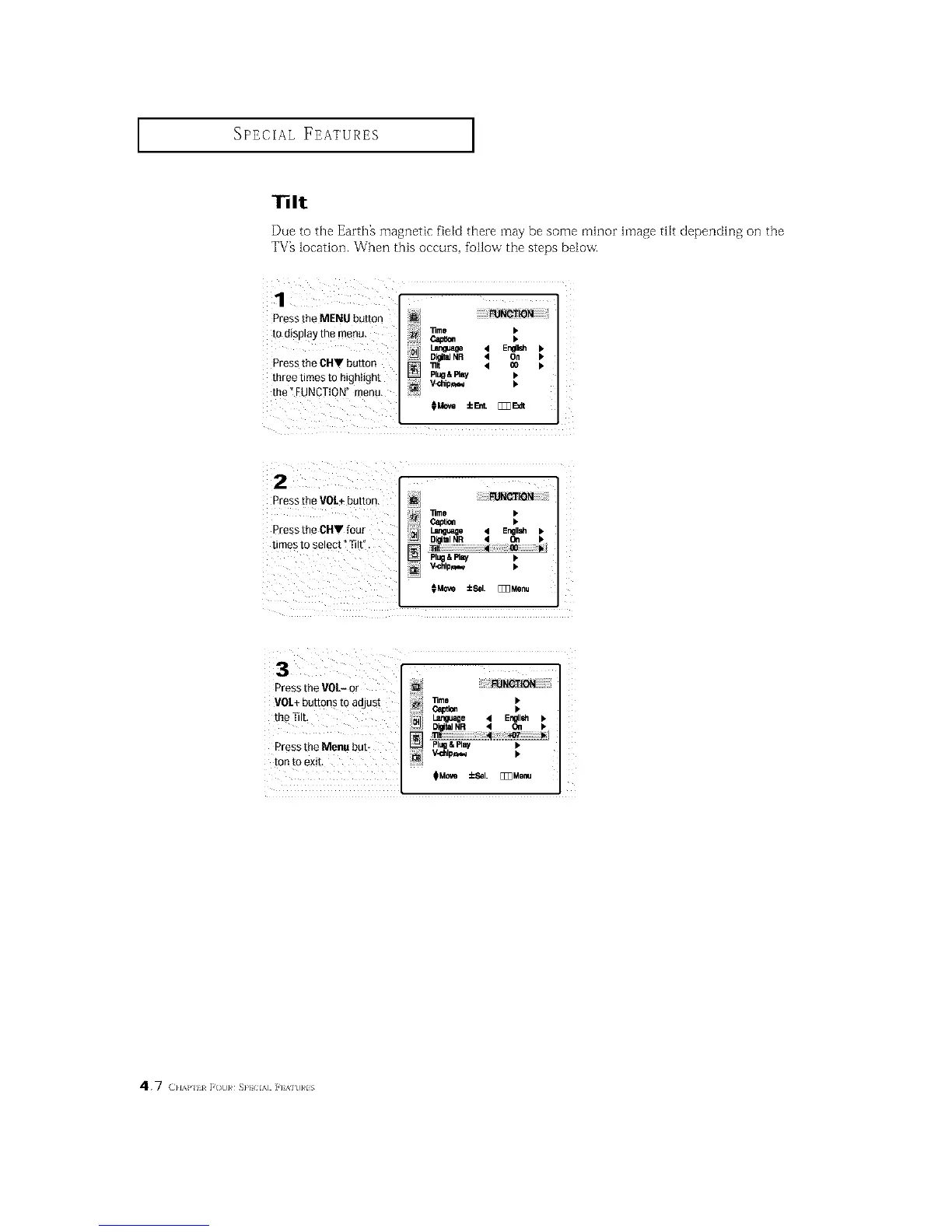
131t
Due to the Earth% magnetic field theze may be some minor hnage tilt depending oil the
TV_ location. When this occuzs, follow the steps below.
Press the MENU button _NOTiO_
]]me •
tOdisplay the menu. _ •
DigitalNR 4 On •
Pressthe CHV button _ _ < co •
three times to highlight _ Pl_&FIBy •
the _FUNCTION" menu, _i V_ilip_ •
CMov_±E_L _E_dt
Pressthe VOL+button.
lime •
Press the CNV four e_t_ •
times to select _Tilt".
PlUg& Fla_ •
_M_ ±Sel. [_3Menu
Press the VOL- or
VOL÷ buttons to adjust
the Tilt,
Press the Menu bub
ton to exit,
i
_OTiO_
D@ta]NR 4 OWl •
Plugl Ray •
V-dllpr_,_ •
N
_Mc_m ±Sal. _Menu
4.7 (}lAP 11 F(t]}# SP} IA] ]'] %]t]}#lS






 To Next Page