I _PECIAL FEATURES 1
Setting the On/Off l mer
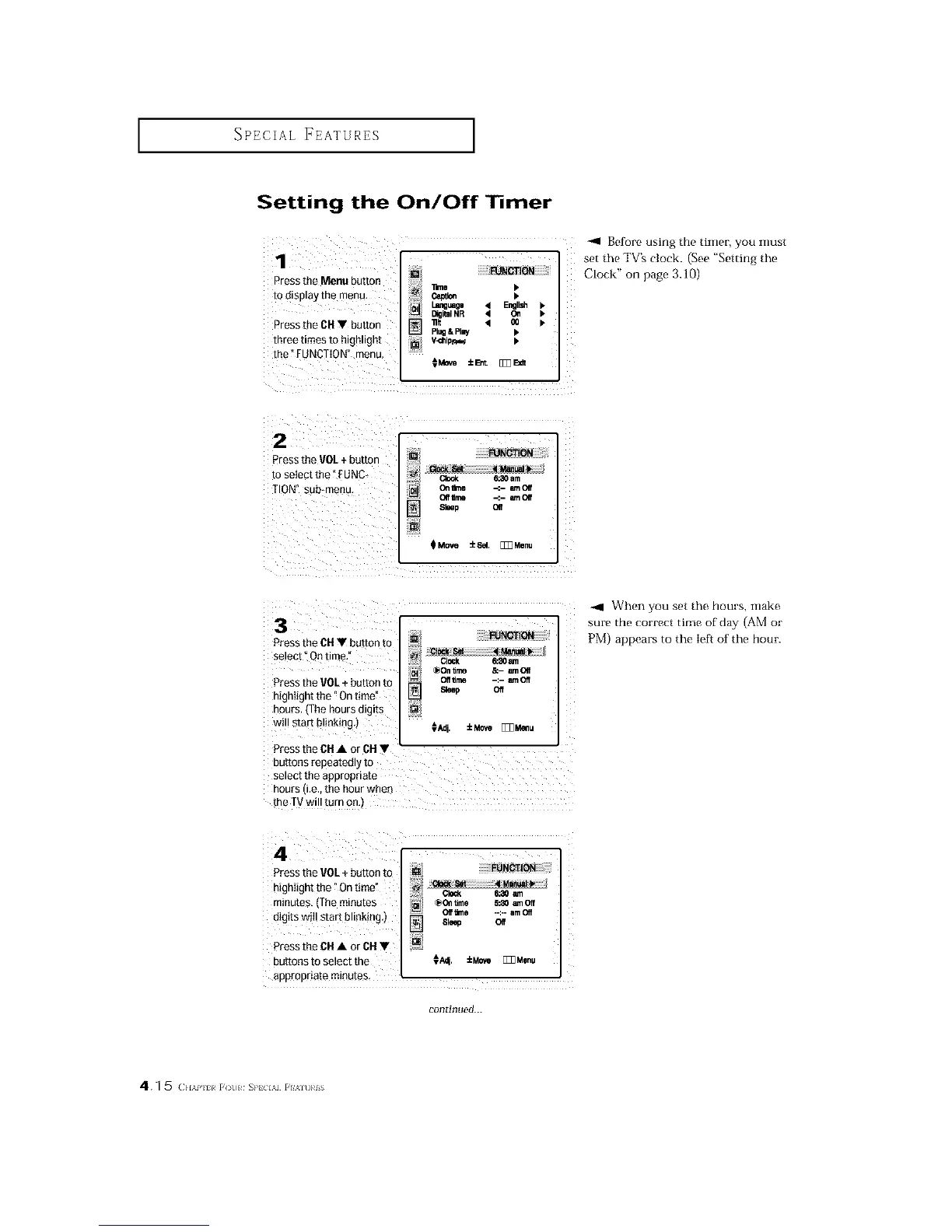
1 I __m_T=_OL_gUagO41_NGTI_DNE_glI_•
Press the Menu BUtton e,_lm •
to _llSpla_ the men{], _ •
k
DigitalNR 4 C_
Press the CH V button I-_ "_ q _ •
tllree times to highlight _/ V_hio_
the"FUNCTION" menu,
CMe_ ±l_t [_3E_t
-ql Before using the timer, you inust
set the TV's clock. (See "Setting the
CLock" on page 3.10)
2 I FUNCTION
Press me VOL + button
to setect the :UNC- c_ Ham
TION" sub*menu On_rne -_- _-noff
elf Hme _.- _-tlOil
Sleeo elf
m_
QMQve _Sal
I
[1_M0nu
3
Press the CHT button to
se!ect _Ontim_,_ :
_On _me &- amOIf
Pressthe VO_.÷b_tten to off_m -:- moff
Sleep Off
highIight the "On time!
hours (The hours digits
WillStart blinking.) [ €_. ±_ _l_,u
Press the CIt• OrcIt •
buttons repeatedly to i
select the appropriate
hours (i.e., the hour wheO
the TVwi!! turn one)
When you set the hours, make
sure the correct time of day (AM or
PM) appears to the Ie[_ of the hour.
Pressthe VOL+ button to
highIight the "On time"
minutes, (the minutes _o_ time 5_0 _ Off
digits wi !start bl nking,) oe_o --:--am_
61e_ Off
Press the CH• or CH•
buttonsto select the €_. ±MO'*__Menu
appropriate minutes
continued...
4.1 5 (:,_,,,,_?,_[(_L,,_s,,, ,,,i






 To Next Page