I _PECIAL FEATURES I
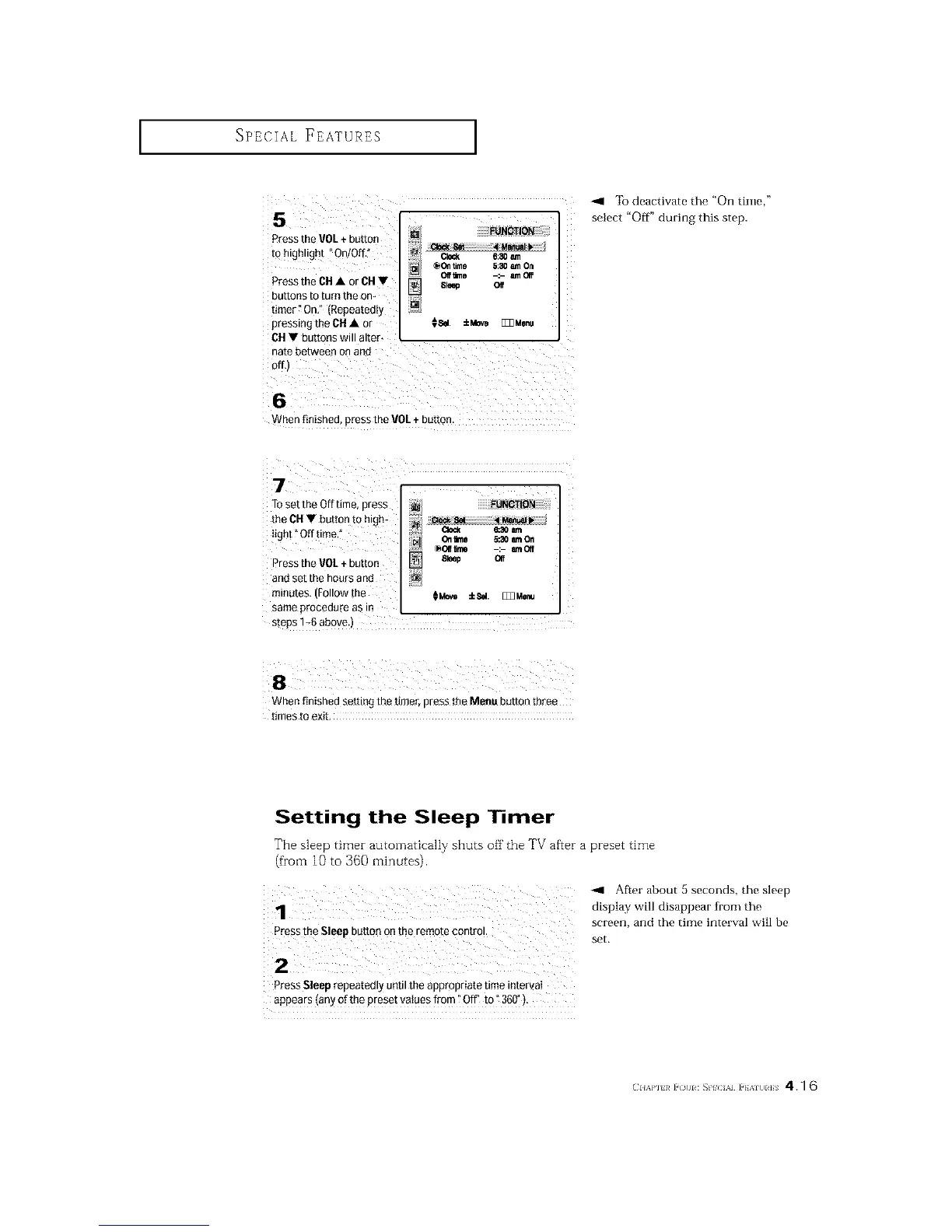
Pressthe VOL+ button
to highlight "On/OfL"
Pressthe CH• or CH•
buttons to turn the om
fimer" On." (Repeatedly
pressing the CH• or
CH• buttons will alter.
elock 6:30 t_n
@011time 5:30 am On
Of_ime -:- amOIf
Sleep Oft
_Sd. ±Mov_ E_Menu
To deactivate the "On time,"
select "Off" during this step.
When finished, press the VOL + button.
7
TOset the Off time, press
the CH• button to high-
light _Off time
Press the VOL+ button
and set the hours and
minutes. (Follow the
same procedure as in
2i _ _aoam
N 01rune _30amOn
f-_]- @011lnle -:- mOff
] Sleep O_
s_eps1_6 above.)
When finished setting the timer, press the Meau button three
times to exib
Setting the Sleep ] mer
The sleep timer automatically shuts off the TV after a preset time
(from 10 to 360 minutes).
After about 5 seconds, the sleep
display will disappear h'on, the
screen, and the tinm interval will be
press the Sleep button on the remote contro!.
set.
Press Sleep repeatedly uetil the appropriate time intervaI
appears (any of the preset vatues from "Off" to _360"):
(_I{A}'I }/ i ¢}{11 : _PIC AI i }AIUIIS 4.1 6






 To Next Page