SPECIAL FEATURES ]
Z
¸¸¸¸3¸¸
i_ ¸ iiiiiiii_;;;;;_i!ii_i;
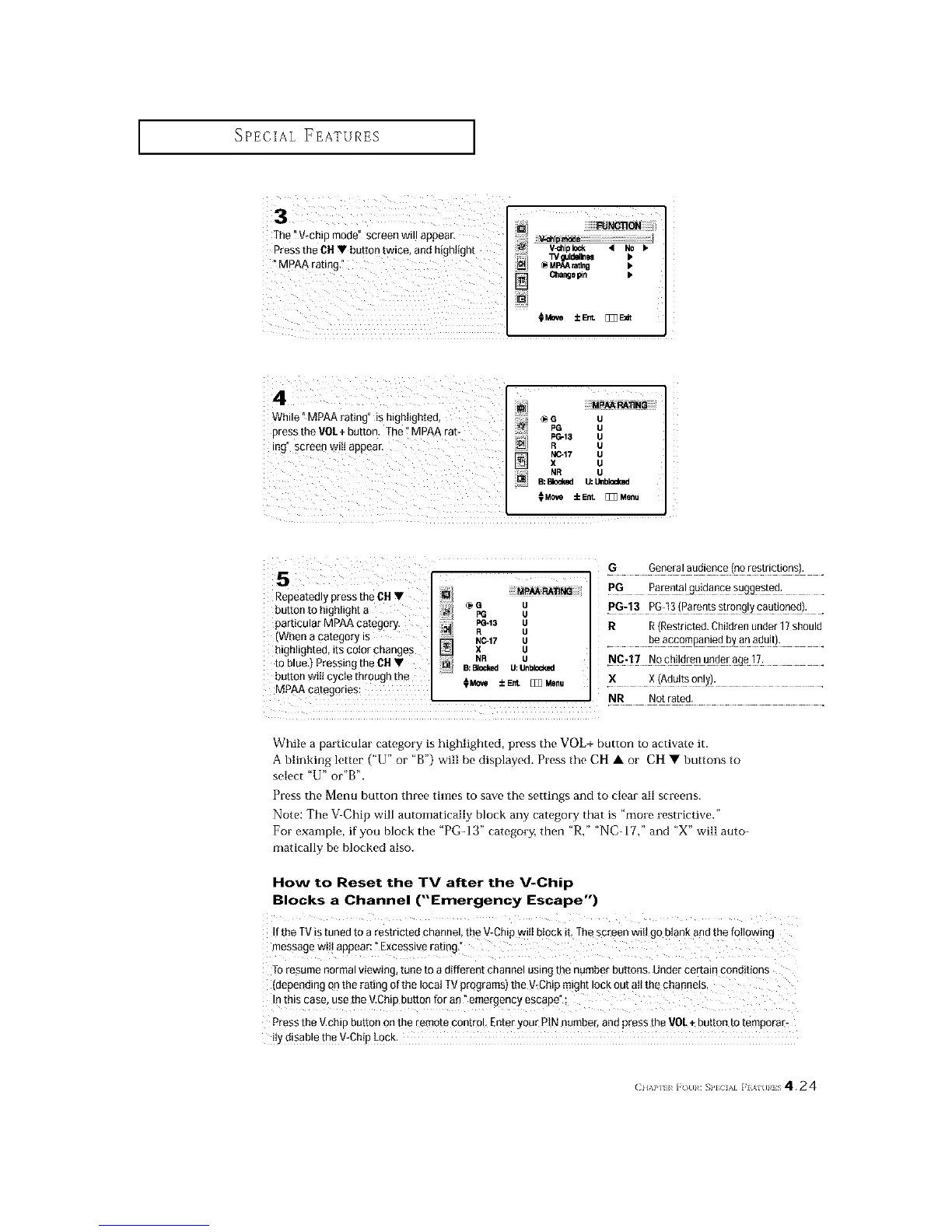
The "V_chip mode" screen will appear.
Press the OHV button twice, and h gh ight _i TVgutd_N •
_MpAA ratingi" _ _ MPAArating •
C_langepin •
O_ve ±Ent [_E_t
4 ¸
While" MPAArating" is highlighted,
press the VO/+ button. The t MPAA rat-
ing" screen witI appear.
i
_J
_G_ uu
PC--13 U
R U
NC-17 U
X U
N/ NR U
B:_ U: Unbl_
MCe_ iEnt. _ Menu
5
Repeatedly press the CH V
button to highlight a
particular MPAA category.
(When a category is
highlighted, its color change#
to blue,) Pressing the OH •
button wiIl cycle through tb_
MPAA categories:
MPAA RATING
_G U
FG U
PG-13 U
R U
N0.17 U
X U
NR U
B:Blocked U:Unblocked
OM0_ ±E_ [_Menu
.G General audience (norestrictions), .
PG Parenta!gg!dapce _ygge_ed: .
.P#:13 PG:13!Parentss!ro%!ycaut!oned!: .
R R(Restricted.Childrenunder 17should
. beaccompaniedb_a0ad_!t): .
X X (Adultsonly).
NR Not rated.
While a particular category is highlighted, press the VOL+ button to activate it.
A blinking letter ("U" or "B') will be displayed. Press the CH • or CH • buttons to
select "U" or'B".
Press the Menu button three times to save the settings and to clear all screens.
Note: The V_Chip will automatically block any category that is "more restrictive."
For example, if you block the "PG-13" category, then "R," "NCdT," and "X" will auto-
matically be blocked also.
How to Reset the TV after the V-Chip
Blocks a Channel ("Emergency Escape")
Ifthe TV Stuned to a restricted channel, the V-Chip w tJbl0ck iL The screen wiii go btank and the f0i!owing
message will appear "Excessive rating,"
TOresume normal viewing, tune to a different channel using the number buttons. Under certain conditions
(depedding on the rating of the Ioca_TV programs) the V_Chipmight Iock out atI the Phanne!s,
Inthis case, use the V,Chip button for an" emergency escape" :
Press the V.chip button Onthe remote control, Enter your PiN number, and press the VOL÷ button to temporat_
itYdisable the vtChiP LOCK
( II,\P] I i (/(11: SP]CIAI F}AI(IIIS 424






 To Next Page