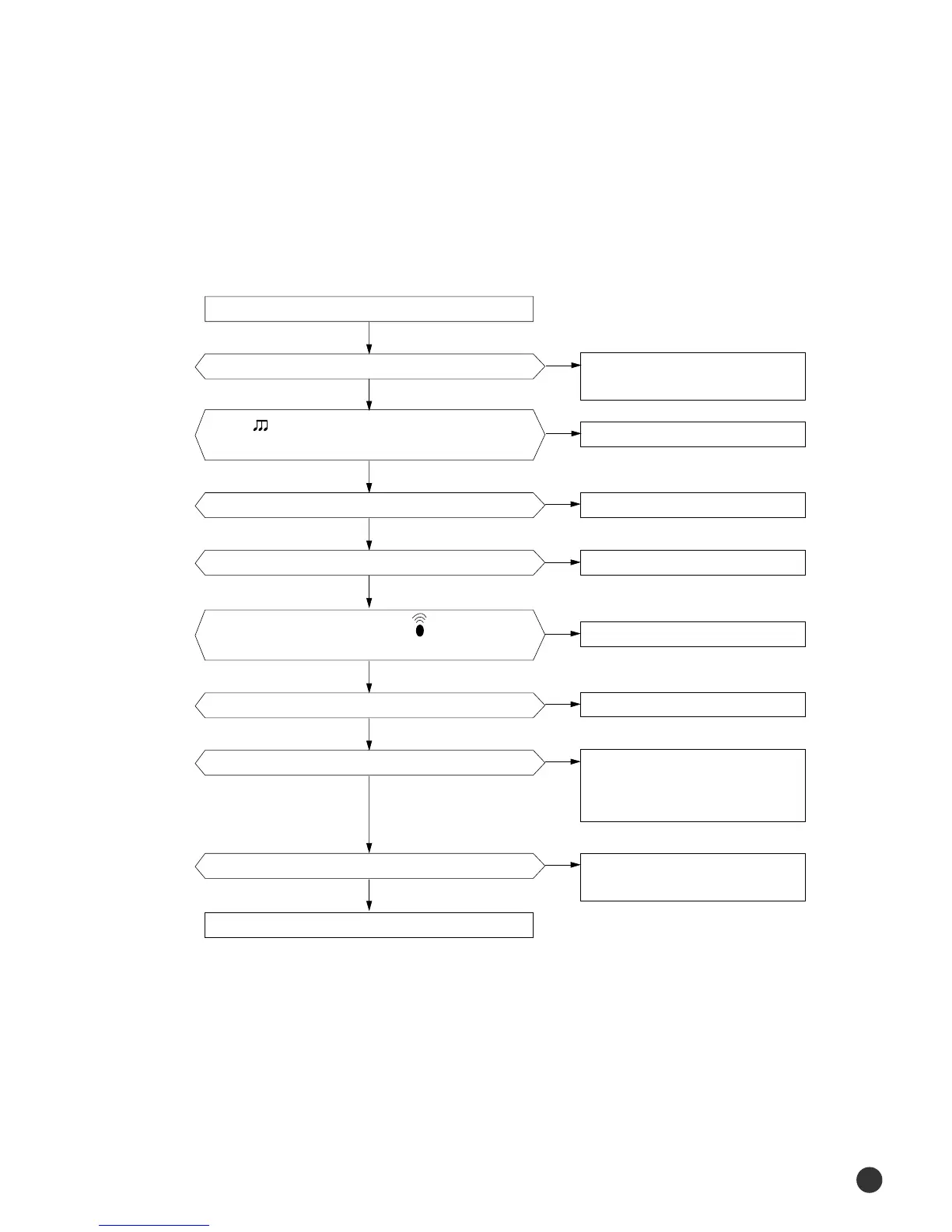
1) Troubleshooting procedure
Remove power cord and plug in again approx. 5 Seconds
Is operation lamp blinking?
Check as in the procedure “NO Power
parts”. Refer to page 5-2.
Normal
Replace battery.
LCD is faulty.
Replace button.
Micom is faulty.
Receiver module is faulty.
Q601(C4375Y) or Q602(C1623Y) is faulty.
IR LED(CL-1L5EU) is faulty.
“ “ sound heard from the indoor unit when ON/OFF
button on the remote control unit pushed?
Voltage of battery less than 2.5V (Remote Control Unit)?
LCD display status of REMOCON normal?
Voltage at PIN #30 of Remocon Micom change?
Voltage at collecter of Q601 or Q602 change?
Voltage at pin #26 of micom (IC04) change (INDOOR UNIT)?
Micom (IC04) is faulty.
Transmission display lamp ( ) blinking when
ON/OFF button on the remote control unit pushed?
◆ If Operation By Remote Control Unit Is Impossible. (Initial Diagnosis)
Troubleshooting
112
00150A(2)-100-139* 2/5/01 12:01 PM Page 112





 To Next Page