Troubleshooting
123
1) Checklist :
(1) Is input voltage normal? (the rating voltage ±10% range)
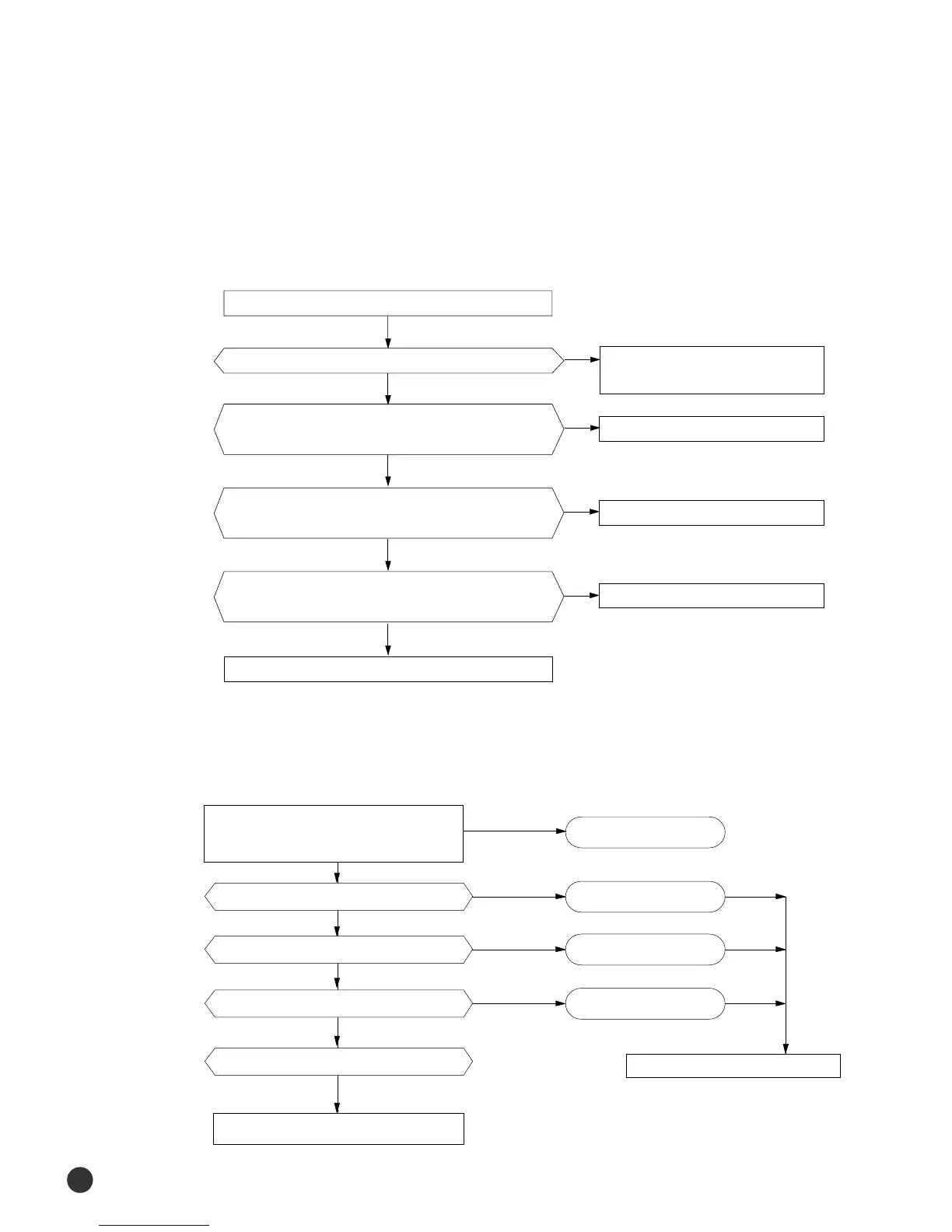
(2) Is the UP/DOWN louver motor properly connected with the connector (CN61)?
2) Troubleshooting procedure
Remove power cord and plug in again in approx. 5 seconds.
Is operating lamp blinking?
Does operation start when swing button of the remote control unit
pushed?
Voltage at pin #1-#4 of micom (ICO4) change?(Squarewave)
Volatge at pin #15, #16 of IC06 (KID65003), #10, All of IC05
change?(Squarewave)
UP/DOWN louver motor is faulty.
Driver IC05 (KID65003) or IC06 is faulty.
Micom (IC04) is faulty.
Normal
Check as in the procedure "No Power parts".
(1) Is the set temperature of Remote Control lower than room temperature in Heat mode?
(2) Is the Indoor PCB properly connected with the CN71 and CN78 connector?
After training on, the heating operation should
start in five minutes.
Is the nunber #7 of Micom (IC04) DC 4.8 V?
Is the munber #12 of IC06 (KID65003) LOW?
Is the voltage between CN71 #5 and CN78 #1 the rating voltage ±10% range?
Abnormal 4way valve of Outdoor Unit.
or connecting Cable
4 way valve should be replaced
or connecting Cable Check.
NO
YES
YES
YES
NO
NO
NO
YES
Normal
Abnormal Micom
Abnormal IC07
Abnormal RY73
Refer to replace PCB module
◆ When the UP/DOWN Louver Moter Does Not Operate. (Initial Diagnosis)
◆ In the Heat mode, When there is no warm air current. Check this first;
00150A(2)-100-139* 2/5/01 12:01 PM Page 123





 To Next Page