EasyManua.ls Logo

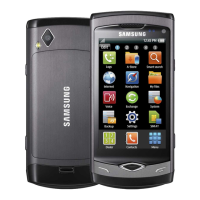
Samsung Wave - User Manual

Samsung Wave
146 pages
Print Icon
To Next Page IconTo Next Page
Loading...
GT-S8500
user manual

Table of Contents

Questions and Answers

  • R
    reidtonyaSep 8, 2025
    What to do if my Samsung Wave Cell Phone beeps and the battery icon flashes?
    • M
      michellebartonSep 8, 2025
      If your Samsung Cell Phone is beeping and the battery icon is flashing, recharge or replace the battery to continue using the device.
  • A
    Adam SuarezSep 9, 2025
    What to do if my Samsung Wave Cell Phone does not connect when dialing from contacts?
    • A
      Amy HodgesSep 10, 2025
      If your Samsung Cell Phone does not connect when dialing from contacts, ensure that the correct number is stored in the contact list. If necessary, re-enter and save the number. Also, make sure you have not set call barring for the contact's phone number.
  • L
    linda72Sep 12, 2025
    Why do error messages appear when launching the camera on my Samsung Cell Phone?
    • G
      George WintersSep 12, 2025
      If you're getting error messages when launching the camera on your Samsung Cell Phone, try charging the battery or replacing it with a fully charged one. Also, try freeing up memory by transferring files to a PC or deleting files from your device. Restarting the device might also help. If the issue persists, contact a Samsung Service Centre.
  • D
    deangraceSep 13, 2025
    Why do error messages appear when launching the FM radio on my Samsung Wave?
    • A
      Angela HurstSep 13, 2025
      If you see error messages when launching the FM radio on your Samsung Cell Phone, first make sure the headset is properly connected. Then, scan for and save available radio stations. If it still doesn't work, test your desired station with another radio receiver. If it works on another receiver, your device may need service.
  • W
    Wendy ChapmanSep 15, 2025
    Why do error messages appear when opening music files on my Samsung Cell Phone?
    • A
      Ashley GonzalezSep 15, 2025
      If error messages appear when opening music files on your Samsung Cell Phone, try freeing up memory by transferring files to a PC or deleting files. Make sure the music file isn't DRM-protected, or if it is, that you have the appropriate license. Also, check that your device supports the file type.
  • B
    Bianca FieldsSep 18, 2025
    Why is another Bluetooth device not located on my Samsung Wave Cell Phone?
    • S
      Scott VargasSep 18, 2025
      If another Bluetooth device is not being located by your Samsung Cell Phone, make sure that the Bluetooth wireless feature is activated on your device. Also, ensure that the Bluetooth wireless feature is activated on the device you are trying to connect to, if necessary.

Summary

Using this manual

Instructional icons

Explains symbols used in the manual.

About DivX Video

Explains DivX video format and VOD registration.

Assembling

Unpack

Lists items included in the product box.

Install SIM or USIM card and battery

Instructions for inserting SIM and battery.

Charge the battery

Guide on how to charge the device battery.

Insert a memory card

Steps to insert a memory card for extra storage.

Remove and format memory card

Procedures for memory card removal and formatting.

Getting started

Turn device on and off

Guide on powering the device on and off.

Device layout

Overview of device components and layout.

Keys and Idle screen

Explains device keys and the main idle screen.

Indicator icons

Explains various status icons shown on the device display.

Touch screen usage

Basic actions and tips for using the touch screen.

Access and lock menus

How to navigate menus and lock/unlock the device.

Manage applications and widgets

Organizing apps, adding widgets, and managing active apps.

Customize device settings

Personalizing the device appearance and features.

Set time, date, and sound

Configure time, date, volume, and sound profiles.

Display and security settings

Adjust brightness, set wallpaper, and lock device.

Text input methods

Overview of different ways to enter text on the device.

Communication

Making and answering calls

Basic call functions.

Voice and video call options

Features available during calls.

Call management

Auto rejection, fake calls, call diverting.

Message management

Sending texts, MMS, and viewing messages.

Email setup and sending

Configure and send emails.

IM and Social Hub

Instant messaging and integrated communication.

Entertainment

Camera usage

Capturing photos and videos.

Capture photos with scenes and effects

Using preset scenes, beauty mode, and vintage effects.

Video recording and editing

Capturing videos and basic editing.

Video player

Playing video files and customizing playback.

Media browser

Viewing photos and videos stored on the device.

Music player

Playing music, managing playlists, and customizing settings.

FM radio

Listening to and recording FM radio.

Games and applications

Downloading and playing games.

Personal information

Contacts management

Creating, finding, and managing contacts.

Calendar and events

Managing daily/monthly events and reminders.

Task management

Creating and viewing tasks.

Memo and voice recorder

Creating memos and recording voice notes.

Web

Internet access

Setting up profiles and browsing web pages.

Browser customization

Adjusting browser settings and bookmarking pages.

Samsung Apps

Downloading applications.

Synchronization

Syncing data with web servers.

Connectivity

Bluetooth

Wireless communication and pairing.

Wi-Fi

Connecting to wireless networks.

AllShare

Sharing media files via DLNA.

Mobile AP

Using device as a wireless access point.

GPS

Navigation and location services.

TV connections

Connecting device to TV.

PC connections

Connecting device to PC for file transfer.

Tools

Clock functions

Alarms, world clocks, stopwatch, timer.

Calculator

Performing mathematical calculations.

Mini diary

Keeping a photo diary.

My accounts

Managing web accounts for data sync.

My files

Accessing and managing device files.

Image and video editing

Editing photos and creating videos.

Smart search

Searching device content and the web.

Settings

Settings menu access

Navigating the settings menu.

Flight mode

Disabling wireless functions.

Connectivity settings

Bluetooth, Wi-Fi, GPS configurations.

Sound profiles

Customizing call and message alerts.

Display and General settings

Screen brightness, wallpaper, language, keyboard.

Date and time settings

Setting device time and date.

Application settings

Managing device applications.

Call settings

Customizing calling features.

Message settings

Customizing text, MMS, and email features.

Security settings

Device lock, privacy lock, SIM lock.

Memory and Reset

Managing device memory and resetting settings.

Troubleshooting

Device prompts and errors

Codes like Password, PIN, PUK, and network errors.

Call issues

Dropped calls, unconnected calls.

Touch screen problems

Unresponsive or slow touch screen.

Device heating and battery issues

Device getting hot, battery not charging.

FM radio and camera errors

Troubleshooting launch issues for FM radio and camera.

Music file and Bluetooth errors

Music playback errors, Bluetooth connection issues.

PC connection and device freezing

PC connection problems, device freezes.

Safety and usage information

General safety warnings

Hearing protection, vehicle installation caution.

Device handling and disposal

Battery care, disposal, and proper device handling.

Environmental and interference precautions

Explosive environments, repetitive motion, pacemaker interference.

Device damage prevention

Cracked screens, approved accessories, aircraft use.

Important usage information

Normal position use, qualified service, battery life.

Disposal and SAR information

Product/battery disposal, RF exposure limits.

Disclaimer

Legal notice on third-party content.

Index

Declaration of Conformity (R&TTE)

To install Kies (PC Sync)

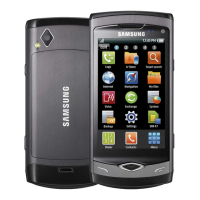
Samsung Wave Specifications

General IconGeneral
NetworkGSM / HSPA
2G bandsGSM 850 / 900 / 1800 / 1900
3G bandsHSDPA 900 / 2100
SpeedHSPA 3.6/0.384 Mbps
StatusDiscontinued
Dimensions118 x 56 x 10.9 mm (4.65 x 2.20 x 0.43 in)
Weight118 g (4.16 oz)
SIMMini-SIM
TypeSuper AMOLED capacitive touchscreen, 16M colors
Resolution480 x 800 pixels, 5:3 ratio (~283 ppi density)
ProtectionCorning Gorilla Glass
CPU1.0 GHz Cortex-A8
GPUPowerVR SGX540
RAM512 MB
Internal Storage2GB/8GB
Main Camera5 MP, AF
Video720p@30fps
LoudspeakerYes
3.5mm jackYes
WLANWi-Fi 802.11 b/g/n, DLNA
GPSYes, with A-GPS
RadioStereo FM radio, RDS
USBmicroUSB 2.0
SensorsAccelerometer, proximity, compass
BatteryRemovable Li-Ion 1500 mAh battery
Talk timeUp to 15 h (2G) / Up to 7 h (3G)
Announced2010, February
OSBada 1.0
Expandable StoragemicroSD, up to 32 GB
BluetoothA2DP
Stand-byUp to 550 h (3G)
ColorsBlack, Pink

Related product manuals