EasyManua.ls Logo

Sandstrom SDABXRL13 - User Manual

Sandstrom SDABXRL13
28 pages
Print Icon
To Next Page IconTo Next Page
Loading...
Instruction Manual
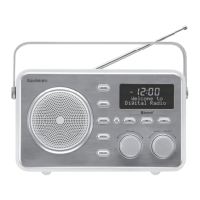
Portable Wireless
DAB Radio
SDABXRL13
SDABXRL13_IB.indd 1 08/04/2013 10:30

Questions and Answers

  • B
    Bruce Herring MDAug 3, 2025
    How to fix a Sandstrom SDABXRL13 that has no power?
    • S
      Shane WilliamsAug 3, 2025
      If your Sandstrom Radio has no power, first ensure that the AC adapter is properly connected to both the radio and a working power socket. If you're using battery power, the batteries might be depleted. Try replacing them with a fresh set.
  • A
    Austin BarrettAug 8, 2025
    Why does my Sandstrom SDABXRL13 have poor reception?
    • B
      Brittany BrownAug 8, 2025
      If your Sandstrom Radio has poor reception, try repositioning the aerial to improve the signal. If repositioning the aerial doesn't help, test the radio in a different location, away from computers and other electronic devices that may cause interference.
  • E
    Emily HarrisAug 14, 2025
    What to do if the Sandstrom SDABXRL13 volume is too low on Bluetooth or Aux?
    • D
      Diana SmithAug 14, 2025
      If you experience insufficient volume when playing a Bluetooth or Aux source on your Sandstrom Radio, the volume on the source device might be set too low. Try increasing the volume setting on the connected device.
  • A
    Ashley PorterAug 21, 2025
    How to reset Sandstrom Radio when it doesn't respond to controls?
    • S
      Sonya BarnesAug 21, 2025
      If your Sandstrom Radio is unresponsive to the controls, disconnect the AC power or remove the batteries. Wait for 10 seconds, and then reconnect the AC power or re-insert the batteries to reset the device.
  • A
    Andrew SmithAug 27, 2025
    Why is there no radio information text on my Sandstrom Radio?
    • S
      Stephen SandersAug 27, 2025
      The radio signal might be too weak to receive information text. Also, not all stations broadcast information text.

Summary

Safety Warnings

Controls and Connections

Front View Controls

Identifies and explains the buttons and controls on the front panel of the radio.

Back View Connections

Details the various input and output sockets located on the back of the radio.

Getting Started

Mains Power and Battery Fitting

Guide on connecting the radio to mains power and installing batteries for portability.

First Time Use

Initial Scan Process

Steps for the radio's automatic scan of DAB stations upon first activation.

Listening to DAB Radio

Browsing and Selecting Stations

Guide on navigating and choosing DAB radio stations.

Listening to FM Radio

Automatic and Manual Tuning

Procedures for scanning for and manually tuning FM radio stations.

DAB and FM Station Presets

Saving and Recalling Preset Stations

Instructions on how to store and retrieve favourite radio stations.

Bluetooth Connectivity

Pairing and Reconnecting Bluetooth Sources

Steps to connect and re-establish connection with Bluetooth audio devices.

Auxiliary Input (AUX In)

Function Menu Navigation

DAB Mode Menu Functions

FM Mode Menu Functions

All Mode Menu Functions

Alarm Setup and Configuration

Setting up and configuring the dual alarm functions, including time and source.

Maintenance

Troubleshooting

Sandstrom SDABXRL13 Specifications

General IconGeneral
BrandSandstrom
ModelSDABXRL13
CategoryRadio
LanguageEnglish

Related product manuals