EasyManua.ls Logo

Sansui G-9000 - Page 28

Sansui G-9000
58 pages
Print Icon
To Next Page IconTo Next Page
To Previous Page IconTo Previous Page
Loading...
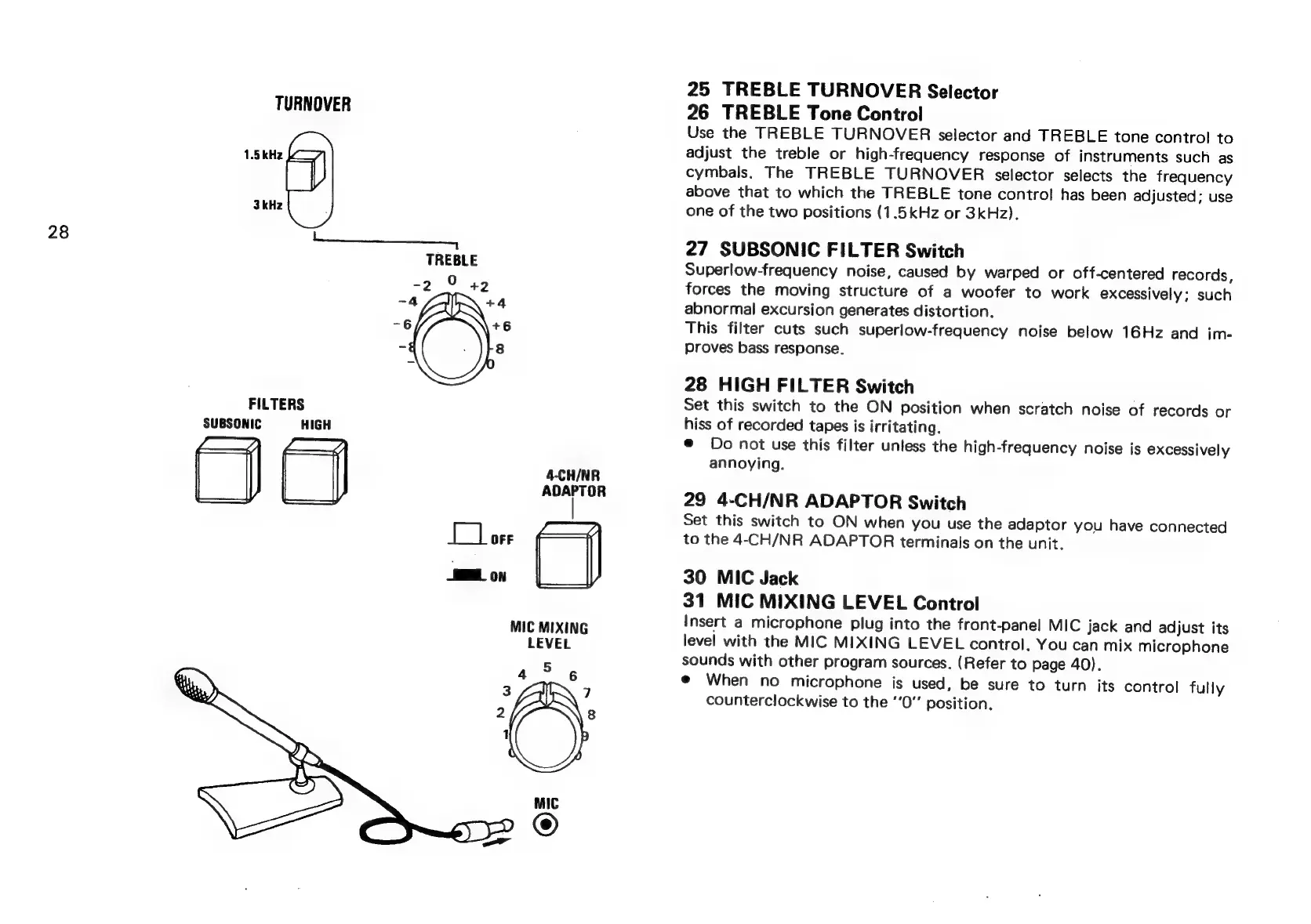
TURNOVER
1.5
kHz
3
kHz
28
TREBLE
-2_°
+42
-4
+4
-6
+6
ize
8
FILTERS
SUBSONIC
HIGH
4-CH/NR
ADAPTOR
MIC
MIXING
LEVEL
25
TREBLE
TURNOVER
Selector
26
TREBLE
Tone
Control
Use
the
TREBLE
TURNOVER
selector
and
TREBLE
tone
contro!
to
adjust
the
treble
or
high-frequency
response
of
instruments
such
as
cymbals.
The
TREBLE
TURNOVER
selector
selects
the
frequency
above
that
to
which
the
TREBLE
tone
control
has
been
adjusted;
use
one
of
the
two
positions
(1.5kHz
or
3kHz).
27
SUBSONIC
FILTER
Switch
Superlow-frequency
noise,
caused
by
warped
or
off-centered
records,
forces
the
moving
structure
of
a
woofer
to
work
excessively;
such
abnormal
excursion
generates
distortion.
This
filter
cuts
such
superlow-frequency
noise
below
16Hz
and
im-
proves
bass
response.
28
HIGH
FILTER
Switch
Set
this
switch
to
the
ON
position
when
scratch
noise
of
records
or
hiss
of
recorded
tapes
is
irritating.
©
Do
not
use
this
filter
unless
the
high-frequency
noise
is
excessively
annoying.
29
4-CH/NR
ADAPTOR
Switch
Set
this
switch
to
ON
when
you
use
the
adaptor
you
have
connected
to
the
4-CH/NR
ADAPTOR
terminals
on
the
unit.
30
MIC
Jack
31
MIC
MIXING
LEVEL
Control
Insert
a
microphone
plug
into
the
front-panel
MIC
jack
and
adjust
its
level
with
the
MIC
MIXING
LEVEL
control.
You
can
mix
microphone
sounds
with
other
program
sources.
(Refer
to
page
40).
@
When
no
microphone
is
used,
be
sure
to
turn
its
control
fully
counterclockwise
to
the
‘‘0”
position.