16
RECALL
This button allows you to go back to the last channel
selected by pressing RECALL. Press RECALL again to
return to the last channel you were watching.
External input is not included in the last channel.
MUTE
Press MUTE to switch off the sound. The TV’s sound
will be silenced and “
” will appear on the screen.
The sound can be switched back on by pressing this
button again or the VOL + or –.
will be displayed until the MUTE function is
cancelled.
•
•
SLEEP
To set the TV to turn off after a preset amount of time,
press SLEEP on the remote control. The clock will
count up 10 minutes for each press of the SLEEP
button (Off, 10, 20, 30, 40, 50, 60, 90, 120 minutes).
After the sleep timer is programmed. To confirm the
sleep timer setting, press SLEEP and the remaining
time will be displayed for a few seconds. To cancel the
sleep timer, press SLEEP repeatedly until the display
turns to Off.
Quick guide for menu
operation
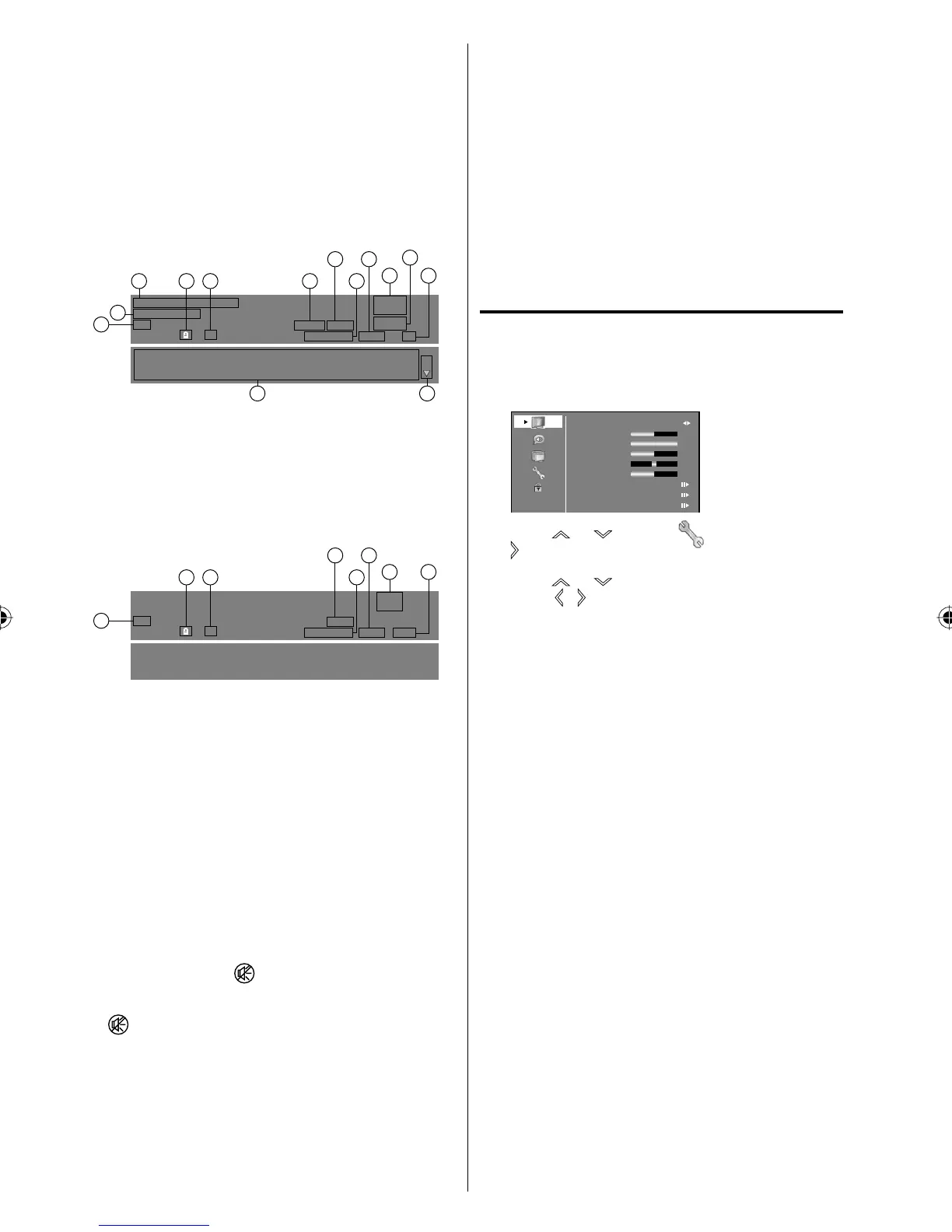
Call menu and for example: Select Language.
1
Press INPUT SELECT to select TV mode.
2
Press MENU. The TV menu screen will appear.
Audio
Picture
Setup
Option
Lock
Picture Preference
Brightnes
s
Contrast
Color
Tint
Sharpnes
s
Color Temperature
Advanced Video
Rese
t
Sports
0
0
50
50
100
3
Press or to select (Option), then press
or ENTER.
4
Press or to select “OSD Language”, then
press
/ to select the desired language.
…on the following pages the menu can be called
in the same way as here.
5
Press RETURN several times or MENU to return
to the normal screen.
NOTE:
If no buttons are pressed for more than about 60
seconds, the menu screen will return to normal
operation automatically.
•
SDTV_Moving_Picture2_480p_1
7:00 PM - 7.30 PM
R
SDTV_Moving_Picture2_480p_1__ABCDEFGHIJKLMNOPQRSTUVWXYZabcdefghijklmnopqr
stuvwxyz1234567890ABCDEFGHIJKLMNOPQRSTUVWXYZabcdefghijklmnopqrstuvwxyz1
234567890ABCDEFGHIJKLMNOPQRSTUVWXYZabcdefghijklmnopqrstuvwxyz12345678
English
Stereo
480p SD
CS3
Digital
Air
15-3
CH-3
1 23 4 6
8 10
11
12
14
13
57
9
1/2
1. Lock status
2. Closed Caption
3. Audio Format
4. Video Format
Press DISPLAY several times to clear the call display.
NOTE:
After about 10 seconds, DISPLAY screen will return
to normal TV-operation automatically.
•
5. Analog
6. Channel Number
7.
Tuner Mode
8. Parental Rating
CH +/
-
Press and release CH +/
-
. The channel automatically
stops at the next channel set into memory.
For proper operation, before selecting channels, they
should be set into the memory. See “Memorizing
channels” on page 19.
DISPLAY
Press DISPLAY to display the current information on
the screen.
When the TV receives a digital signal, the digital
information will appear.
(No program title)
R
(No program details.)
Stereo
480p SD
C1
Analog
Cable
14
1 24
67
8
3 5
1. Program Title
2. Lock status
3.
Closed Caption (if preset)
4. Audio Language
5. Audio Format
6. Video Format
7. Digital
8. Channel Number
9. Channel Name
10.
Tuner Mode
11.
There are more than 2 pages.
12. Program Detail
13. Parental Rating
14. Program Duration
When the TV receives an analog signal, the analog
information will appear.
38L0221A.indb 1638L0221A.indb 16 8/4/09 9:43:46 AM8/4/09 9:43:46 AM



 To Next Page