9
ENGLISH
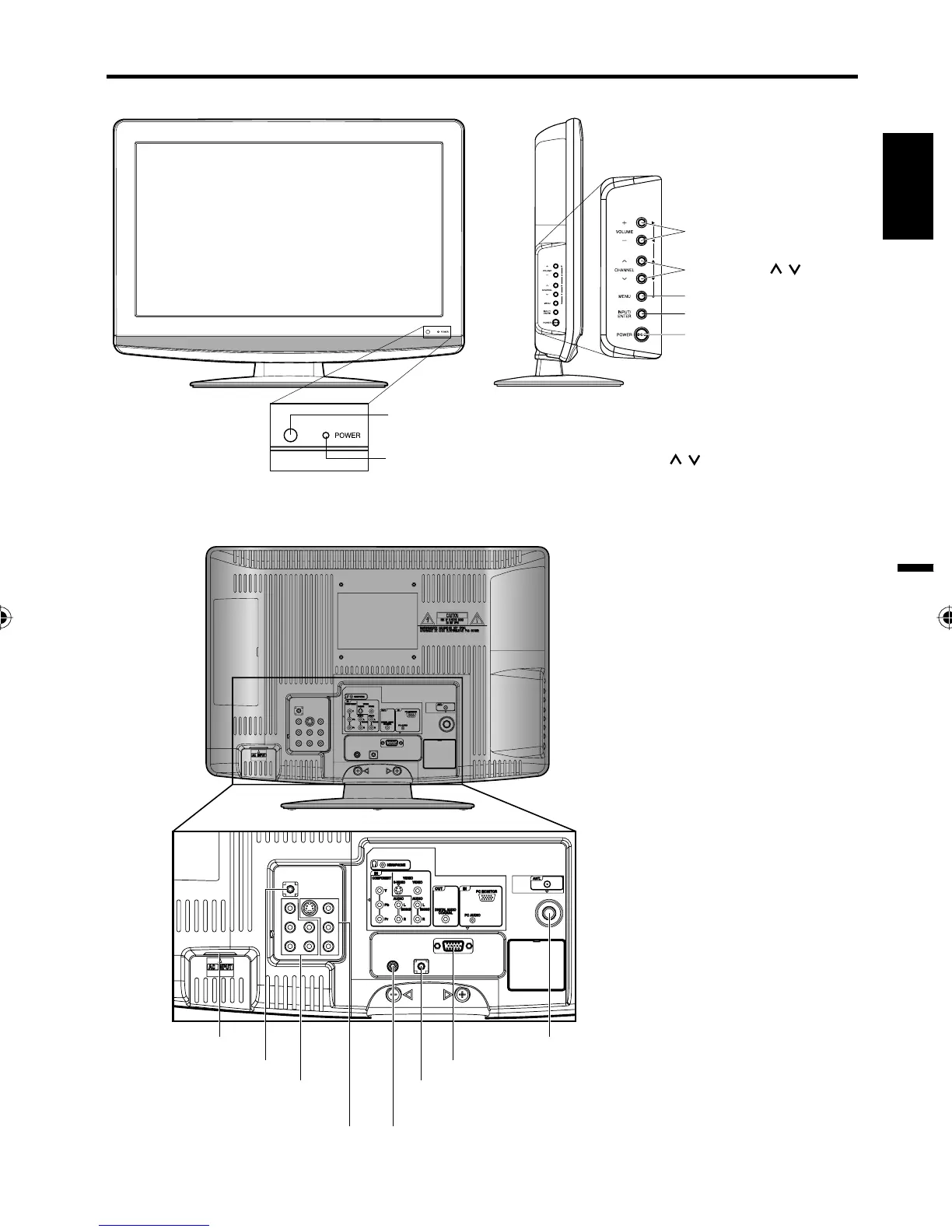
Left sideFront
Remote sensor
POWER indicator
Red: Standby
Green: On
POWER button
INPUT/ENTER button
VOLUME +/– buttons
CHANNEL
/ buttons
MENU button
Rear
To display the menu screen.
Press MENU button to display the menu
screen.
CHANNEL
/ buttons,
VOLUME
+/– buttons and INPUT/ENTER button
can be used to select the desired setting
during the menu screen operations.
AC INPUT jack
DIGITAL AUDIO COAXIAL OUT jack
VIDEO IN jacks
(VIDEO/S-VIDEO/AUDIO (L/R))
COMPONENT IN jacks
(Y/Pb/Pr/ AUDIO (L/R))
RF (ANT.) IN jack
HEADPHONE jack
PC MONITOR IN jack
Parts and functions
PC AUDIO IN jack
38L0221A.indb 938L0221A.indb 9 8/4/09 9:43:36 AM8/4/09 9:43:36 AM



 To Next Page