17
ENGLISH
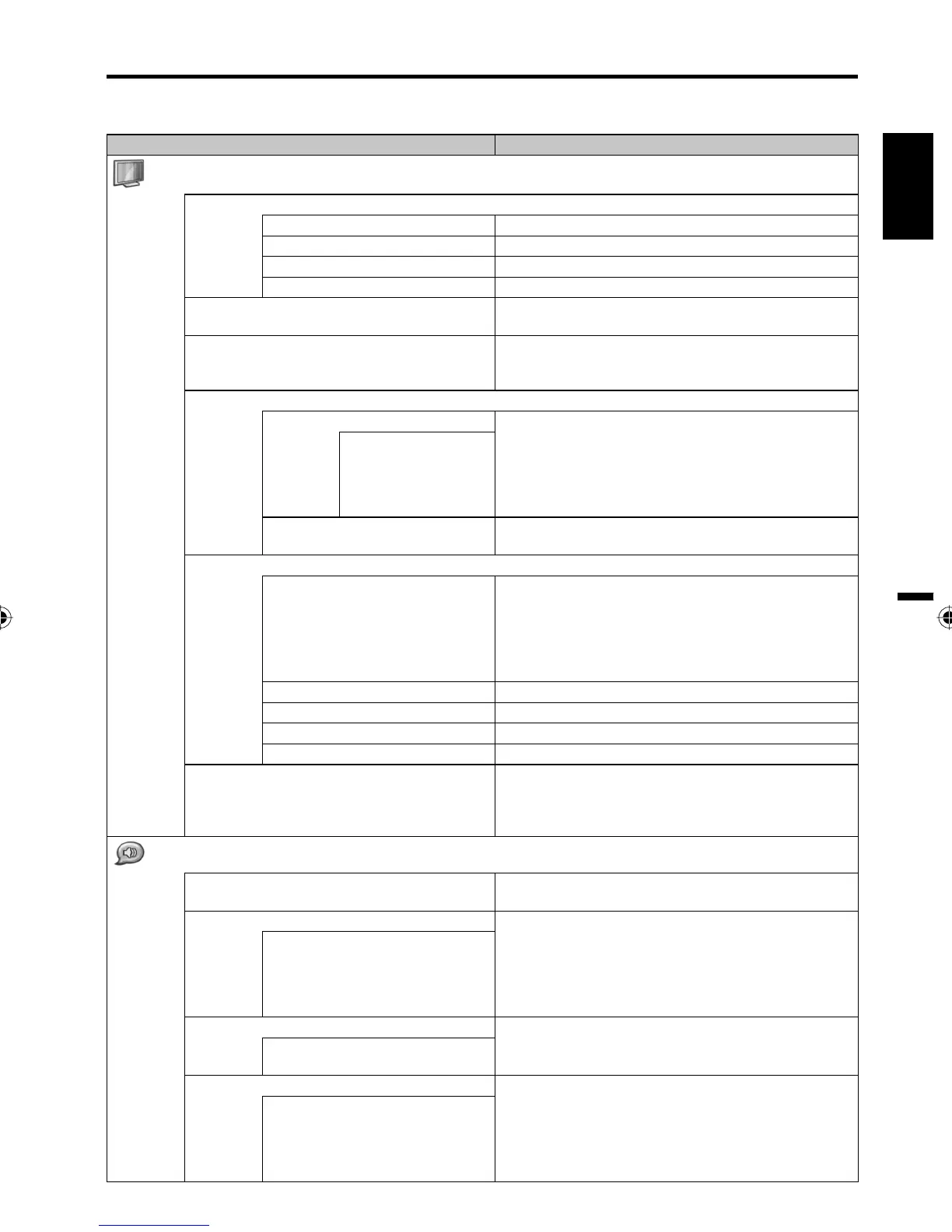
You can change the default settings by pressing the Menu button on your remote, then select the one of the
icons at the top of the menu - follow the On-Screen prompts to set your preferences.
Selected Items
Setup hint
(Picture)
Picture Preference
Memory Your personal preferences
Sports Bright and dynamic picture (factory-set)
Standard Standard picture quality (factory-set)
Movie Movie-like picture setting (factory-set)
Brightness / Contrast / Color / Tint /
Sharpness
You can adjust the picture to your preference.
Color Temperature Bluish (Cool) / Neutral (Standard) / Reddish (Warm)
/ Memory.
Adjust R Gain, G Gain and B Gain.
Advanced Video
DNR Sometimes it is not possible to input a high-quality
HD signal. The actual signal input is too small and
noisy, e.g. a video fi lm in letterbox format, or a
noisy analogue cable TV signal. DNR can slightly
reduce interferences caused by the faulty input
signal.
Low / Medium /
High /
Off
Backlight You can use the Backlight feature to adjust the
screen brightness for improved picture clarity.
PC
Auto Adjust
Hor Position, Ver Position, Phase and Clock are
adjusted automatically as per the input PC video
signal.
When PC-input mode was selected and a PC-
signal was input, Auto Adjust will be performed
automatically.
•
Hor Position To adjust the horizontal placing of the image.
Ver Position To adjust the vertical placing of the image.
Phase Eliminates the horizontal (Phase) interfering lines.
Clock Eliminates the vertical (Clock) interfering lines.
Reset Select “Reset” to reset Picture Preference,
Brightness, Contrast, Color, Tint, Sharpness, Color
Temperature, R Gain, G Gain, B Gain and Backlight
to the factory preset values.
(Audio)
Balance / Bass / Treble You can adjust the sound quality to your
preference.
Surround The Surround feature processes the audio signal
to expand the listening fi eld wider and deeper to
create a 'pseudo surround-sound' from the TV's
speakers.
The feature works with stereo signals from TV
broadcast or AV input.
•
On / Off
Equalizer You can change the characteristic of audio
frequency.
Off / Rock / Pop / Live / Dance /
Techno / Classic / Soft
SPDIF Type Select the audio format from SPDIF.
You can only hear Dolby Digital audio through the
amplifi er equipped with a Dolby Digital decorder.
Dolby is a trademark of Dolby Laboratories.
There is no sound output from the amplifi er when
set to Off.
•
•
•
PCM / Off / Dolby Digital
Convenience functions
38L0221A.indb 1738L0221A.indb 17 8/4/09 9:43:50 AM8/4/09 9:43:50 AM



 To Next Page