19
Memorizing channels
This TV is equipped with a channel memory
feature which allows channels to skip up or down
to the next channel set into memory, skipping
over unwanted channels. Before selecting
channels, they must be programmed into the
TV’s memory. To use this TV with an antenna, set
the Signal Type option to the Air mode. When
shipped from the factory, this menu option is in
the Cable mode.
Air/Cable selection
1
Select (Setup), then press or ENTER.
2
Press or to select “Signal Type”.
3
Press or to select “Air” or “Cable”.
Air - VHF/UHF channels
Cable - CABLE TV channels
Signal T
ype
Automatic Search
Add/Dele
te
MTS
Audio Language
Air
Stereo
English
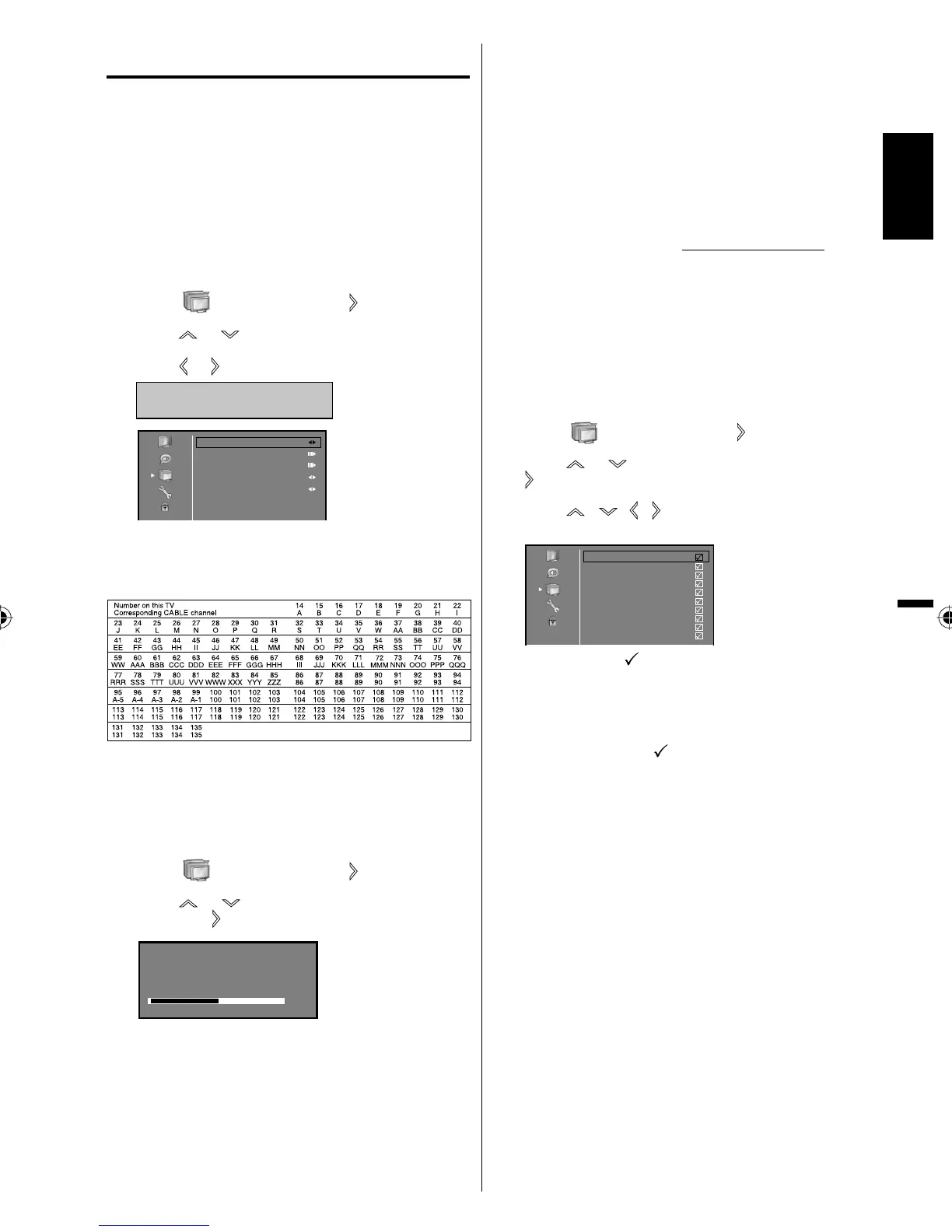
CABLE CHART
The chart below is typical of many cable system
channel allocations.
NOTE:
It may take a few seconds for a digital channel
picture to appear on screen after being selected.
Automatic search
1
Select (Setup), then press or ENTER.
2
Press or to select “Automatic Search”,
then press
or ENTER.
Status : Scanning...
Analog Channels : 3
Digital Channels : 5
Air
60%
3
The TV will begin memorizing all the channels
available in your area.
It may take from 15 minutes to 30 minutes to
complete memorizing digital cable channels.
Depending on the reception condition, a bar
display may not advance for several minutes,
please be patient.
Press RETURN to stop Automatic Search.
•
•
•
4
After you complete Automatic Search, press
RETURN several times or MENU to return to the
normal screen.
NOTE:
Memorizing channels is best accomplished during
evening “PRIMETIME” hours, as more stations are
broadcasting digital signals. Memorizing channels can
only be accomplished while a station is broadcasting
a digital signal to set that channel into memory.
If you are unsure of the digital channels available
in your area, you may visit www.antennaweb.org to
receive a list based on your address or zip code.
Should you require further assistance you may call
our toll-free customer service line at 1-800-289-0980.
New digital channels may be added to your area
periodically, it is recommended to perform the
“Automatic Search” procedure regularly.
Add/Delete channel
You can select the channel that you want to skip.
1
Select (Setup), then press or ENTER.
2
Press or to select “Add/Delete”, then press
or ENTER.
3
Press / / / to select the channel that
you want to skip.
1 Analog
2 Analog
3 Analog
4 Analog
5 Analog
6 Analog
7 Analog
8 Analog
9 Analog
10 Analog
4
Press ENTER. mark will appear.
5
Repeat steps 3 - 4 for other channels you want to
add or delete.
NOTE:
The channel you add mark will skip by CH +/–.
Skip channel function does not work in Channel
List.
•
•
•
•
•
ENGLISH
38L0221A.indb 1938L0221A.indb 19 8/4/09 9:43:51 AM8/4/09 9:43:51 AM



 To Next Page