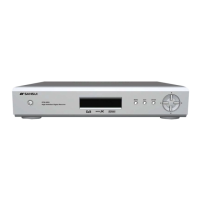
This document is an instruction manual for the SANSUI SQ-115 Digital Media Receiver, a car audio system. It provides detailed information on installation, operation, and technical specifications in both English and Chinese.
Function Description:
The SANSUI SQ-115 is a digital media receiver designed for in-car entertainment. It supports various audio sources including FM/AM radio, USB flash drives, SD cards, and external audio devices via AUX input. A key feature is its Bluetooth hands-free system, allowing for phone calls and music streaming (A2DP) from a connected mobile phone. The device can also be controlled wirelessly via a dedicated mobile APP for Apple and Android smartphones.
Important Technical Specifications:
- Power Supply Requirement: DC 12V
- Maximum Power Output: 50W x 4CH
- Speaker Impedance: 4 - 8 Ohm
- Unit Dimensions (WxHxD): 178 x 115 x 50 mm
- Weight: 0.38 kg
- Fuse: 10 A
- FM Frequency Range: 87.5 MHz - 108.0 MHz
- AM Frequency Range: 522 KHz - 1620 KHz
- Usable USB Audio Formats: MP3/WMA
- USB Port Type: 2.0
- USB Charging: 5V/1A
- USB Frequency Response: 20 Hz - 20 KHz
- USB S/N Ratio: 60 dB
- Bluetooth Profile Supports: A2DP, AVRCP, HFP
- Bluetooth Range of Frequency: 2.4 GHz spectrum
Usage Features:
General Operation:
- Power On/Off: Long press the MODE button to power on, short press to power off.
- Volume Adjustment: Rotate the volume knob.
- Mode Switch: Press the MODE button to cycle through Radio, USB, SD, AUX-in, and Bluetooth modes.
- Audio/Menu Settings: Repeatedly press the volume button (SEL) to access settings like BAS, TRE, BAL, FAD, EQ presets (FLAT/CLASSIC/ROCK/POP), LOUD (ON/OFF), LOCAL/DISTANT radio, and STEREO/MONO mode. Rotate the volume knob to adjust selected settings.
- Voice Button: Activates the phone's smart voice assistant when paired via Bluetooth.
- Reset Button: Press with a pointed object to restore factory settings.
Radio Features:
- Band Selection: Short press the BAND button to select FM1, FM2, FM3, AM1, AM2 bands.
- Manual Store/Call Preset Stations: Long press preset number keys (1-6) to store current frequency; short press to recall.
- Manual Tuning: Long press the Tune/Track Up/Down buttons to enter manual tuning mode, then short press to step up/down frequencies.
- Automatic Tuning: Short press the Tune/Track Up/Down buttons to search for strong signal stations.
- Automatic Store Preset Stations: Long press the BAND button for 2 seconds to automatically store 18 FM or 12 AM stations and browse them.
USB/SD Playback Features:
- Music Playback: Automatically plays MP3/WMA files when a USB flash drive or SD card is inserted.
- Next/Previous Song: Press the Tune/Track Up/Down buttons.
- Fast Forward/Rewind: Long press the Tune/Track Up/Down buttons.
- Play/Pause: Short press the Play/Pause button.
- Intro Scan: Press the INT button to preview the first 10 seconds of each song; press again to cancel.
- Repeat Mode: Press the RPT button to select RPT FLD (repeat current folder), RPT ALL (repeat all songs on USB/SD), or RPT ONF (repeat current song).
- Random Play: Press the RDM button to play songs in random order; press again to cancel.
- Folder Navigation: Long press the Folder Down/Up buttons to select previous/next folders (only if multiple folders exist).
- Jump 10 Tracks: Short press the Folder Down/Up buttons to jump 10 tracks backward/forward (only if more than 10 songs exist).
Bluetooth Hands-Free Operation:
- Pairing: The "BT" character on the display flashes until successfully paired with a mobile phone (device name "SQ-115").
- Making Calls: Dial directly from the paired Bluetooth phone.
- Redial: Long press the BAND button to redial the last number.
- Answer Calls: Short press the BAND button when a call comes in.
- Refuse Calls: Short press the MODE button.
- Terminate Calls: Long press the MODE button during a call.
- Switch Audio Source: Short press the BAND button during a call to switch between the Bluetooth hands-free system and the mobile phone.
- Adjust Call Volume: Rotate the volume button on the panel during a call.
- Bluetooth Music Player (A2DP): Streams audio from a Bluetooth mobile phone. Use Tune/Track Up/Down buttons for next/previous song, and Play/Pause button for play/pause.
Mobile APP Control:
- SANSUI MP3 Mobile APP: Wirelessly control the SQ-115's audio functions from Apple or Android smartphones. Download the APP from Apple APP Store or Google Play Store.
Maintenance Features:
- Remote Control Battery: When using the remote control for the first time, remove the protective plastic tab from the battery compartment.
- Installation: Instructions include disconnecting the vehicle battery, wire harness, and antenna, then using bracket keys to separate the chassis from the housing for mounting.
- Wiring: Refer to the "Wiring Diagram" for proper connections.

 Need help?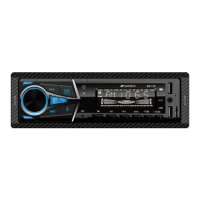

 To Next Page
 General