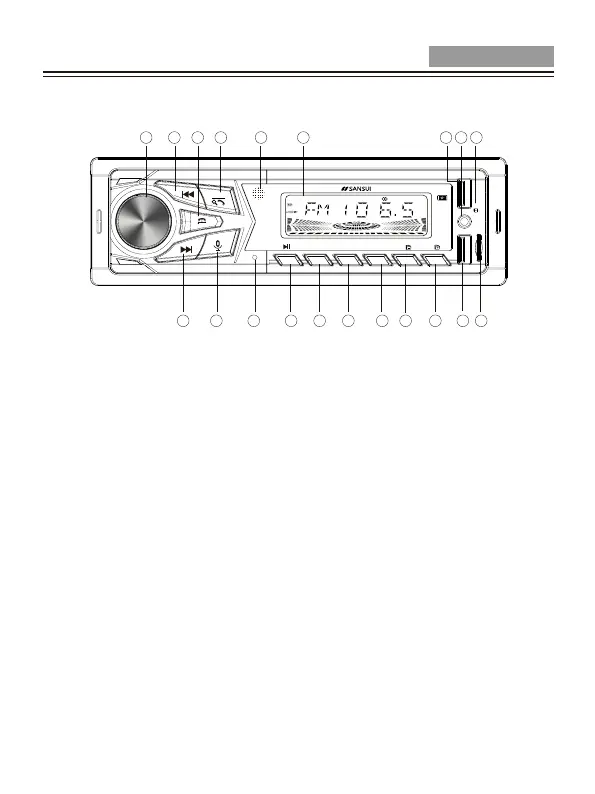
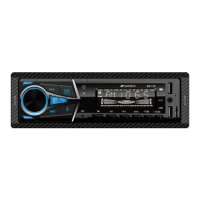
1. LCD Display
2. IR Remote Sensor
3. Band Selector, Search Radio Station(Long press), Answer Call
4. Power on/off, Mode Selection, End Call
5. Tune/Track Up, fast forward
6. Volume knob, SEL(Push for Audio/Menu Setting)
7. Tune/Track down, reverse
8. Voice button
9. Microphone
10. Preset #1, Play/Pause
11. Preset #2, Intro Scan
12. reset #3, Repeat
13. Preset #4, Random
14. Preset #5, Folder Down, Jump 10 Track backward(Long press)
15. Preset #6, Folder Up, Jump 10 Track forward(Long press)
17. TF cardreader
16. USB Port
18. Reset
20. USB Port
19. Aux Input Socket
Overview Of Panel Components
Installation/Connection Manual
1
2
3
4
5
6
20
19
18
17
16
15
14
13
12
11
109
8
7
BAND
/MODE
MIC
IR
INT PRT RDM
RES
TF
+10-10
1 2 3 4 5 6
DISC LOUD BT EON AF PTY TA TP INT PRT ROM
AUX
USB
SQ-115
3 EN


 To Next Page