Remote Operation
18
6
3
7
9
11
5
15
1
12
2
16
17
19
14
4
13
20
21
8
10
4 EN
Note: When using the remote control for the first time, you must pull out the portective plastic tab
from the battery compartment found on the back of the remote control.
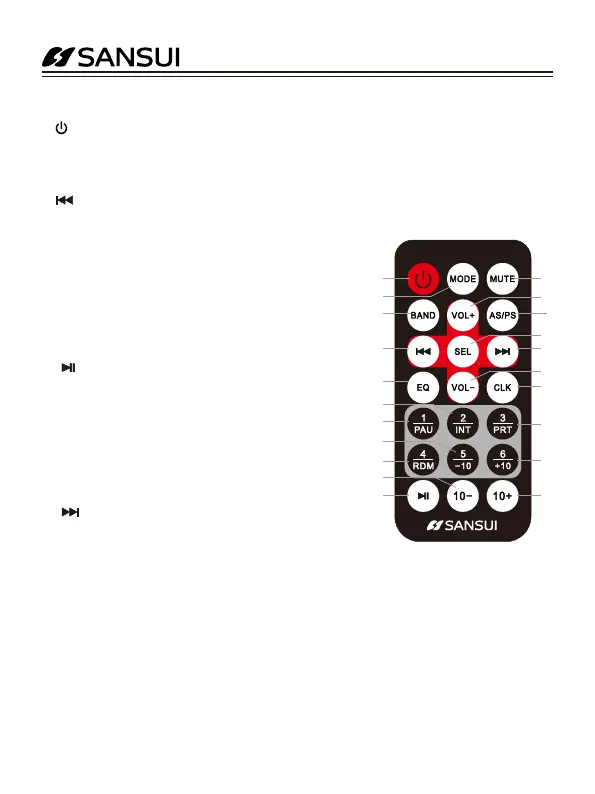
1. (Power on/off) button
2. (MODE) button, End Call button
3. (BAND) button, Answer Call button
4. (Tune down, seek down/Track down, Fast reverse) button
5. EQ (Equalizer Preset)
6. INT (intro), Preset station 2
7. PAU (pause/play), Preset station 1
8. -10 (previous 10 tracks), previous folder, Preset station 5
9. RDM (random), Preset station 4
10. 10- (previous 10 tracks), previous folder
11. (Play/Pause) button
12. (MUTE) button
13. VOL+ (volume increase) button,
14. AS/PS (Automatically save preset stations (long press)/
browse stations )
15. SEL (Audio/Menu) button
16. (Tune up, seek up/Track up, Fast forward) button
17. VOL- (volume decrease) button
18. CLK (Clock setting)
19. RPT (repeat), Preset station 3
20. +10 (next 10 tracks), next folder, Preset station 6
21. 10+ (next 10 tracks), next folder


 To Next Page