EasyManua.ls Logo

Sansui SR-636 - Tonearm Calibration; Cartridge Mounting Gauge Usage; Tonearm Horizontal Balance

Sansui SR-636
35 pages
Print Icon
To Next Page IconTo Next Page
To Previous Page IconTo Previous Page
Loading...
14
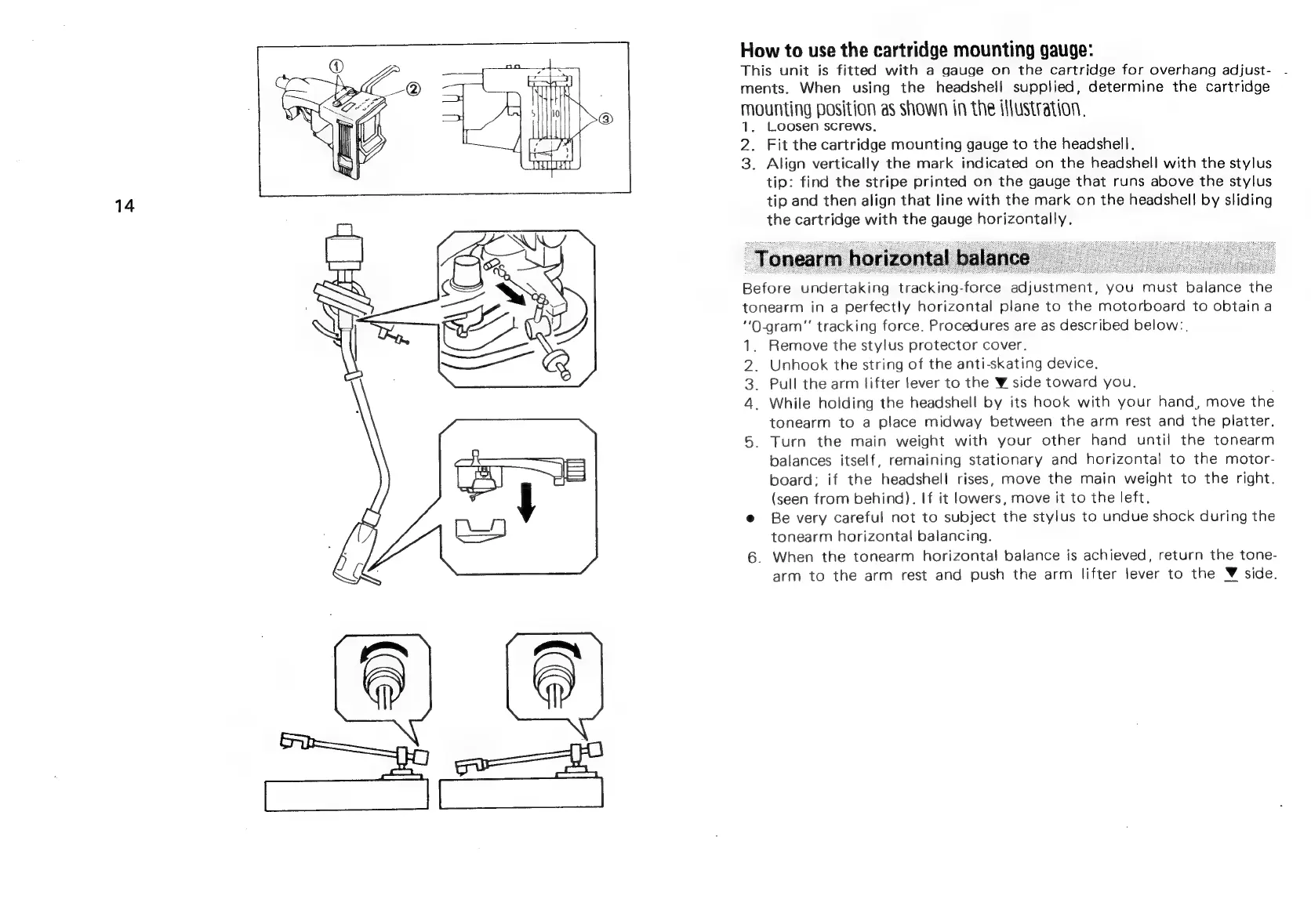
How
to
use
the
cartridge
mounting
gauge:
This
unit
is
fitted
with
a
gauge
on
the
cartridge
for
overhang
adjust-
ments.
When
using
the
headshell
supplied,
determine
the
cartridge
mounting
position
as
shown
in
the
illustration.
1.
Loosen
screws.
2.
Fit
the
cartridge
mounting
gauge
to
the
headshell.
3.
Align
vertically
the
mark
indicated
on
the
headshell
with
the
stylus
tip:
find
the
stripe
printed
on
the
gauge
that
runs
above
the
stylus
tip
and
then
align
that
line
with
the
mark
on
the
headshell
by
sliding
the
cartridge
with
the
gauge
horizontally.
Before
undertaking
tracking-force
adjustment,
you
must
balance
the
tonearm
in
a
perfectly
horizontal
plane
to
the
motorboard
to
obtain
a
“O-gram”
tracking
force.
Procedures
are
as
described
below:,
1.
Remove
the
stylus
protector
cover.
2.
Unhook
the
string
of
the
anti-skating
device,
3.
Pull
the
arm
lifter
lever
to
the
W
side
toward
you.
4.
While
holding
the
headshell
by
its
hook
with
your
hand,
move
the
tonearm
to
a
place
midway
between
the
arm
rest
and
the
platter.
Turn
the
main
weight
with
your
other
hand
until
the
tonearm
balances
itself,
remaining
stationary
and
horizontal
to
the
motor-
board:
if
the
headshell
rises,
move
the
main
weight
to
the
right.
(seen
from
behind).
If
it
lowers,
move
it
to
the
left.
e
Be
very
careful
not
to
subject
the
stylus
to
undue
shock
during
the
tonearm
horizontal
balancing.
6.
When
the
tonearm
horizontal
balance
is
achieved,
return
the
tone-
arm
to
the
arm
rest
and
push
the
arm
lifter
lever
to
the
©
side.
-

Related product manuals