10
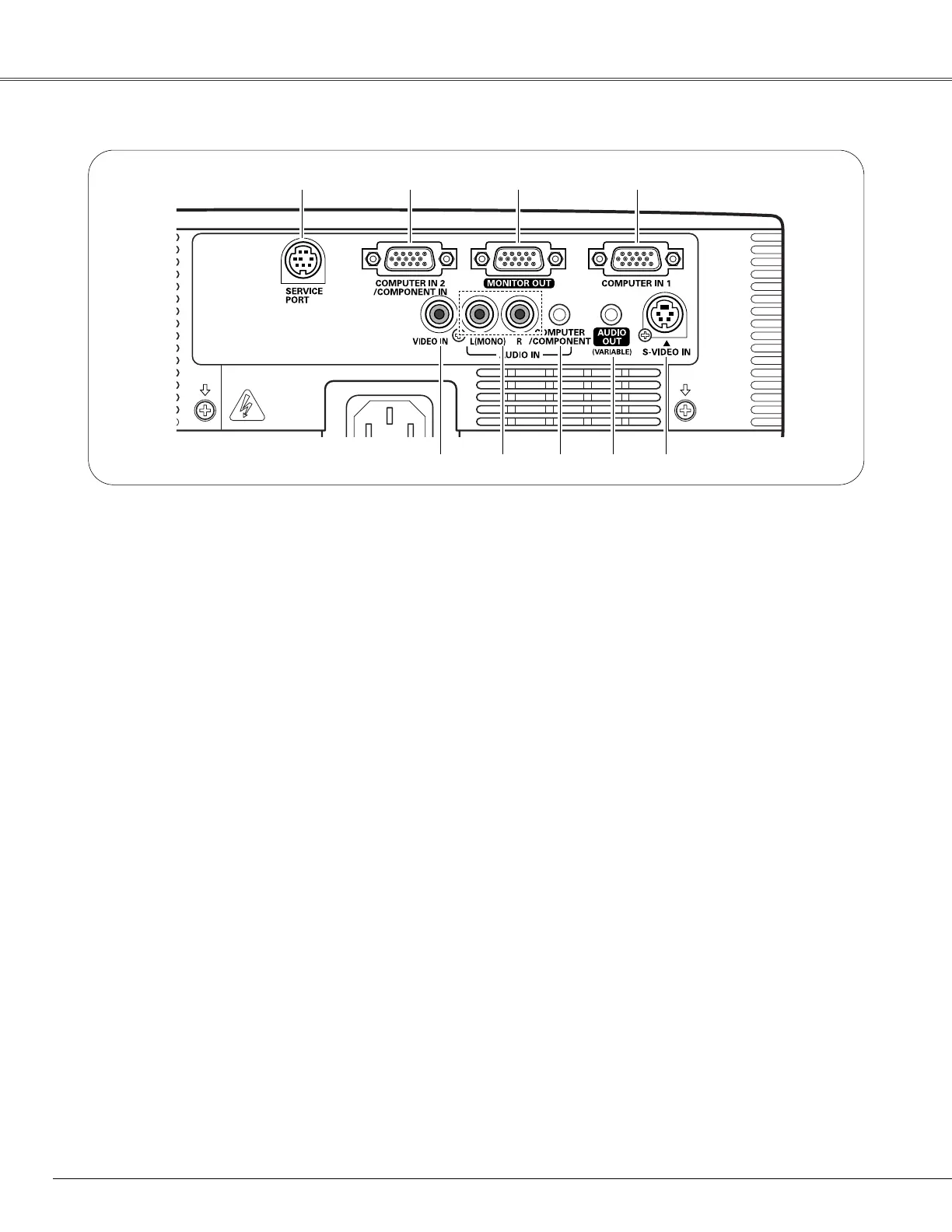
o S-VIDEO IN
Connect the S-VIDEO output signal from video
equipment to this jack (p.16).
y AUDIO IN
Connect the audio output signal from video
equipment connected to t or o to this jack. For a
mono audio signal (a single audio jack), connect it
to the L (MONO) jack (p.16).
u COMPUTER/COMPONENT AUDIO IN
Connect the audio output (stereo) signal from a
computer or video equipment connected to w or
r to this jack (pp.15, 17).
t VIDEO IN
Connect the composite video output signal to this
jack (p.16).
w COMPUTER IN 2/COMPONENT IN
Connect the computer or component video (or
RGB Scart) output signal to this terminal.
Use the supplied VGA cable or a Component-VGA
cable (not supplied).
i AUDIO OUT (VARIABLE)
Connect an external audio amplifier to this jack
(pp.15–17).
This terminal outputs sound from AUDIO IN terminal
(y or u).
q SERVICE PORT
This jack is used to service the projector.
r COMPUTER IN 1
Connect the computer output to this terminal
(p.15).
Rear Terminal
q w e r
t y u
e MONITOR OUT
This terminal can be used to output the incoming
signal from COMPUTER IN 1 terminal or
COMPUTER IN 2/COMPONENT IN terminal to the
other monitor (pp.15, 17).
i
o
Part Names and Functions


 To Next Page
 Loading...