66
The Sapling Company, Inc.
1633 Republic Road
Huntingdon Valley, PA 19006
USA
P. (+1) 215.322.6063
F. (+1) 215.322.8498
www.sapling-inc.com
Web Interface - Synchronization (Continued)
59 Minute Sync 58 Minute Sync_4 Once a Day Pulse
58 Minute Sync_1 Rauland Digital Once An Hour Pulse
58 Minute Sync_2 National Time_Rauland_1 Once A Minute Pulse
58 Minute Sync_3 National Time_Rauland_2
3
7 8
4
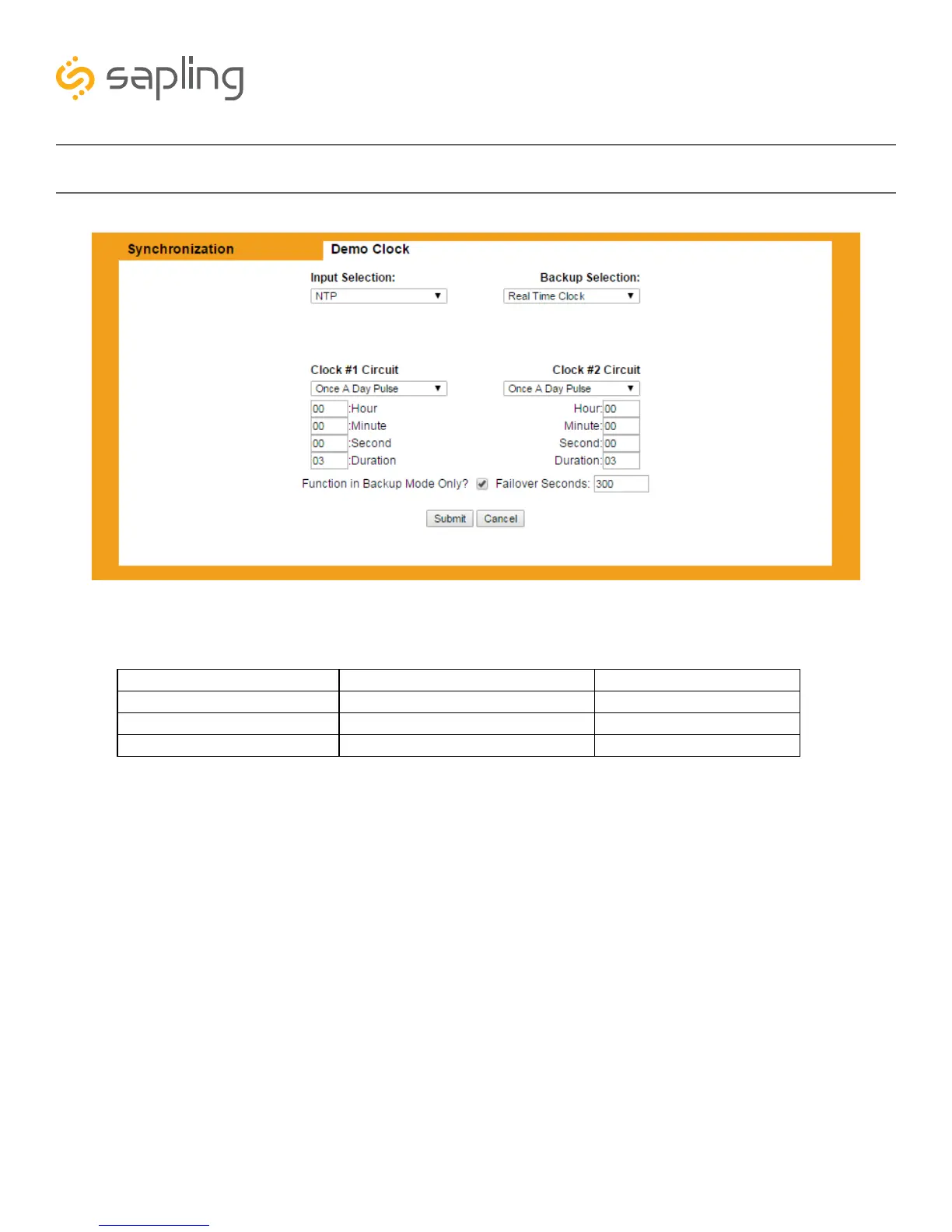
3. Clock #1 Circuit - This drop-down list allows the user to select the sync-wire output for master clock
Sync-wire Circuit 1. The available output signals are:
4. Clock #2 Circuit - This drop-down list allows the user to select the sync-wire output for master clock
Sync-wire Circuit 2. The available output signals are listed above.
5. Function in Backup Mode Only? - When the box is selected, the master clock will funciton as a
backup clock. In this mode, the clock will wait until a time signal from a primary master clock is lost before
becoming the primary time source. Enabling this value overrides the Clock #1 and Clock #2 Circuits. Refer
to the page “Outputs - Backup Mode” for more information.
6. Failover in Seconds - Allows the user to enter a length of time, in seconds, that time data from a
primary master clock should be absent before the backup clock takes over the role of distributing time data.
7. Submit - This button, when pressed, saves and applies all the selections to the master clock.
8. Cancel - This button, when pressed, clears any changes made and does not save any data.
5
6



 To Next Page