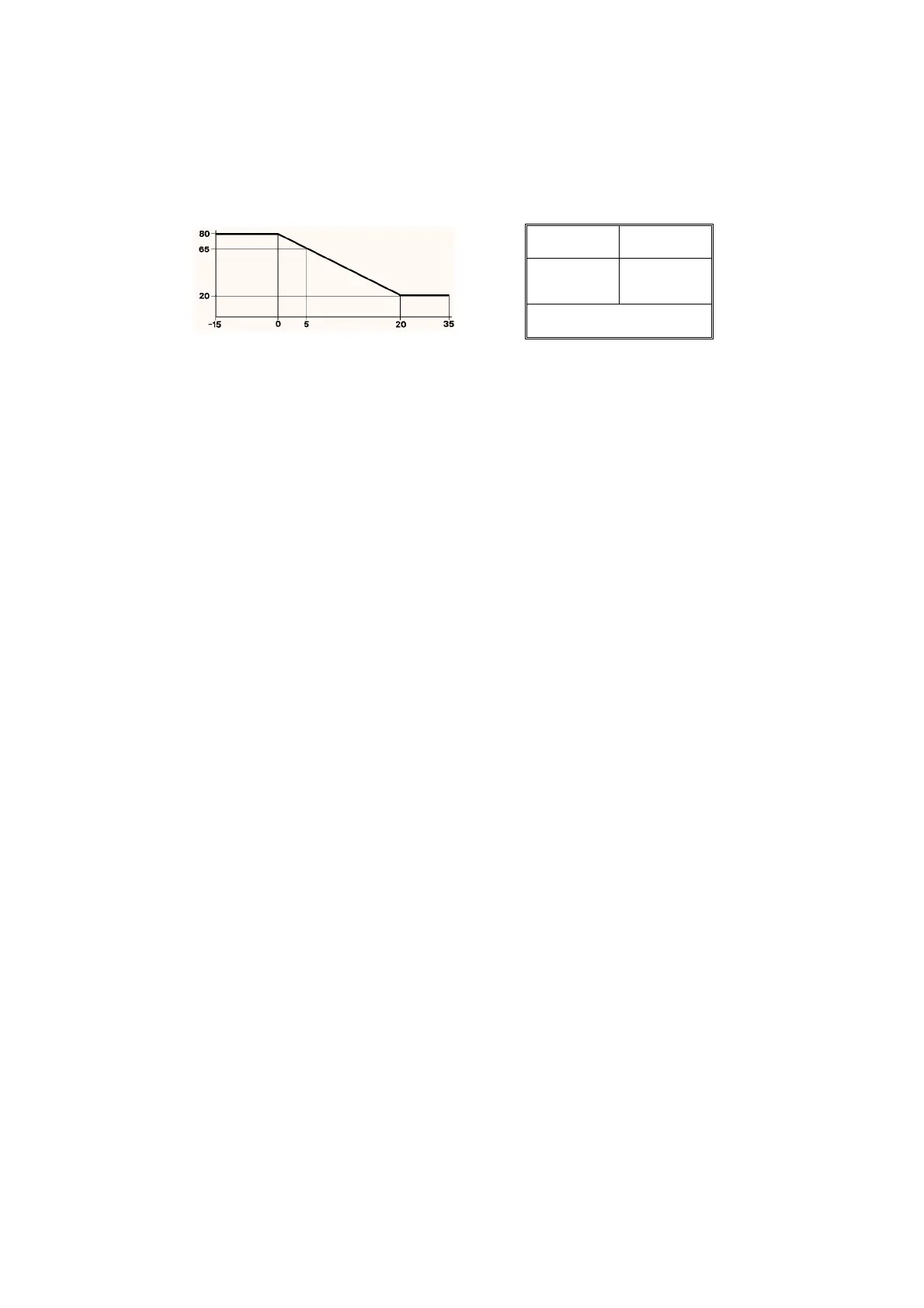
Outside Air
Temperature
°
C
Water
Temperature
°
C
OUTSIDE
TEMP.
SUPPLY SET
VALUE
1: IN 0
2: IN 5
3: IN 20
OUT 80
OUT 65
OUT 20
Settin
s 4 to 11 set to "---"
unused
.
EXAMPLE COMPENSATION SET-UP
To confi
ure a controller module to operate a compensation scheme
connect the modules as follows:
Water/Air Suppl
sensor connected to controller module main sensor
input.
Outside sensor connected to RPW input via a look-up table module.
Wind sensor connected to the 0 to 10 Volt reset input
optional
.
Other inputs and outputs would be connected as for normal control
schemes.
Example Look-Up Table settings for the graph below:-
APPLICATIONS
The IAC has a number of preset applications built in. The preset applications are selected from the 8 wa
bit switch on the IAC.
It is important to note that
any
application ma
be customised b
usin
the computer and it will be stored in the IAC even in the event of a
power failure. The supplied applications are merel
a startin
point for a s
stem but if the supplied application suits
our s
stem it ma
be
used as it stands.
Hardware Preset Applications
There are currentl
4 preset applications that can be selected from the 8 wa
bit switch and the
are as follows:-
Preset 0 – Fully configurable
No links are made between modules. This preset should be chosen if
ou wish to confi
ure the IAC completel
.
APPLICATION NOTES
1. If an application is to be used on an IAC via a computer select software preset 0. Use the confi
uration librar
in the Satchnet Computer
Software to load the re
uired preset application from disk. Then send the confi
uration to the controller.
2. Most applications include one or more timeschedules. If the IAC is connected to a computer then the IAC will operate on its own
timeschedule. If it is not then the IAC will default to its occupied state.
3. Most applications can be used as sin
le sta
e if re
uired b
settin
the unused sta
e as follows:-
Proportional Band = 10,000
Inte
ral Action Time = 0
Derivative Action Time = 0
Ramp Time = 0
4. When outputs are duplicated either the 24Vac or 0 to 10Vdc output can be used as re
uired as the
operate in parallel.
DS 2.951A 14 - 24 05/98



 To Next Page