14
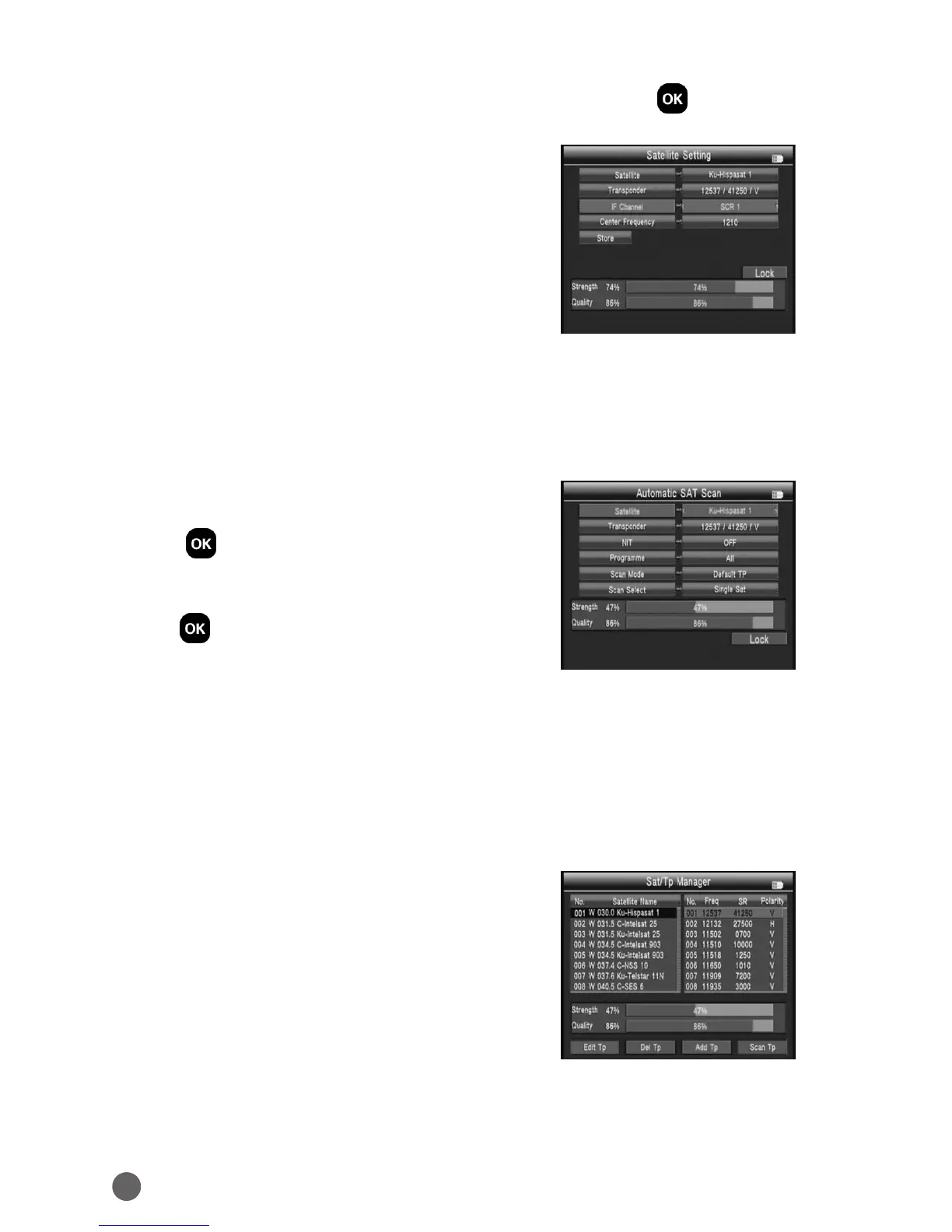
8. Unicable: Press
AB
key to select Unicalbe then press OK into the Unicable
setting.
• Transponder: Press
AB
key to change the
current TP.
• IF Channel: Press
AB
key to change SCR
channel.
• Center Frequency: Use number key to input
number.
• Store: Store the setting.
3.4.2 AUTO SCAN
In the Sat/Tp Manager submenu, select Auto Scan into Automatic SAT Scan.
• Satellite: Press
AB
key into the satellite list.
Use
YZ
key to move the cursor, then press
OK to select the satellite of youwant.
• Transponder: press
AB
key into the TP list.
Use
YZ
key to move the cursor, then press
OK to select the satellite of you want.
• NIT: press
AB
key to switch network
searcher on/o.
• Program: TV search type ALL/FTA.
• Scan Mode: scan mode select, we can select Default TP / One TP/Blind.
• Scan Select: scan all satellites of selected or the current satellite.
3.4.3 TRANSPONDER
In the Sat/Tp Manager submenu, select
Transponder into Transponder.



 To Next Page