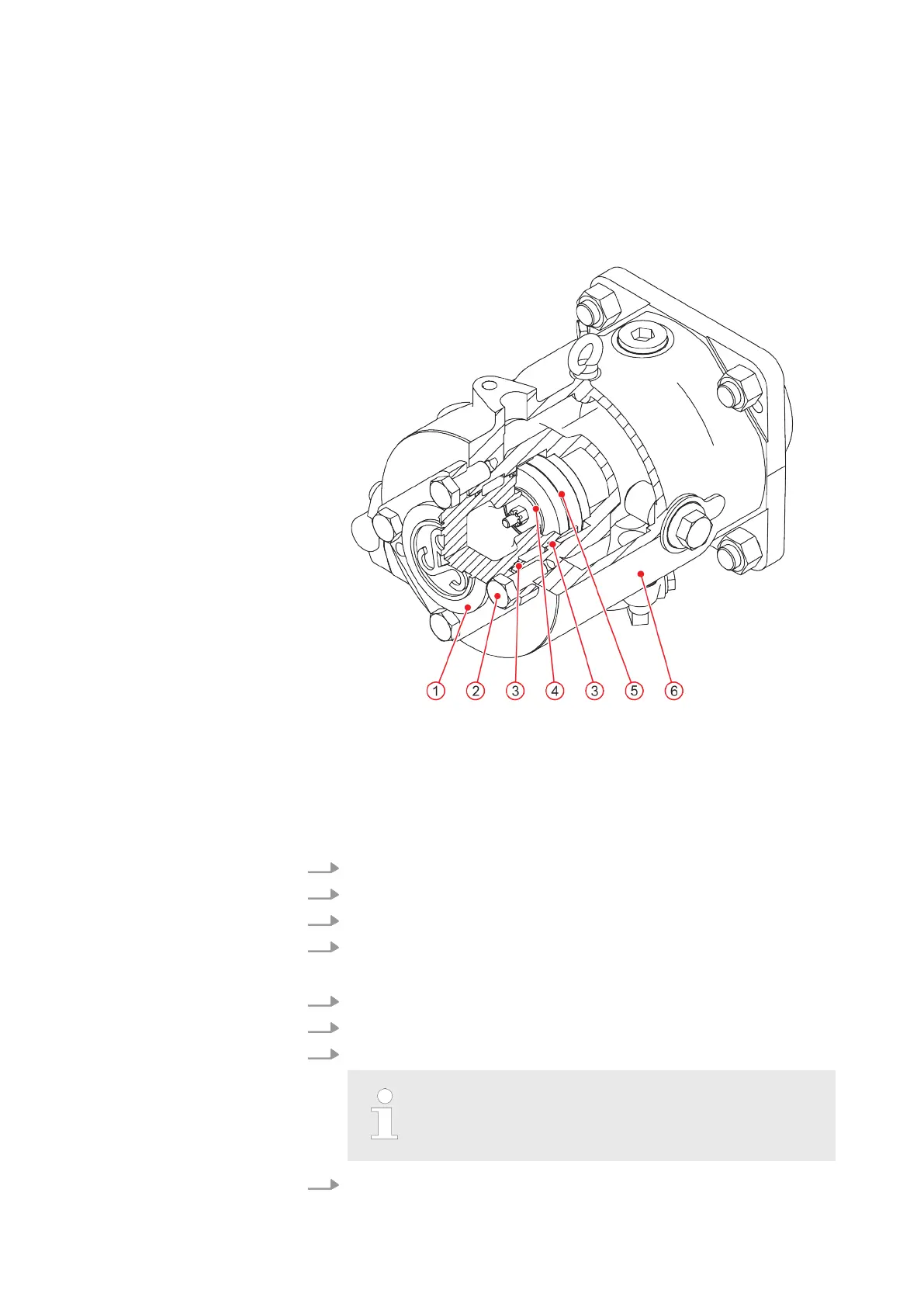
Fig. 8: Compression stage 3 valve
1 Valve cover
2 Hexagon head screw
3 O-ring
4 Ring gasket
5 Valve
6 Cylinder
1. Unscrew the hexagon head screws and remove the valve cover
.
2. Carefully remove the valve from the cylinder
.
3. Remove the o-rings and gasket.
4. Clean all sealing surfaces.
1. Carefully insert the new valve in the cylinder
.
2. Fit a gasket between the valve and valve cover
.
3. Insert the valve cover together with new o-rings into the cylinder
.
When fitting the valve cover for compression stage 3,
ensure it is positioned correctly
. The Sauer symbol on
the valve cover must point upwards.
4. Screw in the hexagon head screws hand tight.
Removing the compres-
sion stage 3 valve
Installing the compres-
sion stage 3 valve
MAINTENANCE
WP5000 Basic WA 41013675 en GB 20190916 | 31



 To Next Page