- 12 -
www.SCEPTRE.com
SCEPTRE E32 HDTV User Manual
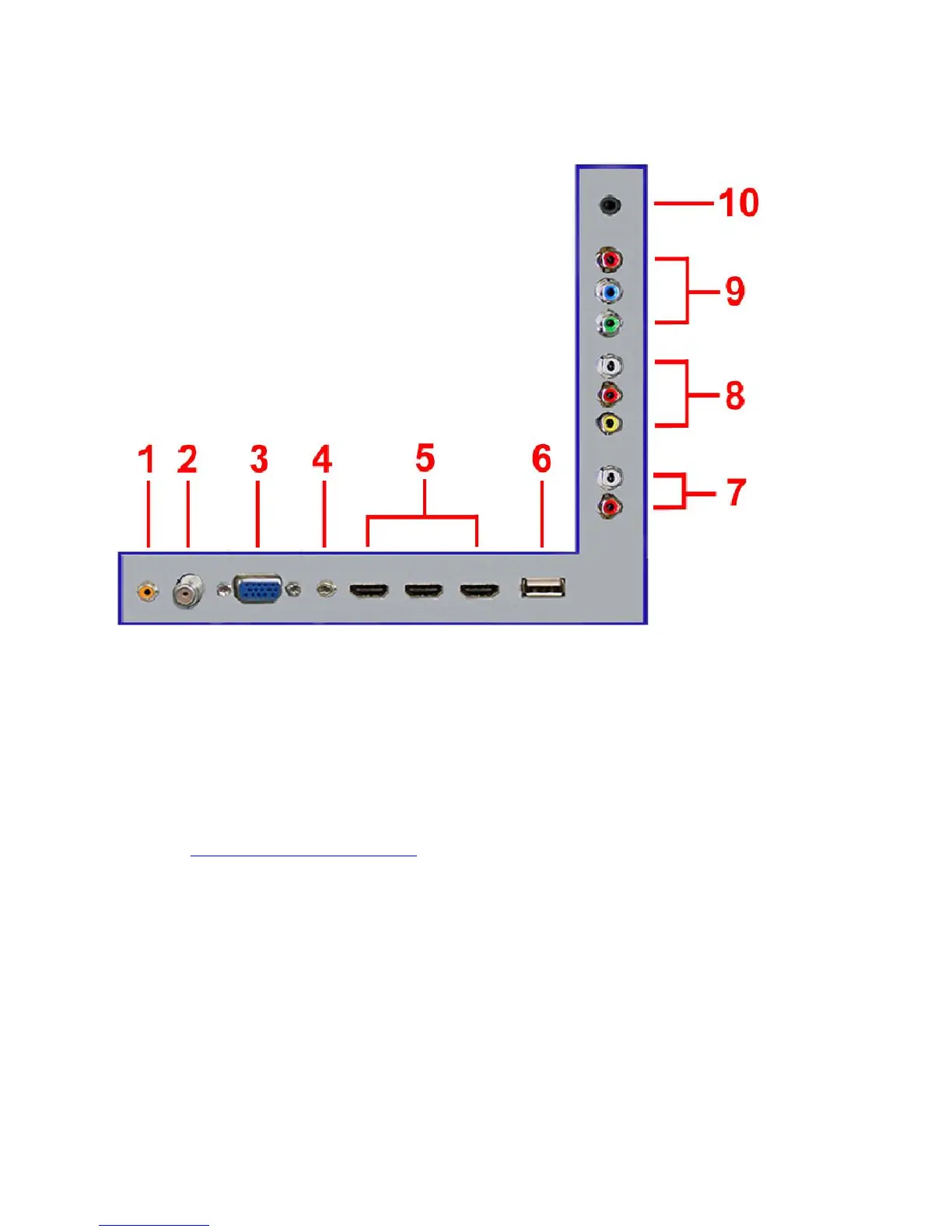
Rear View Connections
1. SPDIF - This connection port is used for sending out digital audio
signals to digital surround sound receivers. The orange (COAX
SPDIF OUT) connector sends out either bit-stream or PCM digital
sound signal to a home theater receiver with digital coax input.
2. TV – This connection is for digital or analog cable without the cable
box or over-the-airwave antennas. The tuner is a hybrid tuner that
tunes to both analog and digital channels. This connection uses
coaxial RF cable. For over-the airwave digital stations please check
http://www.antennaweb.org.
3. VGA - This connection port connects to a PC for video using VGA
cable. Be sure to connect your audio cable to the VGA Stereo input if
you want sound out of VGA video source.
4. Audio In - This connection port is for people who want to provide
audio to the TV when using a PC or a DVI video device. The sources
use 3.5mm mini-jack audio cable.
5. HDMI1-3 – HDMI connects to devices that use HDMI cable, such as
Blu-ray or HD DVD player, or HD cable / satellite set-top box. This
connection port receives pure digital audio and high definition signal
through one single cable. This port also can accept a HDCP video
device for video.
6. USB – USB connects to USB flash drives for playing music and
picture. The USB port is also used for updating the TV’s firmware.



 To Next Page