- 23 -
www.SCEPTRE.com
SCEPTRE E32 HDTV User Manual
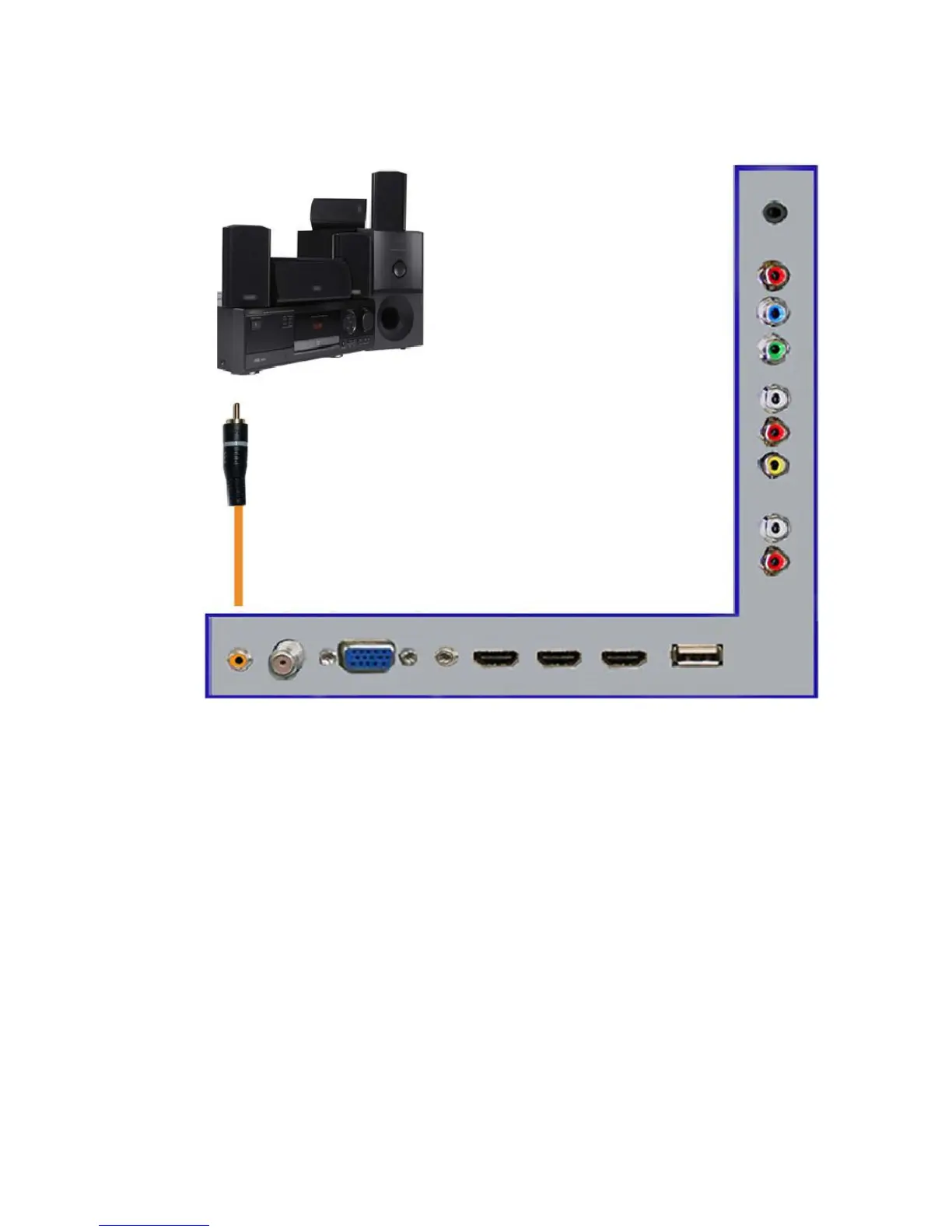
Connecting a Digital Audio Receiver with Coax SPDIF…
1. Make sure the power of HDTV and your receiver is turned off.
2. Obtain a coax SPDIF cable, connect it to your receiver’s coax SPDIF digital
input and the coax SPDIF connection on the LINE OUT port on the back of
the HDTV.
3. Turn on the HDTV and your receiver.
Please Note :
If you want pure digital stream for your receiver to decode, you
must also configure the TV’s OSD Sound->Digital Audio Out
function. Make sure the option is on 5.1CH.
If your receiver is making static noises when receiving 5.1CH, you
must use the PCM option instead.
Please reference the receiver’s manual as well, to make sure the
receiver is configured to receive signals correctly from the TV.
The TV’s SPDIF out for 5.1CH is ONLY used for antenna/cable
connection. Any other incoming audio signal will be passed
out of SPDIF in PCM format.



 To Next Page