Operating Instructions
VACUMASTER
J. Schmalz GmbH
Aacher Straße 29
D - 72293 Glatten
Tel +49 +7443 / 2403 - 0
Fax +49 +7443 / 2403 - 259
http://www.schmalz.de
e-mail: schmalz@schmalz.de
30.30.01.00185 Status 03.2013 / Index 00 Page 13 / 28
3.4
C
C
O
O
M
M
F
F
O
O
R
R
T
T
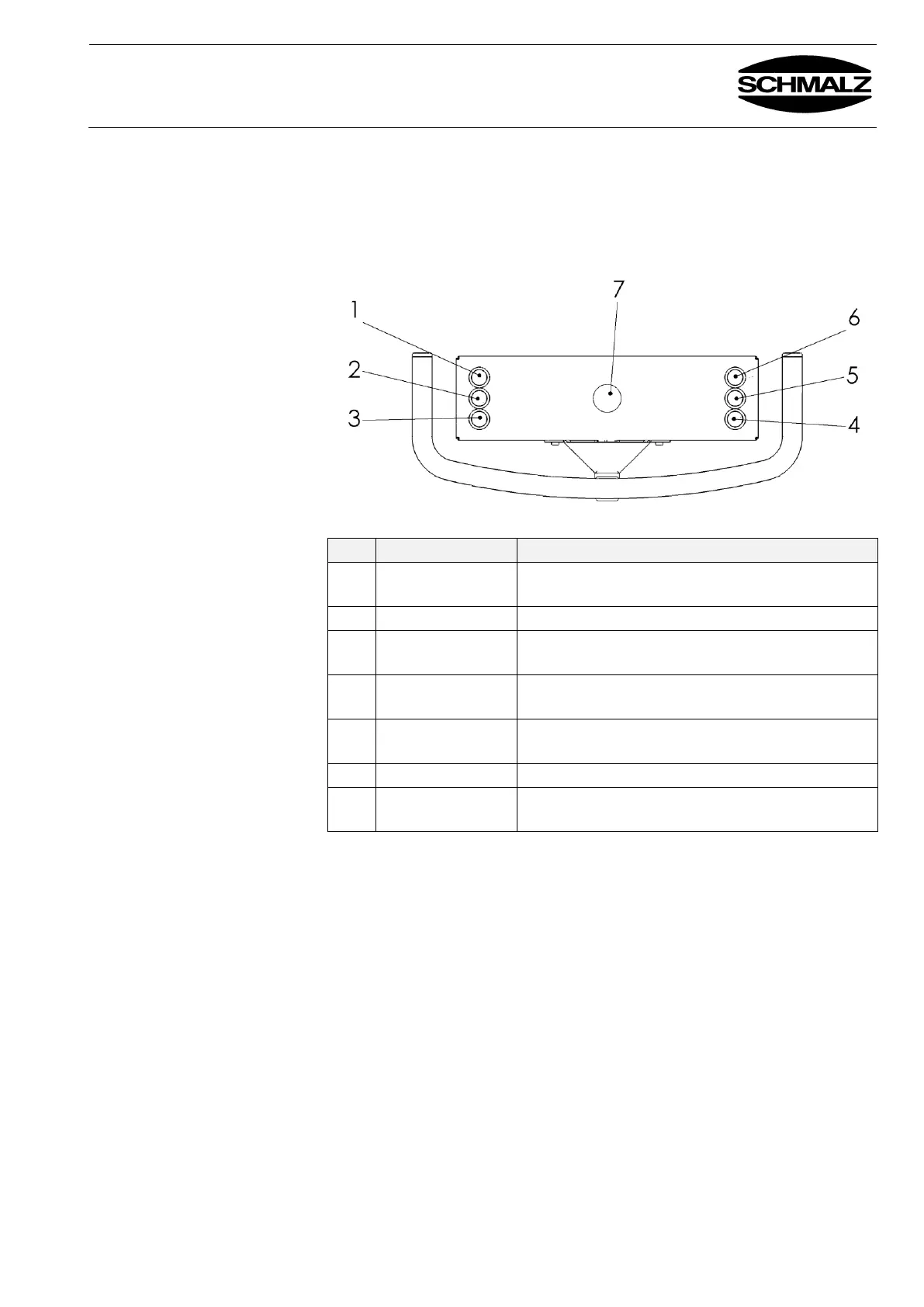
controls
Switches entire control unit on/off
Buttons on the operating
panel
Chain hoist travels upwards – two speeds
Chain hoist travels downwards – two speeds
Releases the load – 2 button operation
Must be pressed at the same time as button 1!
Rotates or turns the load to the start position
Rotates or turns the load 90° or 180°
Switches the control unit off in emergencies
(vacuum generator remains active)
* None on device for horizontal handling


 To Next Page