EasyManua.ls Logo

schmersal PROTECT-PSC - Program;data transfer

schmersal PROTECT-PSC
267 pages
Print Icon
To Next Page IconTo Next Page
To Previous Page IconTo Previous Page
Loading...
Programming / parameter assignment
6
Instruction Manual PROTECT-PSC
V 2.6R01 / 04.19
6-11
6.7 Program/data transfer
6.7.1 Connecting to PROTECT-PSC
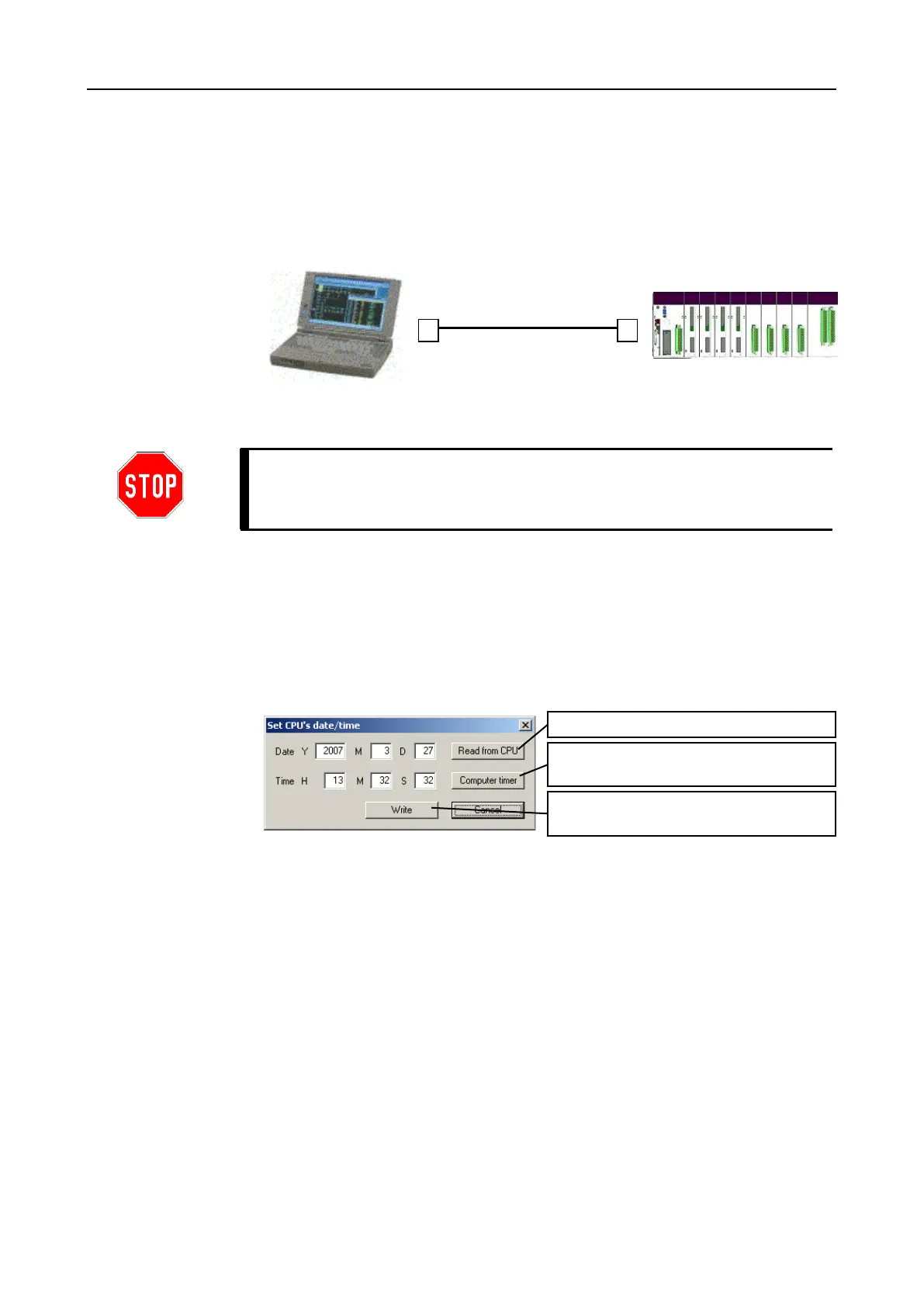
The connection to PROTECT-PSC is made via a standard USB printer cable.
F
F
i
i
g
g
u
u
r
r
e
e
6
6
-
-
9
9
C
C
o
o
n
n
n
n
e
e
c
c
t
t
i
i
o
o
n
n
o
o
f
f
t
t
h
h
e
e
P
P
R
R
O
O
T
T
E
E
C
C
T
T
-
-
P
P
S
S
C
C
t
t
o
o
t
t
h
h
e
e
c
c
o
o
m
m
p
p
u
u
t
t
e
e
r
r
It is only possible to connect the PROTECT-PSC with a different device via a USB
cable for parameter assignment or for short-term trouble shooting.
A permanent connection is not permitted.
6.7.2 Setting time and date
After you have performed a first connection test, you should set the real time clock
of the PROTECT-PSC. You can reach the dialogue via the main menu [CPU]-
[Setup Date/Time]. The real time clock of the PROTECT-PSC can be read out here
and either the time and the date entered manually or the time and the date taken
from your computer.

F
F
i
i
g
g
u
u
r
r
e
e
6
6
-
-
1
1
0
0
S
S
e
e
t
t
t
t
i
i
n
n
g
g
t
t
i
i
m
m
e
e
a
a
n
n
d
d
d
d
a
a
t
t
e
e
d
d
i
i
a
a
l
l
o
o
g
g
u
u
e
e
Read from the real time clock
Use computer settings
Send settings to PROTECT-PSC
USB cable

Table of Contents