EasyManua.ls Logo

schmersal PROTECT-PSC - Page 72

schmersal PROTECT-PSC
267 pages
Print Icon
To Next Page IconTo Next Page
To Previous Page IconTo Previous Page
Loading...
3
Instruction Manual PROTECT-PSC
V 2.6R01 / 04.19
340
Addressing
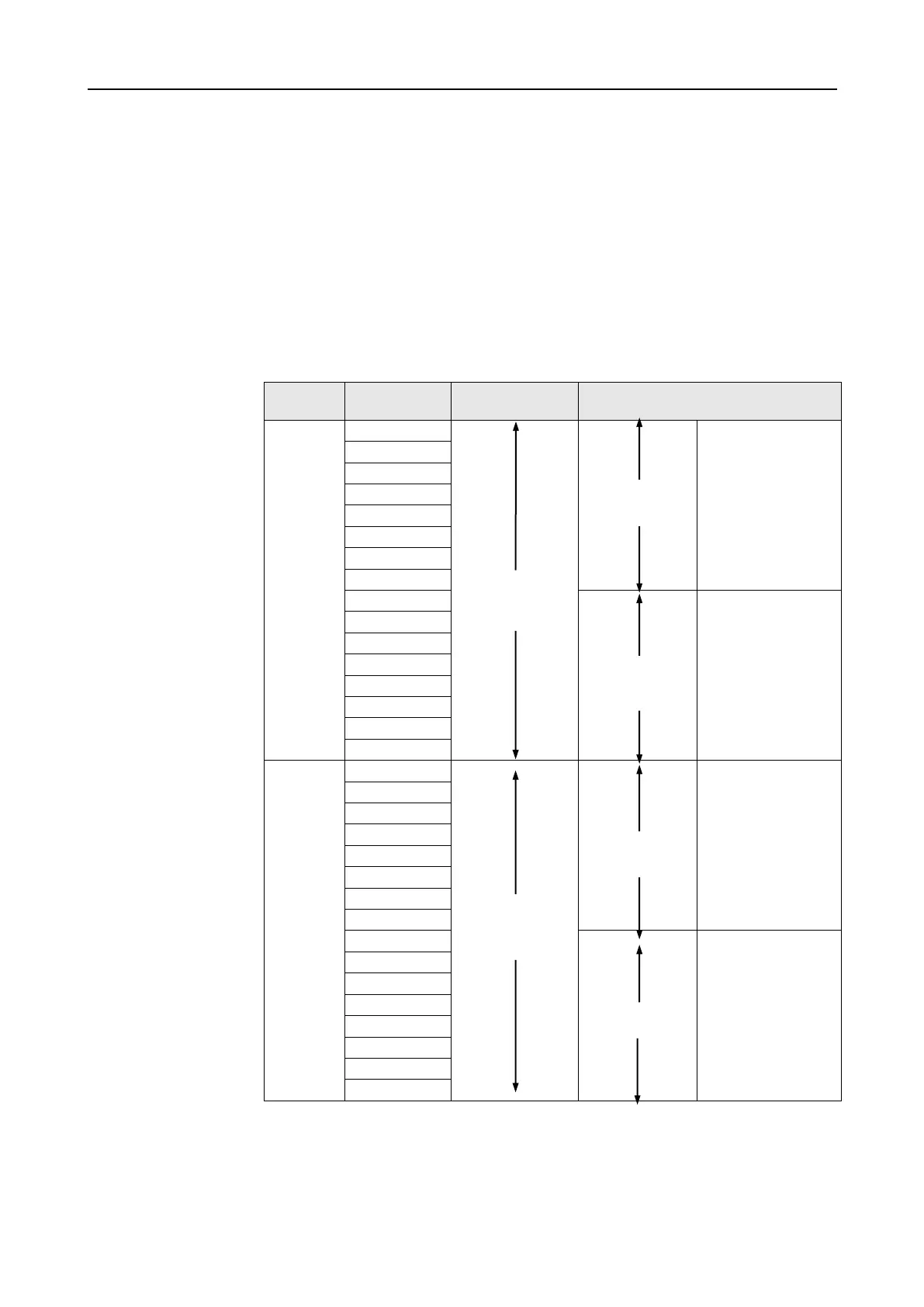
The different memory areas can be addressed BIT-, BYTE- or WORD-wise.
BIT address area
The WORD addressing is shown by the suffix W . The BYTE addressing is
followed by an .L for the low value part of the WORD and an .H for the higher
value part of the WORD.

WORD address area
The BIT addressing is provided by attaching a hyphen and the bit number. The
BYTE addressing is followed by an .Lfor the low value part of the WORD and an
.Hfor the higher value part of the WORD.
BIT-address
WORD-address
BYTE-address
BIT-
address
area
Q000
(LSB)
(LSB)
LOW BYTE
Q001
Q00W
Q00L
Q002
Q003
Q004
Q005
Q006
Q007
(MSB)
Q008
(LSB)
HIGH BYTE
Q009
Q00H
Q00A
Q00B
Q00C
Q00D
Q00E
Q00F
(MSB)
(MSB)
WORD-
address
area
D0000-0
(LSB)
(LSB)
LOW BYTE
D0000-1
D0000
D0000L
D0000-2
D0000-3
D0000-4
D0000-5
D0000-6
D0000-7
(MSB)
D0000-8
(LSB)
HIGH BYTE
D0000-9
D0000H
D0000-A
D0000-B
D0000-C
D0000-D
D0000-E
D0000-F
(MSB)
(MSB)
T
T
a
a
b
b
l
l
e
e
3
3
-
-
1
1
5
5
A
A
d
d
r
r
e
e
s
s
s
s
i
i
n
n
g
g
t
t
y
y
p
p
e
e
s
s
o
o
f
f
t
t
h
h
e
e
m
m
e
e
m
m
o
o
r
r
y
y

Table of Contents