13
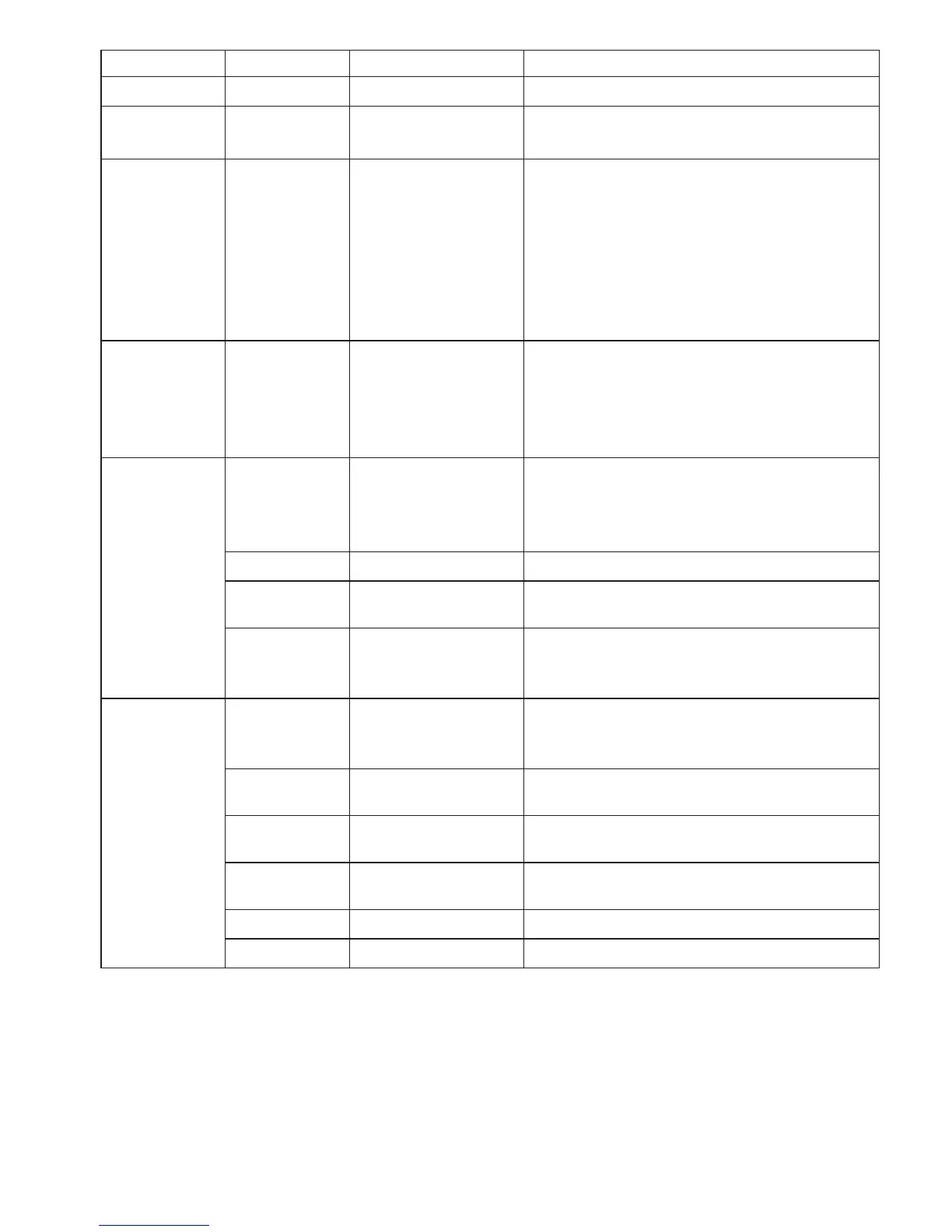
Main Menu Submenu Settings Menu Description
Material [1] to [4] Chapter 3.4.1 Material-Set-up
Cal.
Adjustment
—
[- 10 %] - [+ 10 %] Chapter 3.5.6
Display
Chapter 3.2
—
[numeric]
[Bargraph]
[Graphic]
• Measuredvaluedisplayedasnumber
and alarm monitoring
• Measuredvaluedisplayedasnumber,
bar graph trend display and alarm
monitoring
• Measuredvaluedisplayedasgraphical
trend, measured value/limit values as
graph
Alarms — [ON], [OFF]
Activate/deactivate the alarm for all
calibrations.
The alarm of a material characteristic is
only active if the [Alarm] menu item in
Material Setup is activated as well.
Display
Settings
Backlight [ON], [AUTO]
Switch the display light on or off. With
the AUTO setting, the light switches on
and off automatically depending on the
ambient light.
Brightness [1], [2], [3] Set the display brightness.
Colortheme [white], [black]
A white or black display background can
be adjusted
Screen
Rotation
[0°], [90°], [180°];
[270°], [AUTO]
To set the display orientation to be fixed
or to automatically adapt to the current
orientation of the device.
System
Settings
Tension Unit [cN], [g], [lb], [N],
Set the measurement unit.
The available units may vary depending
on the measuring range of the device.
Auto Power
Off
[ON],
[OFF]
Toggle the „Auto Power off“ function on
and off.
Language [EN], [DE]
Select between the english and german
user language.
Date/Time
[Time], [Date],
[Timeformat]
Set the time, date, and date/time format.
Password [0], [1], [2], [3] Chapter 3.4.2
Factory reset Reset to the factory settings.
3.4 Tension meter settings
Factory settings are illustrated bold


 To Next Page