9
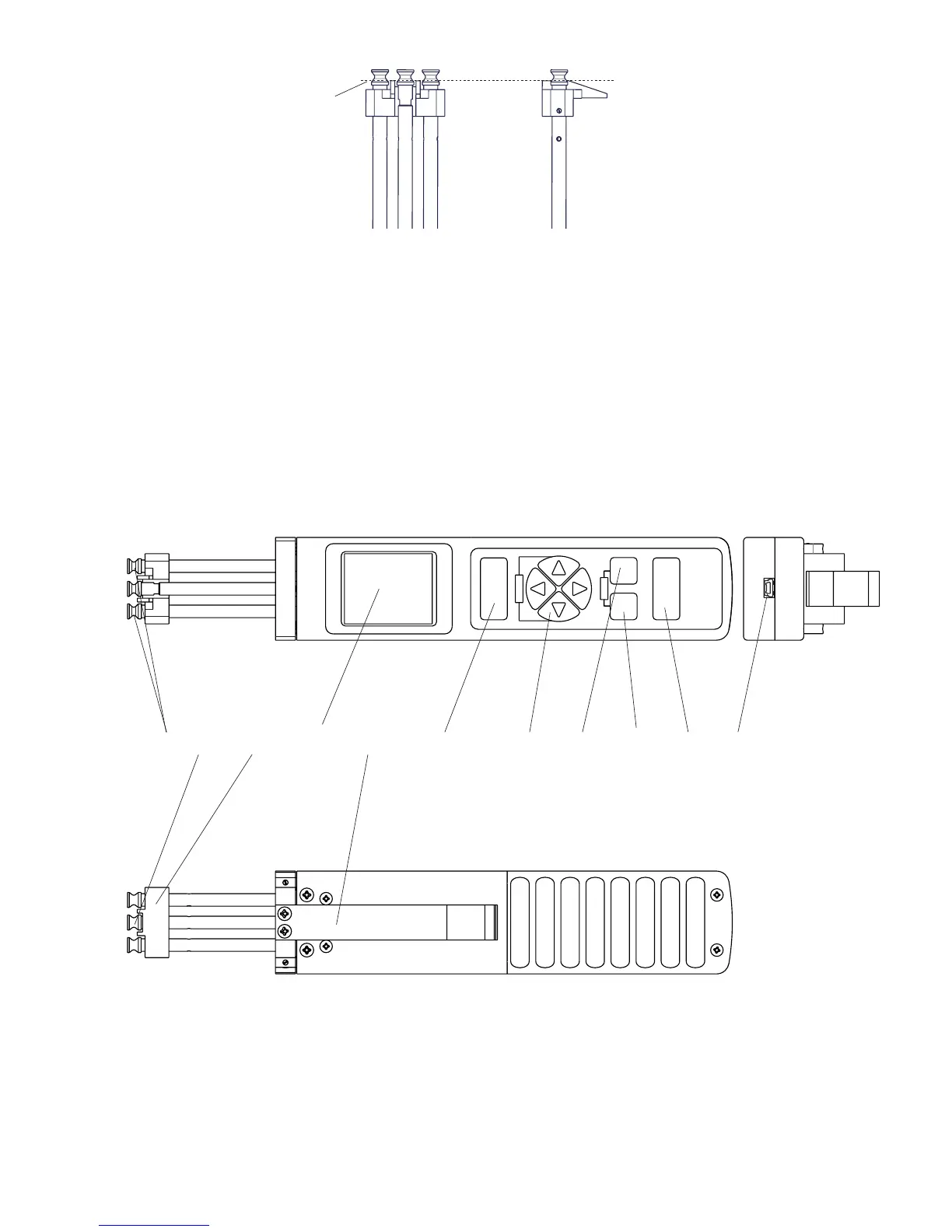
3.1.3 Mounting the Filament Guide
Mounting:
- Unscrew and remove the guide rollers (2x) with the supplied open end
wrench (jaw width 4 mm).
- Slip the filament guide on to the roller shafts.
- Screw the guide rollers (2x) back on to the roller shafts and carefully
tighten them with the supplied open end wrench (jaw width 4 mm) until hand-tight.
- Push the filament guide forward far enough to ensure that the rollers do not rub
against the filament guide and that the process material can slide unhindered from
the filament guide into the roller grooves (fig. 3.0.2 center line).
- Carefully tighten the grub screws (2x) with the supplied screwdriver until
hand-tight.
3.2 Operating and display elements
1 Guide rollers
2 Measuring roller
3 Filament guide
4 Display
5 Lever
6 „MEMORY“ key
7 Arrow key
8 „SET / DAMP“ key
9 „ESC / EXIT“ key
10 „POWER / ZERO“ key
11 Power connector
fig. 3.2b
fig. 3.2a
1 2 3
4 5 6
7
8 9
10 11
fig. 3.1.3
Center Line


 To Next Page