32
Keypad Functions
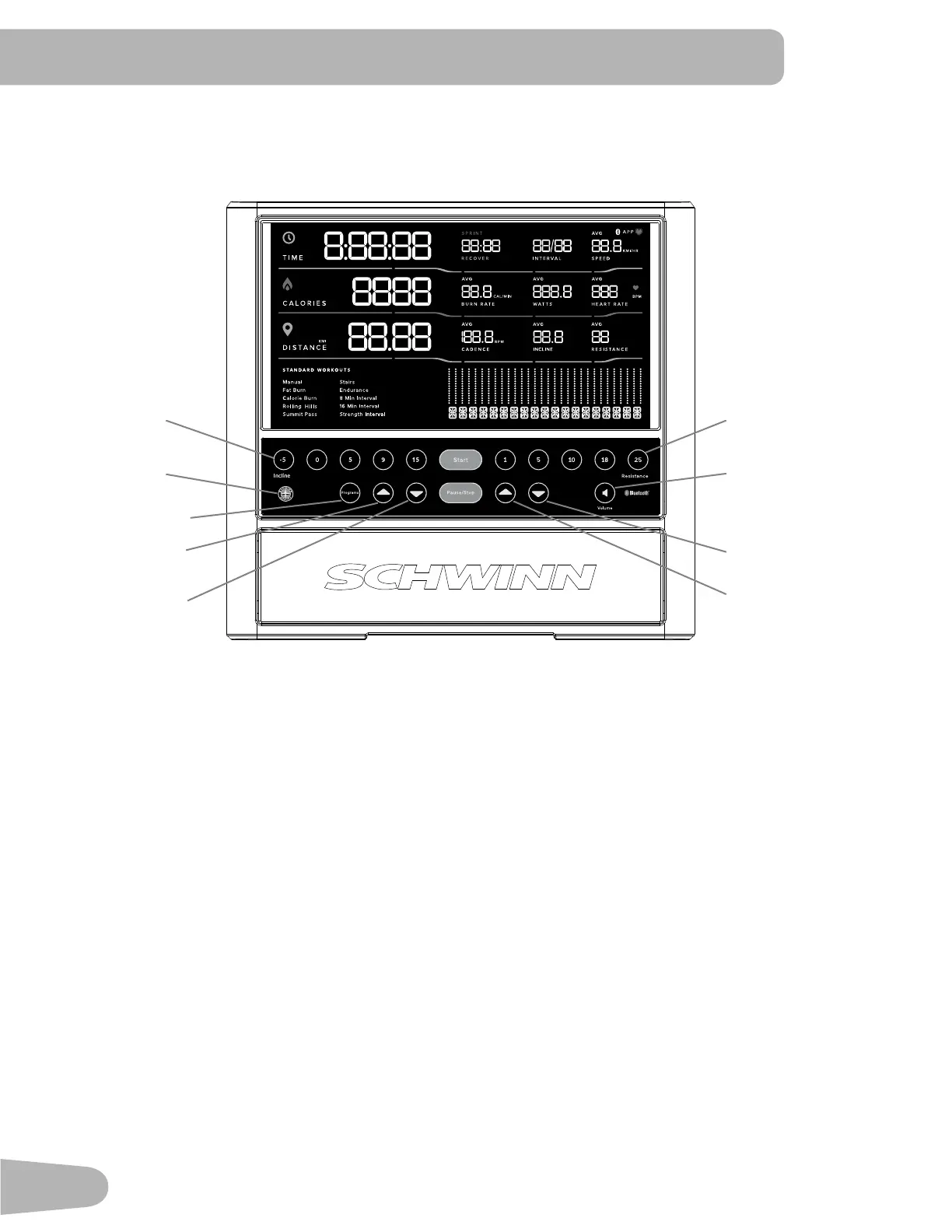
Incline Level Quick buttons- Shifts the incline level to the setting quickly during a workout.
Resistance Level Quick buttons- Shifts the resistance level to the setting quickly during a workout.
Programs button- Tap to cycle through the menu of workout programs.
Start button- Starts a Program workout, conrms information, or resumes a paused workout.
Pause / Stop button- Pauses an active workout or ends a paused workout.
Increase () button- Increases the workout resistance or incline level, or moves through options.
Decrease () button- Decreases the workout resistance or incline level, or moves through options.
Volume button- Sets the sound level of the Console. Tap to cycle through the volume levels: O, 1, 2 (default), 3. It does
not aect the output from your personal device.
Reset button (Schwinn
™
logo)- for service technician use only. When pushed during power up, the button restores the
Console settings to the factory default state. The Console will require updates to be applied in order to become fully
functional. Workout data is not aected.
Console Display
Bluetooth
®
App Connected icon - Display shows when the Console is paired with the App.
Bluetooth
®
Heart Rate Monitor Connected icon - Display shows when the Console is paired with a Bluetooth
®
Heart Rate
Monitor.
Console Features
The Console provides important information about your workout and lets you control the incline and resistance levels
while you exercise. The Console features touch control buttons to navigate you through the exercise programs.
Reset button
™
Incline Level Quick
buttons
Resistance Level
Quick buttons
Increase button
(Resistance)
Decrease button
(Resistance)
Volume button
Programs button
Increase button
(Incline)
Decrease button
(Incline)



 To Next Page