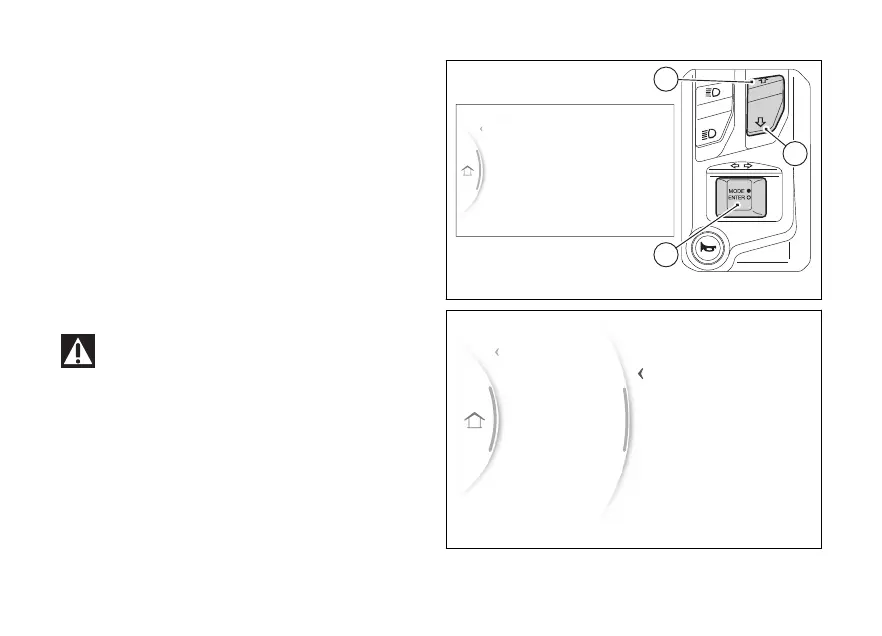
menu - Riding Mode
This function allows customising every Riding Mode.
●
From the Interactive Menu, use (1) and
(2) to select the item menu" and press
ENTER (3).
●
Select the "Riding Mode" item and press ENTER
(3).
The “Road”, Riding modes and “Default”
item are displayed (only visible if one or more
parameters of one or more Riding modes have been
changed).
Use (1) and (2) to select the Riding Mode you
wish to customise and press ENTER (3).
Changes should only be made to the
parameters by people who are in motorcycle
set-up. If the parameters are changed accidentally,
use the "Default" function to restore factory
Fuel indicator
Info display
Riding Mode
Service
Exit
Gear
N
Fig 91
Fuel indicator
Info display
Riding Mode
Service
Exit
Default
Sport
Road
Back
Fig 92
118


 To Next Page