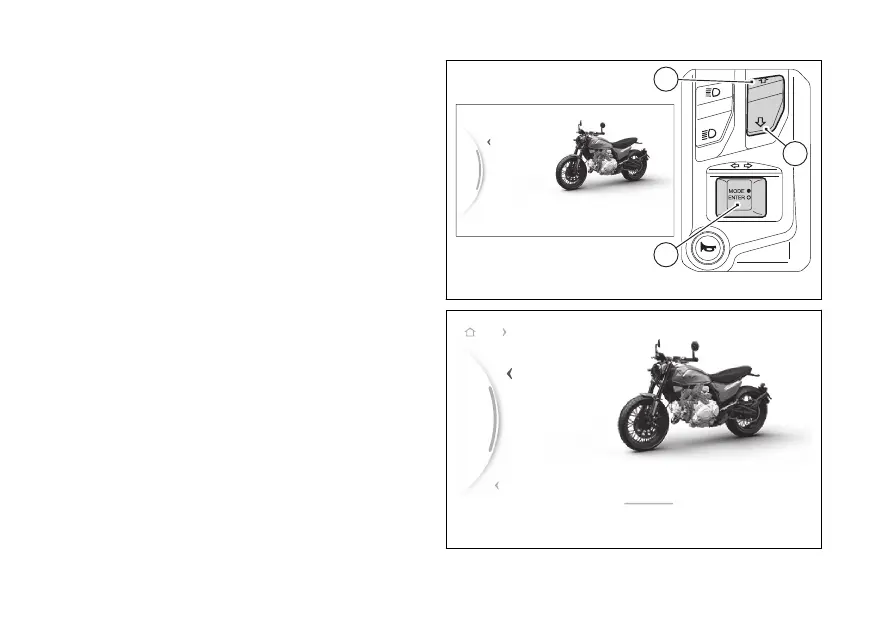
menu - Riding Mode - Power
This function allows the engine power.
●
From the Interactive Menu, use (1) and
(2) to select the item menu" and press
ENTER (3).
●
Select the "Riding Mode" item and press ENTER
(3).
●
Select the Riding Mode you wish to customise
and press ENTER (3).
●
Select the “Power” item and press ENTER (3).
The levels “High”, “Medium” and the bike with the
by the highlighted, followed by
the reference indications are displayed.
Use (1) and (2) to scroll and select the desired
level. Press ENTER (3) to validate, then select "Back",
and press ENTER (3) again to exit.
Fig 94
...
Gear
N
SMOOTHDYNAMIC
Medium
High
Back
Back
Road Power
Fig 95
120


 To Next Page