menu - Date and time
This function allows date and time as well as
the relevant formats.
●
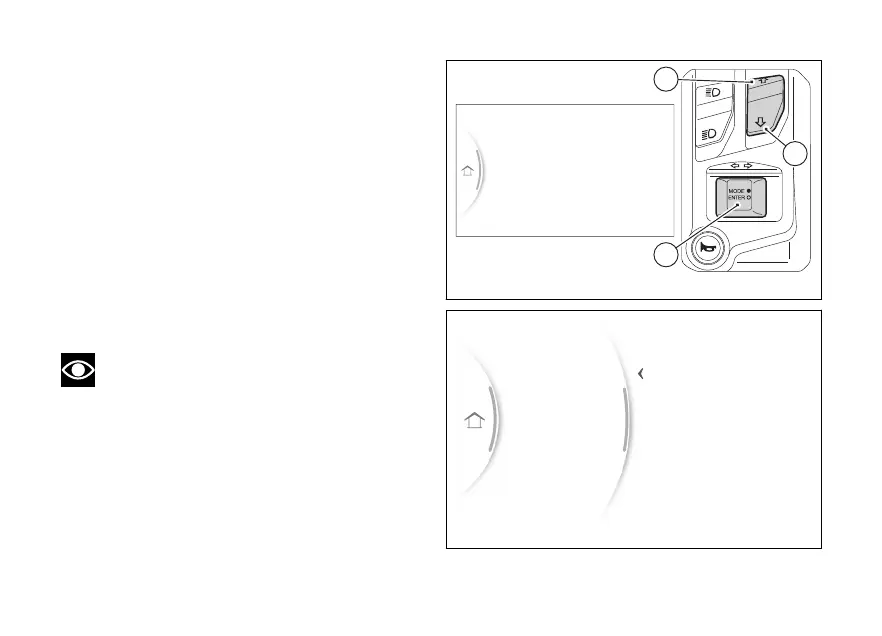
From the Interactive Menu, use (1) and
(2) to select the item menu" and press
ENTER (3).
●
Select the “Date and time” item and press
ENTER (3).
“Set date”, “Date format”, “Set time” and “Time
format” are displayed. The current is shown
on the right side.
With (1) and (2) it is possible to scroll through
and select the parameter to be set. Press ENTER (3)
to confirm.
Note
If the date or time has not been set yet, dashes
- are displayed instead of the relevant values.
Turn signals
Bluetooth
Date and time
PIN code
Display
Gear
N
Fig 124
Turn signals
Bluetooth
Date and time
PIN code
Display
Set time
Date format
Set date
Back
Fig 125
149


 To Next Page