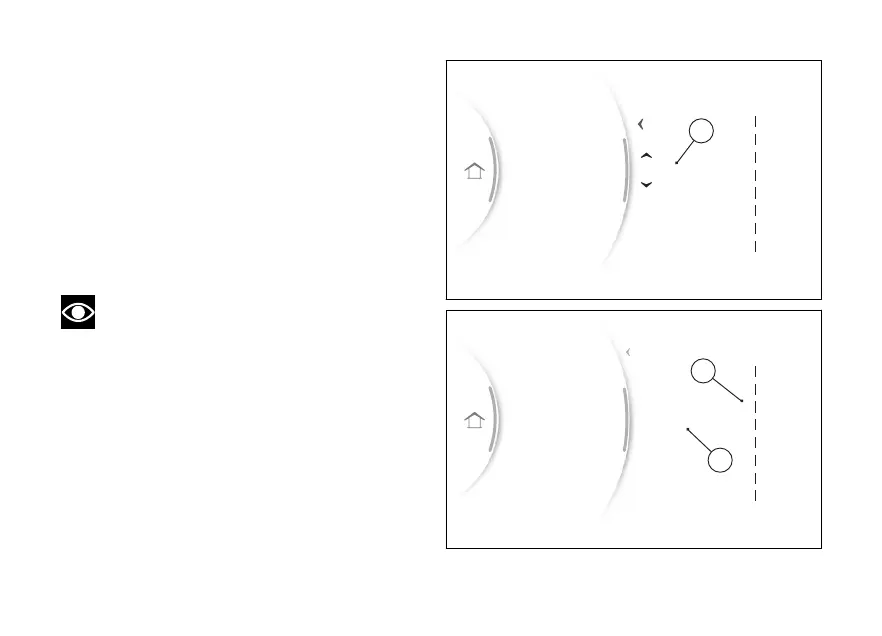
In the following example, the position of the
“Total” item is changed from 1 to 3:
●
Use (1) and (2) to select item "Total” and
press the ENTER (3).
●
Two arrows (C) are displayed above and below
the position number, indicating that by means of
the (1) and (2) it is possible to change the
position number, in this example "3” (D).
●
Press ENTER (3) to confirm. The order of the
Info display is then updated with the new
position (E).
Note
If the fuel level display is set to “Range”, the
is displayed grey in the list.
DRL
Fuel indicator
Info display
Riding Mode
Service
3 Trip 1
2 Range
1 Total
8
7
6
5
4
3
2
1
In.Cons.
Trip 2
Trip 1 time
Ø Speed 1
Ø Cons. 1
Trip 1
Range
Total
Info display order
Back
Gear
N
Fig 104
DRL
Fuel indicator
Info display
Riding Mode
Service
3 Trip 1
2 Range
3 Total
Default
8
7
6
5
4
3
2
1
In.Cons.
Trip 2
Trip 1 time
Ø Speed 1
Ø Cons. 1
Total
Trip 1
Range
Info display order
Back
Gear
N
Fig 105
134


 To Next Page