r3bEL mini User Manual
19
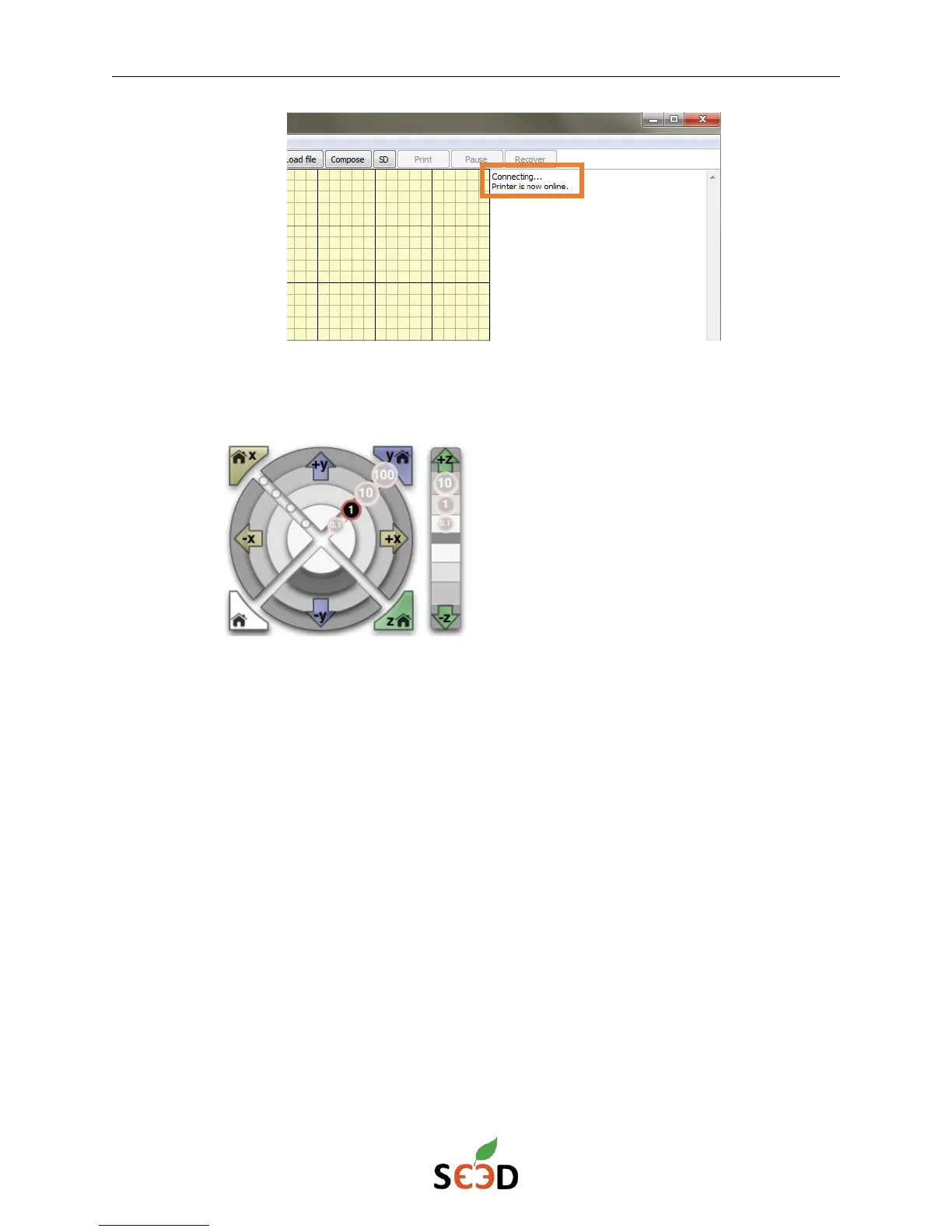
8. To test the motors, use the circular control pad to move the X and Y motors. The 0.1,
1, 10, and 100 increments represent actual distances in millimeters.
X-Y-Z coordinate system on r3bEL mini
X-coordinate:
The X-motion moves the extruder head left or right. +X will move the extruder head to
the right relative to the user facing the front of the printer and –X will move the
extruder head to the left.
Y-coordinate:
The Y-motion moves the bed (Note: The motion of the bed is relative to the extruder
head). +Y will move the bed to the front relative to the head so the extruder head will
shift toward the back of the bed and -Y will move the bed to the back relative to the
head, so the extruder head will shift toward the front of the bed.
Z-coordinate:
The Z-motion moves the bed up and down. Use the control bar on the right to move
the platform in the Z direction. It is important to note that +Z will cause the platform
to move down, increasing the distance between the extruder and the platform bed. -Z
will move the platform up, decreasing the distance between the extruder and the
platform bed.


 To Next Page