r3bEL mini User Manual
26
5.2 Configuring the Wi-Fi
To setup the Wi-Fi connection you must download YAT terminal (for Windows) or Coolterm (for
macOS) depending on the operating system of your computer. Windows users can follow the
instructions listed under section 5.2.1 YAT Terminal and macOS users can skip to section 5.2.2 for
instructions.
5.2.1 YAT Terminal (Windows)
YAT terminal software is used to configure the Wi-Fi module on the bioprinter. If you are running
a Windows operating system follow the steps below:
1. Download the Terminal Emulator program YAT from the link
https://sourceforge.net/projects/y-a-terminal/ and install the software.
2. Make sure that the bioprinter is connected to the computer using the USB Cable.
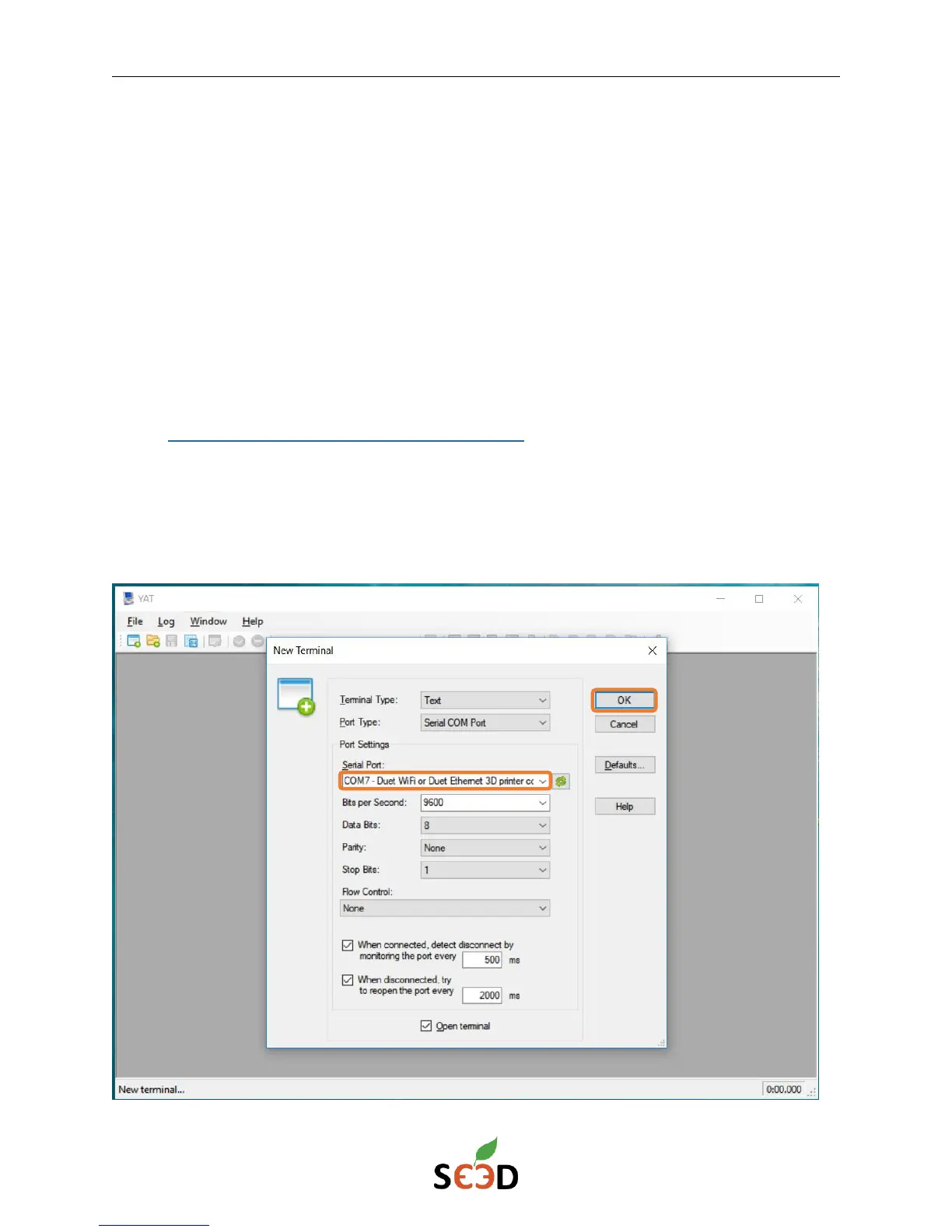
3. Open the program and click on OK in the New Terminal window. Make sure that the
board is recognized in the pop-up window as shown below.


 To Next Page