22 User Manual 62C/62S
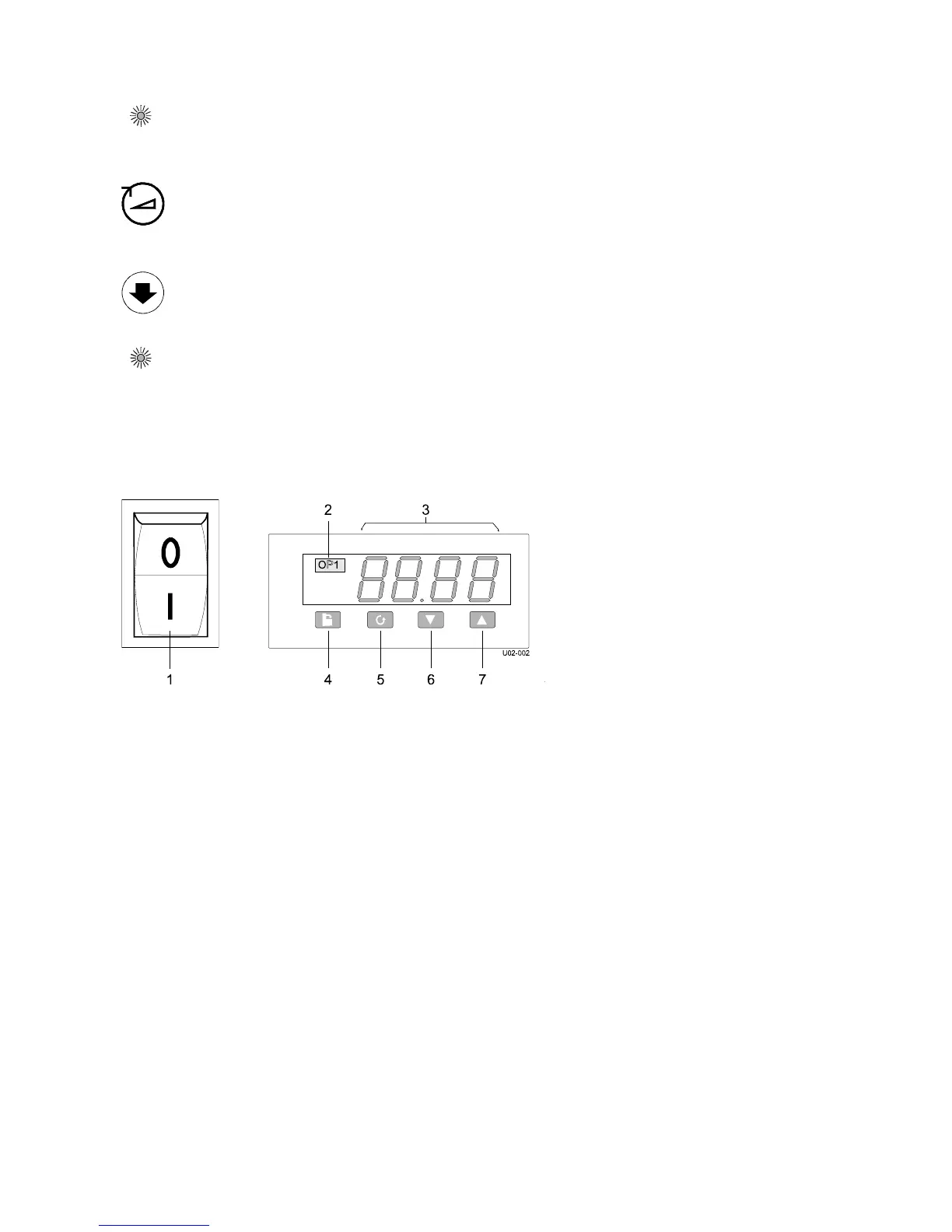
Forward indicator (10), LED;
The LED will light when the forward mode is selected.
Speed control (11), control knob;
Sets the speed anywhere in a range between 0 and 10 (See specifications for
actual speed range).
Reverse (12), snap pushbutton;
Press and hold for rotation of the rolls in reverse direction.
Reverse indicator (13), LED;
The LED will light when the reverse mode is selected.
5.1.2 Heater control (62S only)
The heater-control above the control panel regulates the temperature of the upper main
roller.
Figure 10: Heater-control section.
The heater control is turned on as soon as the machine is powered.
The actual temperature (3) of the roller is now displayed on the temperature control
display.
Press I to turn the heater ON. The heater it self is enabled by the 0/I switch (1) and the
heater element is switched on and off by the temperature control.
If the actual temperature is lower than the set temperature, the heater element is turned
ON and in the operation display position (2) OP1 is displayed.
The heater has a factory defined temperature range. Within this range the roller
temperature can be regulated. The temperature setting is displayed when the up (7) or
down (6) button is pressed, and changed by pressing the up (7) or down (6) buttons again.
Note:
The heated roller needs time to reach its set temperature (e.g. from room temperature
to maximum takes approximately 1 hour). It is recommended to let the machine run at a
low speed, to avoid uneven hot spots.
The buttons (4) and (5) are not used.


 To Next Page