U.4.37
Date Code 20020501 User’s Guide SEL-421/SEL-421-1 Relay
Basic Relay Operations
Examining Metering Quantities
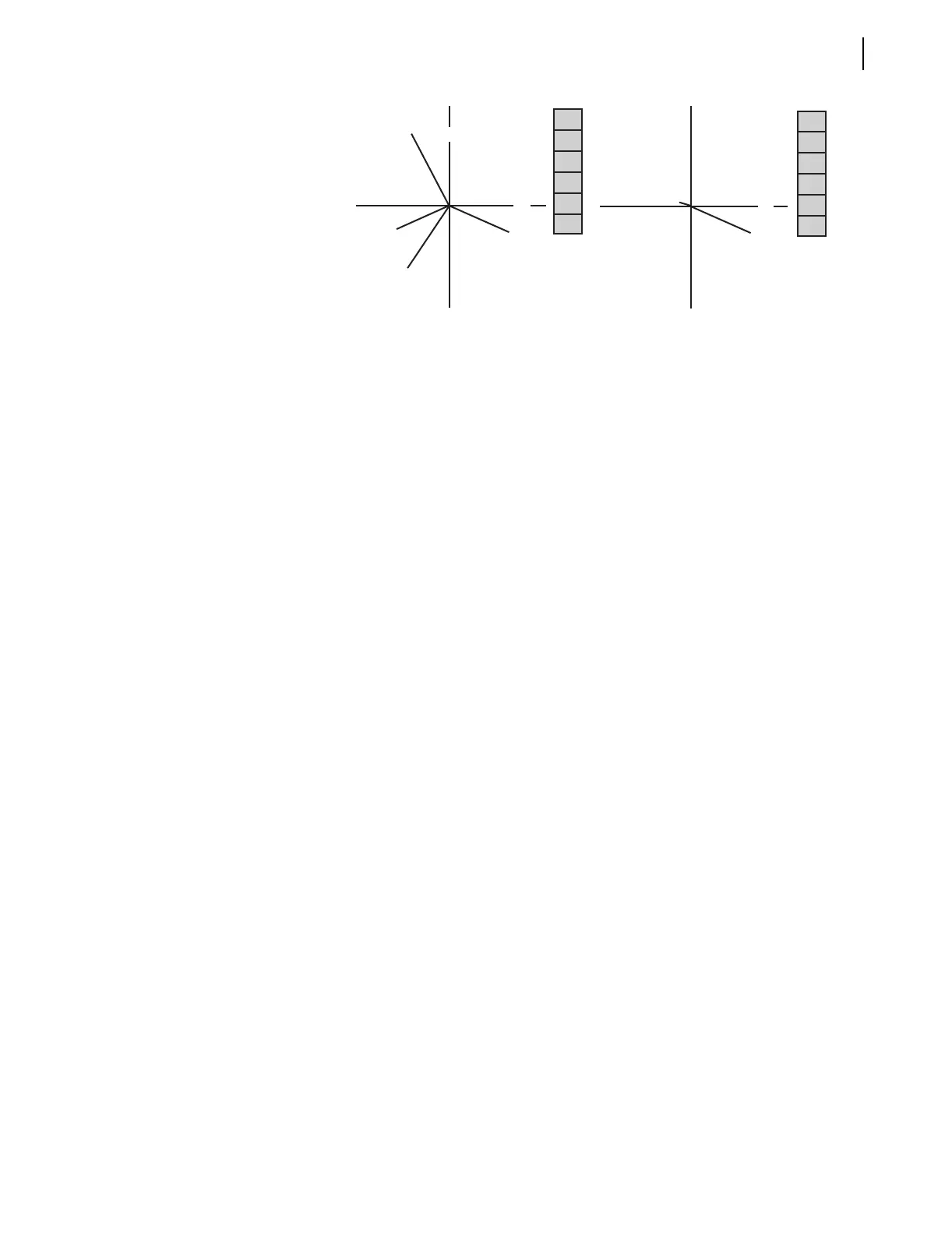
Figure 4.29 Phasor Metering Quantities: ACSELERATOR HMI.
Step 8. View metering data. Click the Instantaneous button of the HMI
tree view to see metering information similar to the terminal
display of Figure 4.25.
View Metering:
Front Panel
You can use the front-panel display and navigation pushbuttons to view the
metering quantities of the SEL-421 Relay. See METER on page U.5.11 in the
User’s Guide for more information on viewing metering on the relay front
panel. The screens in this procedure are for one circuit breaker, and this
example assumes that you have not enabled the demand metering and
synchronism check features.
Step 1. Prepare to use the front panel. After applying power to the
relay, note that the LCD shows a sequence of screens called the
ROTATING DISPLAY. (If you do not operate the front panel
for a certain period, the relay will enter front-panel time-out
mode and you will see the sequential screens of the
ROTATING DISPLAY.)
Step 2. View the MAIN MENU. Press the {ENT} pushbutton to
display the MAIN MENU at the top of Figure 4.30.
Step 3. View the metering selection screen. Highlight the METER
action item (see the first screen of Figure 4.30). Press the
{ENT} pushbutton. The relay displays the METER submenu
(the second screen in Figure 4.30).
Step 4. View the metering screens. Press the {Up} and {Down} arrow
navigation pushbuttons to highlight the FUNDAMENTAL
METER action item (See Figure 4.30, middle screen). Press
the {ENT} pushbutton. The relay displays the first
FUNDAMENTAL METER screen (the third screen of
Figure 4.30). Use the {Up} and {Down} arrow navigation
pushbuttons to move among the fundamental line quantities
metering screens.
Step 5. Normalize the front-panel display. To exit metering, press the
{ESC} pushbutton repeatedly to return to the MAIN MENU.
IA
VB
199.08 A ∠ -31.05°
199.58 A ∠ -150.56°
198.55 A ∠ 89.09°
FREQ = 59.99 Hz
133.750 kV ∠ 0.00°
133.750 kV ∠ -119.82°
133.730 kV ∠ 120.34°
VC
IB
IC
VA
I1
V1
3I2
IA
IB
IC
VA
VB
VC
IA =
IB =
IC =
VA =
VB =
VC =
199.07 A ∠ -30.84°
1.06 A ∠ -160.36°
2.26 A ∠ 92.53°
0.068 MW
133.743 kV ∠ 0.17°
0.226 kV ∠ -60.34°
0.699 kV ∠ 116.49°
0.041 MVar
I1 =
312 =
310 =
V1 =
V2 =
3V0 =
P =
Q =
I1
312
310
V1
V2
3V0


 To Next Page