U.4.48
SEL-421/SEL-421-1 Relay User’s Guide Date Code 20020501
Basic Relay Operations
Reading Oscillograms, Event Reports, and SER
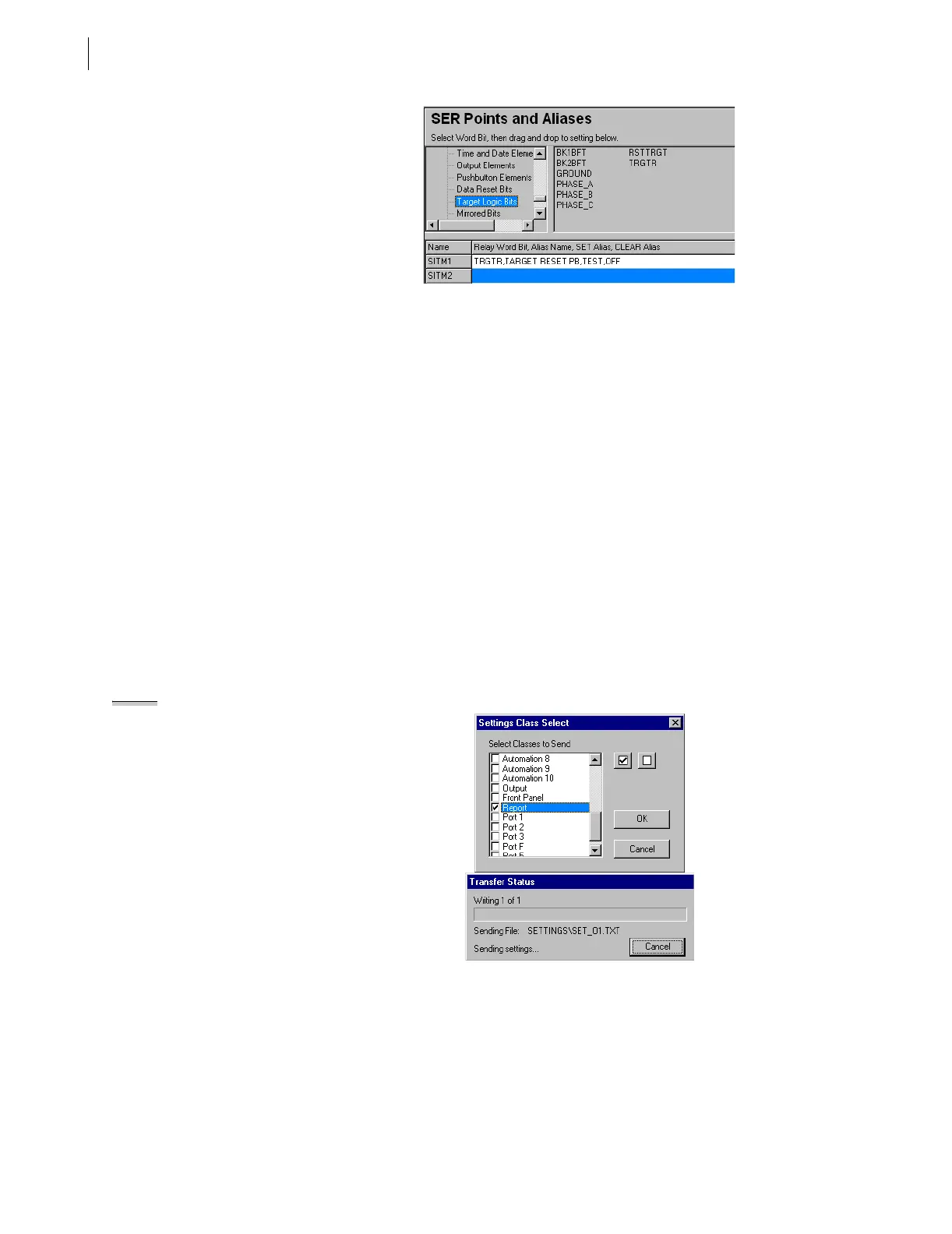
Figure 4.41 SER Points and Aliases Settings: ACSELERATOR Software.
Step 5. Enter SER trigger settings. For this example, select Target
Logic Bits in the Relay Word bits list (See Figure 4.41). Click
and drag the TRGTR Relay Word bit to the SER Points and
Aliases text box for Element Name 1 (labeled SITM1). If you
want the relay to display an alias for the element, enter an alias
name of 20 or fewer characters following the comma after
TRGTR. For this example, type TARGET RESET PB.
Similarly, type ,TEST,OFF to enter a Set Alias and a Clear
Alias. Click in any other row or push Tab; the
ACSELERATOR
software validates your entry. You can enter as many as 250
relay elements in the SER Points and Aliases list.
Step 6. Save the new settings in the
ACSELERATOR software. On the
File menu, click Save.
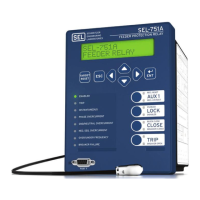
Step 7. Upload the new settings to the SEL-421 Relay. On the File
menu, click Send. The
ACSELERATOR software prompts you
for the settings class you want to send to the relay, as shown in
the first dialog box of Figure 4.42. Click the check box for
Report. Click OK. The
ACSELERATOR software responds with
the second dialog box of Figure 4.42. If you see no error
message, the new settings are loaded in the relay.
NOTE: The Relay Editor dialog boxes
shown in Figure 4.42 are for the
SEL-421 Relay. The SEL-421-1 Relay
dialog boxes are similar.
Figure 4.42 Uploading Report Settings to the SEL-421 Relay.
Step 8. Generate an SER record. Press and release the front-panel
{TARGET RESET} pushbutton.
Step 9. View the SER report. Start the
ACSELERATOR software
operator interface. In the top toolbar HMI menu, click Meter
and Control. Click the SER button of the HMI tree view. See
Figure 4.43. The
ACSELERATOR software displays the SER
records with a display similar to Figure 4.44.


 To Next Page