10S
46
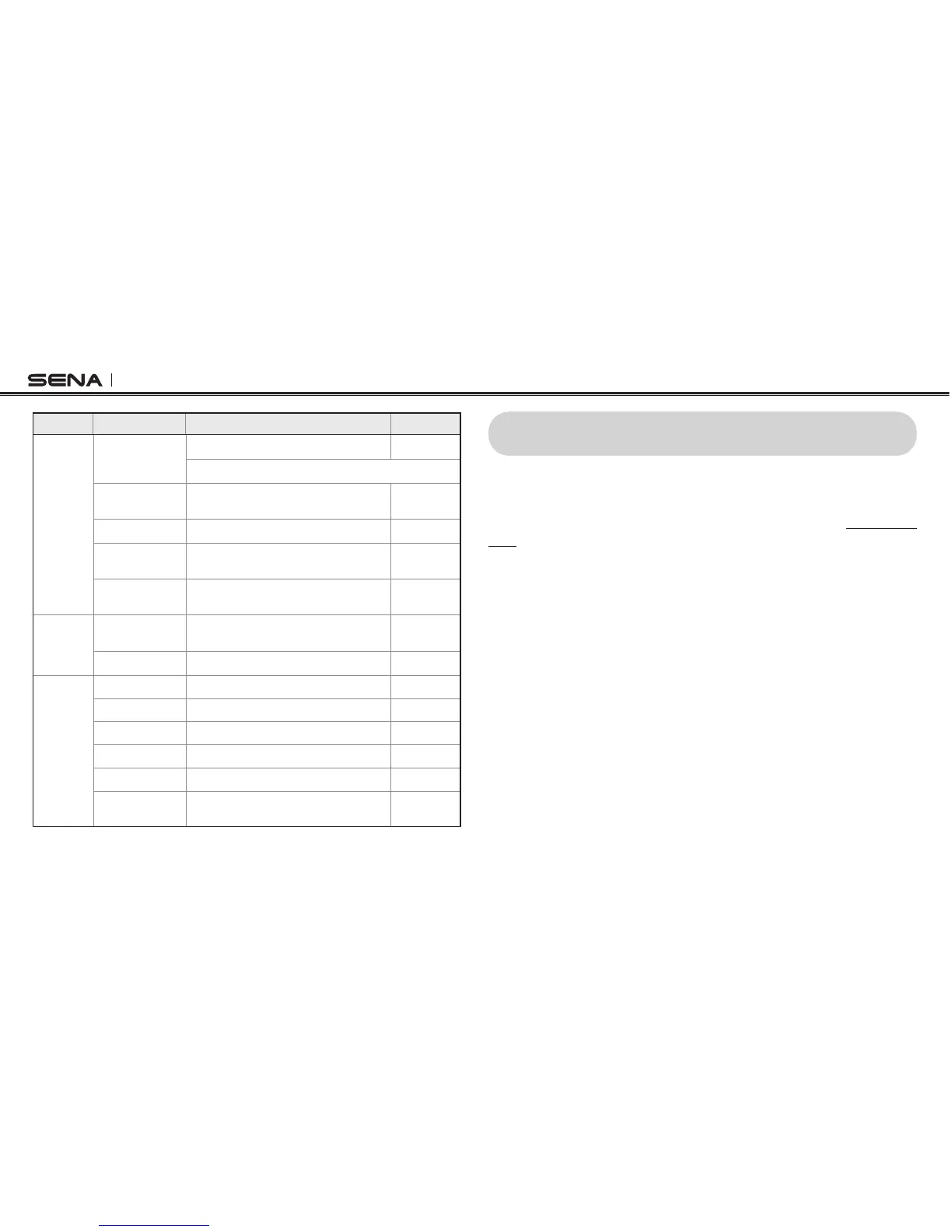
Type Function Handlebar Remote LED
Intercom
Intercom pairing
Press the Front Button for 5 seconds Red ashing
Tap the Front Button of any one of the two headsets
Start/End each
intercom
Tap the Front Button -
End all intercoms Press the Front Button for 1 second -
Start Group
intercom
Press the Front Button for 3 seconds
Green
ashing
End Group
intercom
Press the Front Button for 1 second -
Music
Play/Pause
Bluetooth music
Press the Joystick for 1 second -
Track forward/back Move the Joystick left or right for 1 second -
FM radio
FM radio on/off Press the Rear Button for 1 second -
Select preset Tap the Rear Button -
Seek stations Move the Joystick left or right for 1 second -
Scan up FM band Double tap the Rear Button -
Stop scanning Double tap the Rear Button -
Save preset while
scanning
Tap the Rear Button -
Handlebar Remote Button Operation Table
16 FIRMWARE UPGRADE
The 10S supports rmware upgrades. You can update the rmware
using the Sena Device Manager (please refer to
section 4.7.1, “Sena
Device Manager”
). Please visit Sena Bluetooth website at www.sena.
com to check the latest software downloads.



 To Next Page