10S
48
17.4 Factory Reset
1. To restore the 10S to factory default settings, press and hold the
Phone Button for 10 seconds until the LED shows solid red and
you hear “Factory reset”.
2. Within 5 seconds, press the Jog Dial to conrm reset. The headset
will be restored to factory setting and switched off automatically.
You will hear, “Headset reset, goodbye”.
3. If you press the Phone Button or leave the Jog Dial for 10 seconds,
the reset attempt is cancelled and the headset returns to stand-by
mode. You will hear a voice prompt, “Cancelled”.
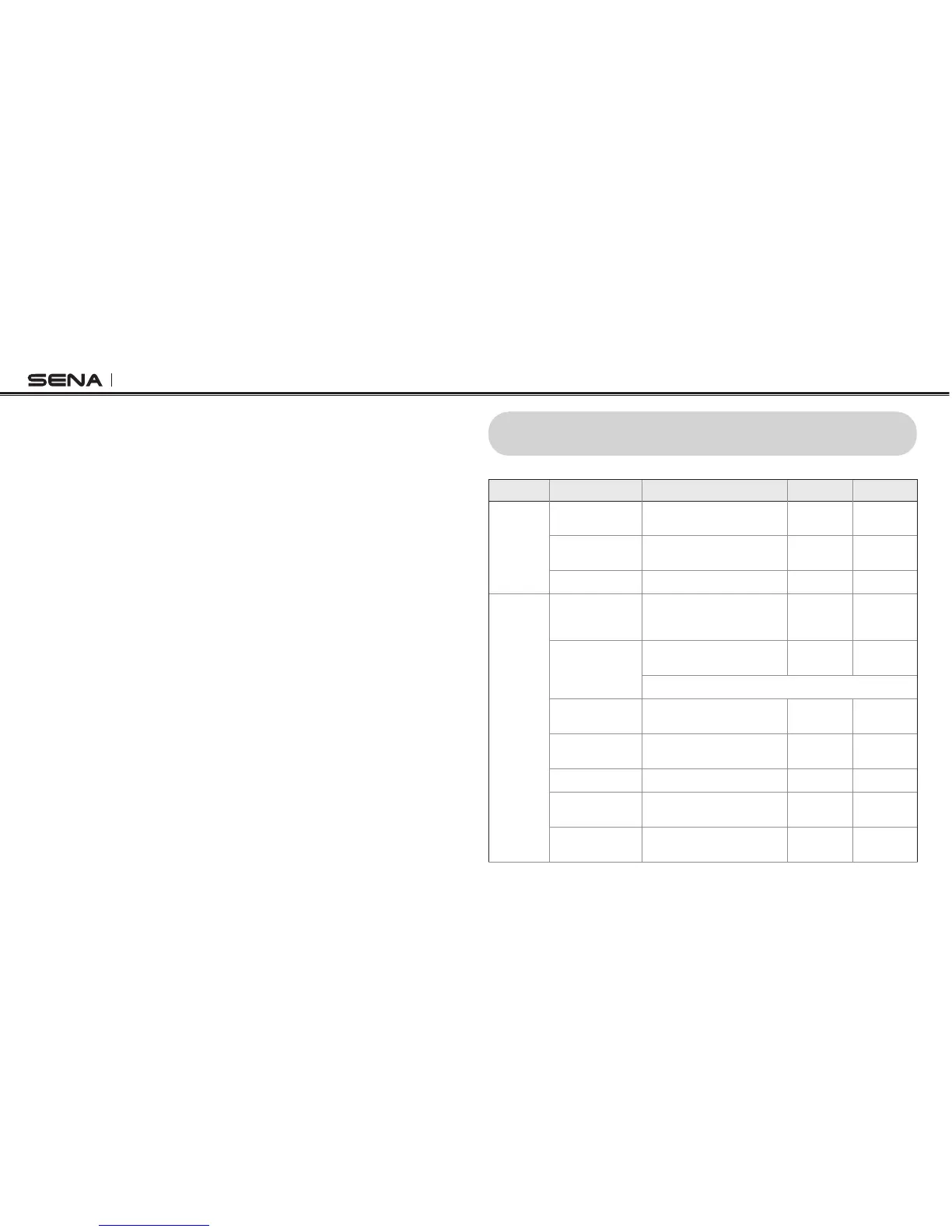
18 OPERATION QUICK REFERENCE
Type Function Button Command LED Beep
Basic
Function
Power on
Press the Phone Button and the
Jog Dial for 1 second
Solid blue
Ascending
beeps
Power off
Press the Phone Button and the
Jog Dial
Solid red
Descending
beeps
Volume adjustment Rotate the Jog Dial - -
Mobile
Phone
Mobile phone
pairing
Press the Phone Button for
5 seconds
Blue & red
alternatively
ashing
High tone
multiple
beeps
Second mobile
phone pairing
Press the Jog Dial for
5 seconds
Red ashing
Multiple
beeps
Tap the Phone Button within 2 seconds
Answer mobile
phone call
Tap the Phone Button or the
Jog Dial
- -
End mobile phone
call
Tap the Phone Button or press
the Jog Dial for 2 seconds
- -
Voice dial Tap the Phone Button - -
Speed dial Double tap the Phone Button -
Mid-tone
single beep
Reject incoming
call
Press the Jog Dial for
2 seconds
- -



 To Next Page