SPIDER RT1 Motorcycle Mesh Communication System | 19
4 PAIRING THE HEADSET WITH OTHER BLUETOOTH DEVICES
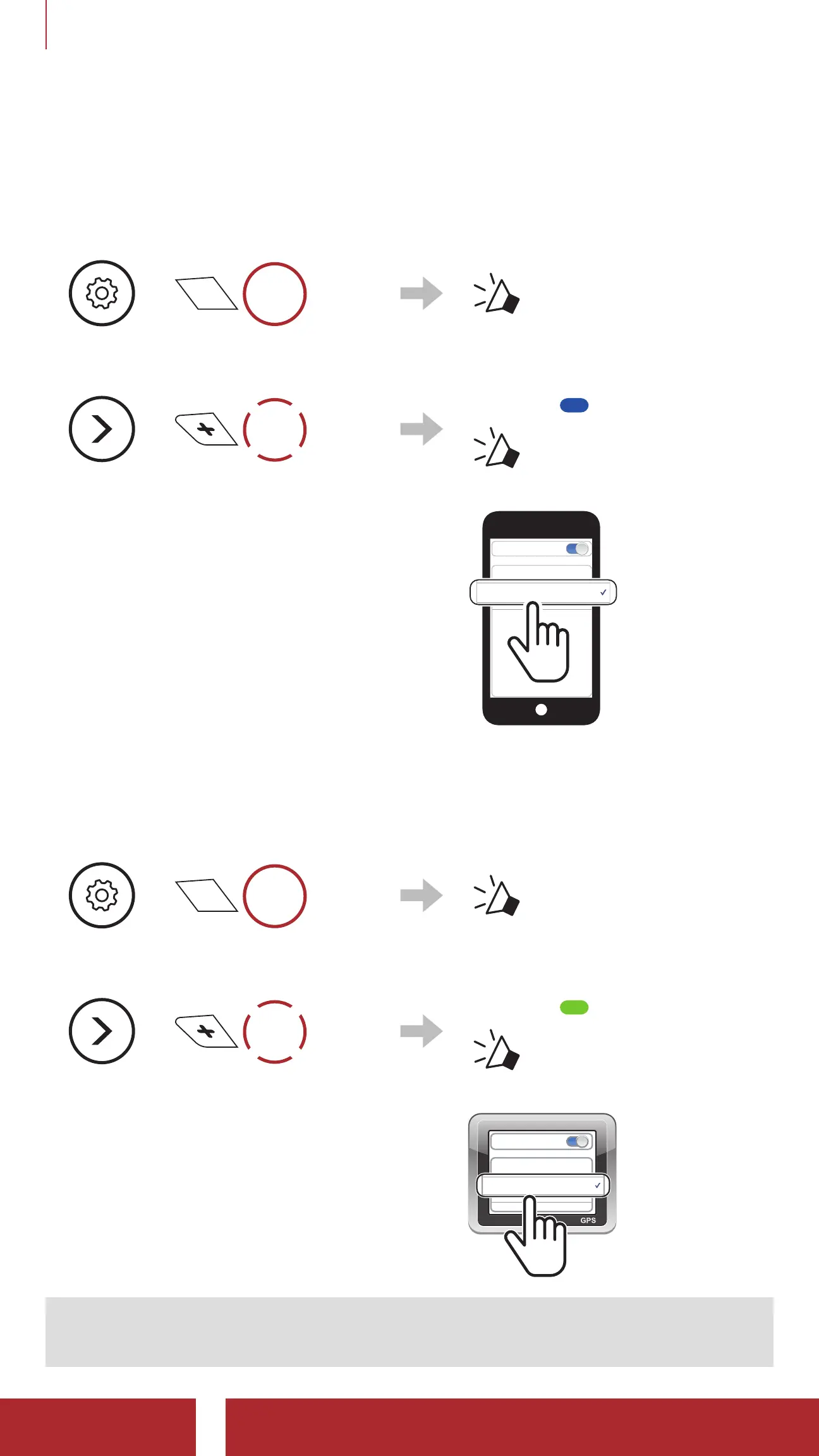
4.2 Second Mobile Phone Pairing - Second Mobile
Phone, GPS, and SR10
1. Press and hold the Center Button for 10 seconds.
=
10s
HOLD
“ Configuration
Menu”
2. Tap the (+) Button.
=
1x
TAP
Blinking
“ Second mobile
phone pairing”
3. Select SPIDER RT1 in the list of
Bluetooth devices detected. If your
mobile phone asks for a PIN, enter
0000.
Device B
Pi
Bluetooth
4.3 GPS Pairing
1. Press and hold the Center Button for 10 seconds.
=
10s
HOLD
“ Configuration Menu”
2. Double tap the (+) Button.
=
2x
TAP
Blinking
“ GPS pairing”
3. Select SPIDER RT1 in the list of
devices detected. If your Bluetooth
device asks for a PIN, enter 0000.
Device B
Pi
Bluetooth
Note: If you pair your GPS device via GPS Pairing, its instruction will
interrupt your Mesh Intercom conversations.



 To Next Page