1 2
3 4
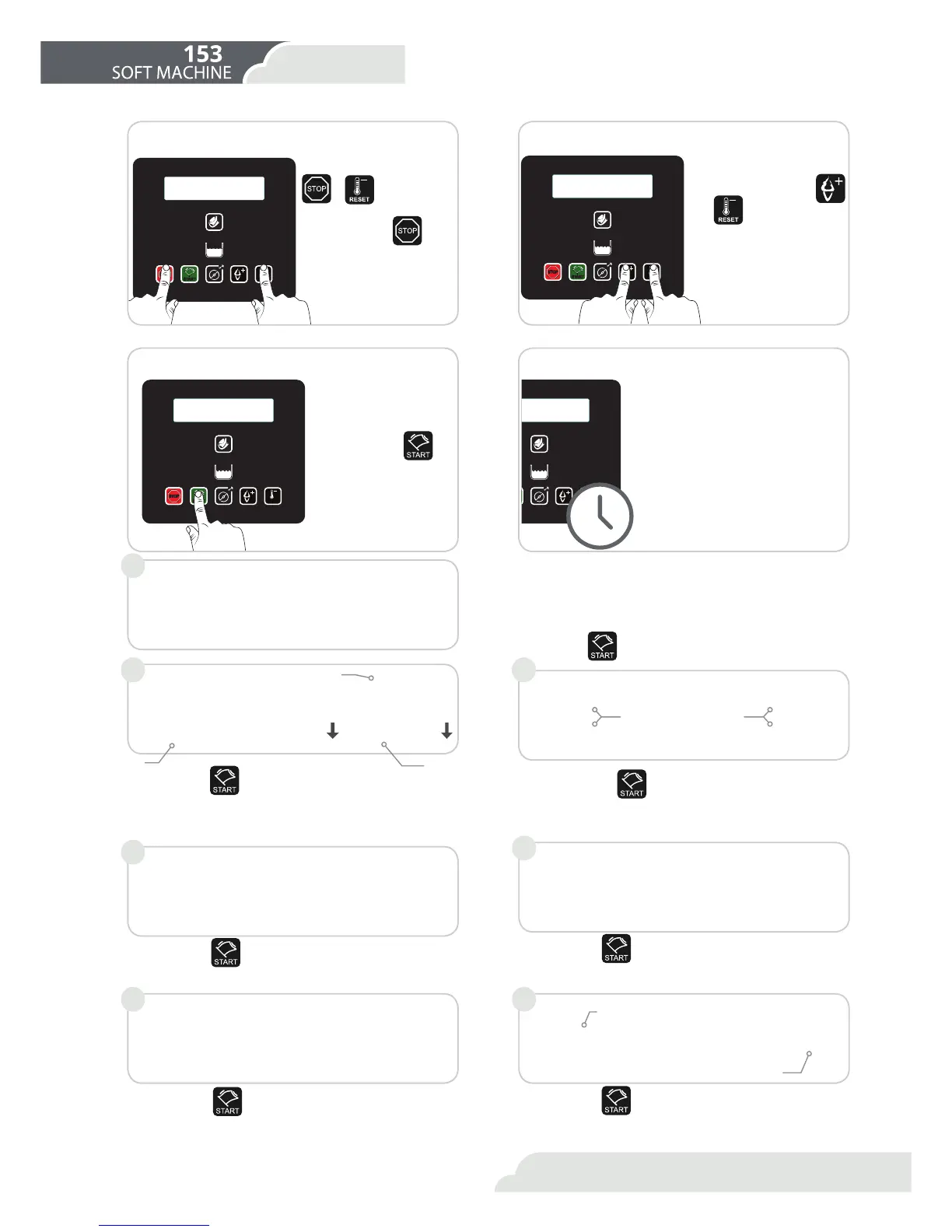
Enter the user menu
Pressing
+ at the same
time, you get to the user
menu. With the
but-
ton you can run through
the parameters to choose
from.
Select cylinder
2QWKHPHQXORRNIRUȊDF-
tive side” and with the
and
buttons you can
select the cylinder to pre-
pare ice-cream from:
/HIW&\OLQGHU
2- Right Cylinder
3- Both cylinders at the
same time
Commence ice-cream production
Press button .
Wait for ice-cream
When the ice-cream is ready, the
screen will show: Ice-cream
ready to serve.
1.By pressing
you can see the temperature of the
refrigerator and the two cylinders. The presence of an
arrow pointing downwards indicates that the cylinder
is getting colder.
2. By pressing
again you can see:
Hot (value of current consistency)
Set (value of consistency to be reached).
5.By pressing
again you can activate the manual
defrosting function. The evaporator is subject to the
IRUPDWLRQRIIURVWZKLFKPD\UHGXFHLWVHHFWLYHQHVV
ΖQRUGHUWRSUHYHQWWKLVWKHPDFKLQHKDVDQDXWRPDWLF
and a manual defrosting cycle.
3.By pressing
again, you can see how many cones
you have served today.
4.By pressing
again, you can see the total number
of cones served by the machine.
2QWKHPDLQVFUHHQ\RXFDQVHH
- State of the ice-cream
- Temperature of the refrigerator
'D\VOHIWIRUZDVKLQJ
By pressing
you can gain access to useful information.
6.By pressing
again, you can see the temperature
of the refrigerant at the entrance to the compressor
and in the condenser.
Cabin +2º C
+018º C
+022º C
Hot=051 Hot=051
Set=100 Set=100
READY!
Cab +2º C LAV -14
Daily cones
00000
Total cones
00000
Force Defrost
Press Button +
T.RTC+035 T.CND+050
1 2
4
3
5 6
RESET
MIX
STOP
START
RESET



 To Next Page