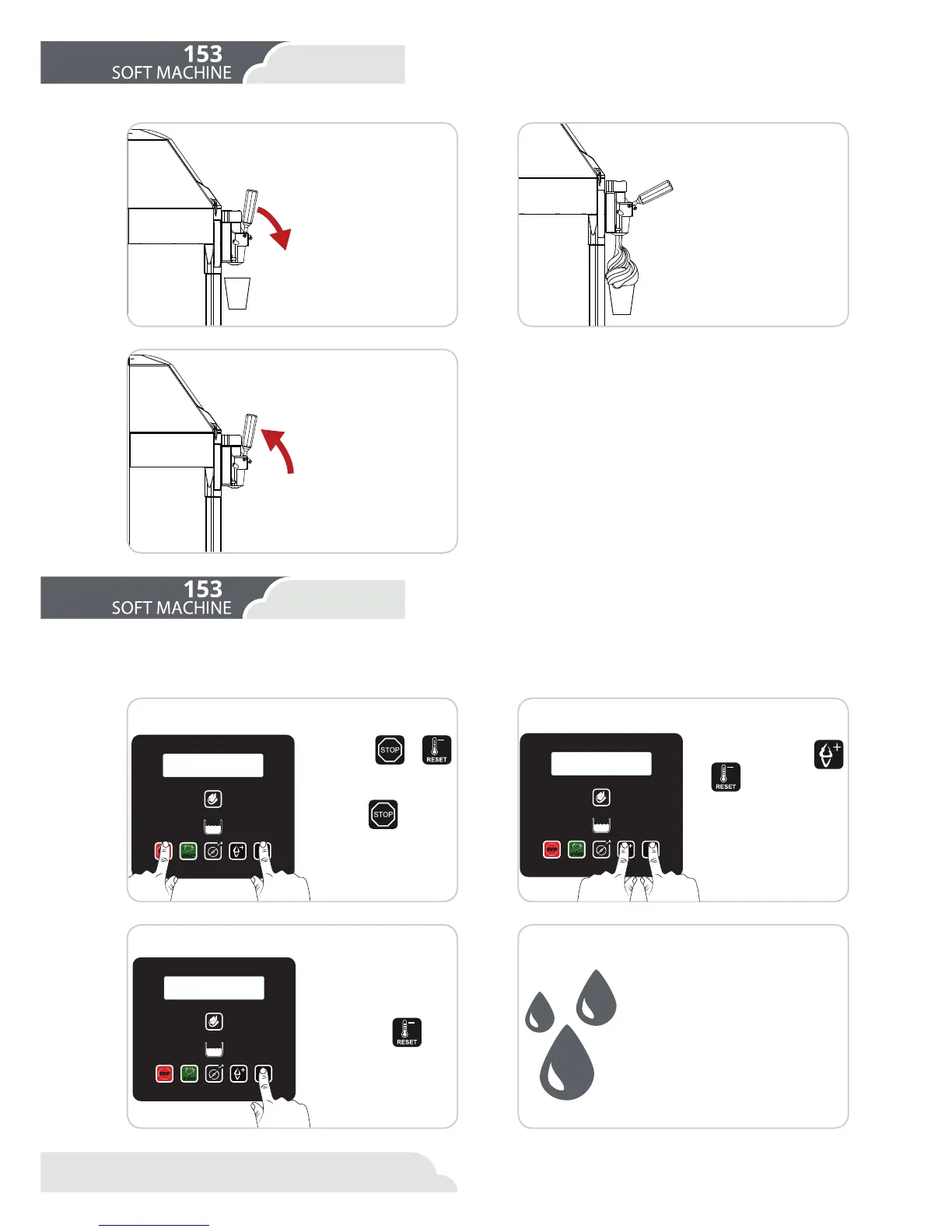
/RZHUWKHFRQWUROOHYHU
Move the container or
the cone
1 2
1 2
3
3 4
Lift the control lever
As soon as the product begins
to come out, move the con-
tainer or the cone in a circular
motion to give the ice cream a
conical shape.
2QFHDVXɝFLHQWSRUWLRQ
of the product has been
served, raise the lever
and move the container
or the cone downwards
WRȴQLVKWKHSRUWLRQZLWK
a point.
ΖQ RUGHU WR VHUYH WKH
SURGXFW LW LV VXɝFLHQW
to position a container
or a cone below the exit
tap and slowly lower the
lever on the tap.
'XULQJWKHSHULRGVRIFORVXUHRI\RXUHVWDEOLVKPHQWLWLVSRVVLEOHWRSXWWKHPDFKLQHLQWRPDLQWHQDQFHPRGHΖQWKLVZD\\RX
will save a considerable quantity of electricity as the compressor works only for the time that is strictly necessary to conserve
WKHSURGXFWDWWKHSURSHUWHPSHUDWXUHPD[|&
The left-hand control lever will serve ice-cream from the
left-hand cylinder.
The central control lever will serve a mixture of the ice-
creams present in the two cylinders.
The right-hand control lever will serve ice-cream from
the right cylinder.
'LVWULEXWHWKH LFHFUHDP ZLWKRXW H[FHHGLQJ WKH UDWH RI
production of the machine as indicated in the table in
WKH 6SHFLȴFDWLRQV VHFWLRQ %\ QRW H[FHHGLQJ WKLV UDWH
DQG E\ EHLQJ FDUHIXO WR UHȴOO WKH PDFKLQH ZLWK IUHVK
product, you can be sure not to interrupt sales even at
the busiest times.
Enter the user menu
By pressing
+
at the same time, you
will enter the user menu.
With the
button,
you can run through the
parameters that you wish
to change.
Select the cylinder
2Q WKH PHQX ȴQG ȊDFWLYH
side” and with the
and
buttons, you can
choose the cylinder that
you are going to put into
conservation mode:
/HIWF\OLQGHU
2- Right cylinder
3- Both cylinders at the
same time
Commence Conservation Cleaning
Press button
.
Carry out the cleaning and hygiene
of the machine if the cleaning notice
appears on the screen.
See cleaning and hygiene section.
Carry out the surface cleaning of the
machine if there is no cleaning notice
on the screen.
See Surface cleaning section.



 To Next Page