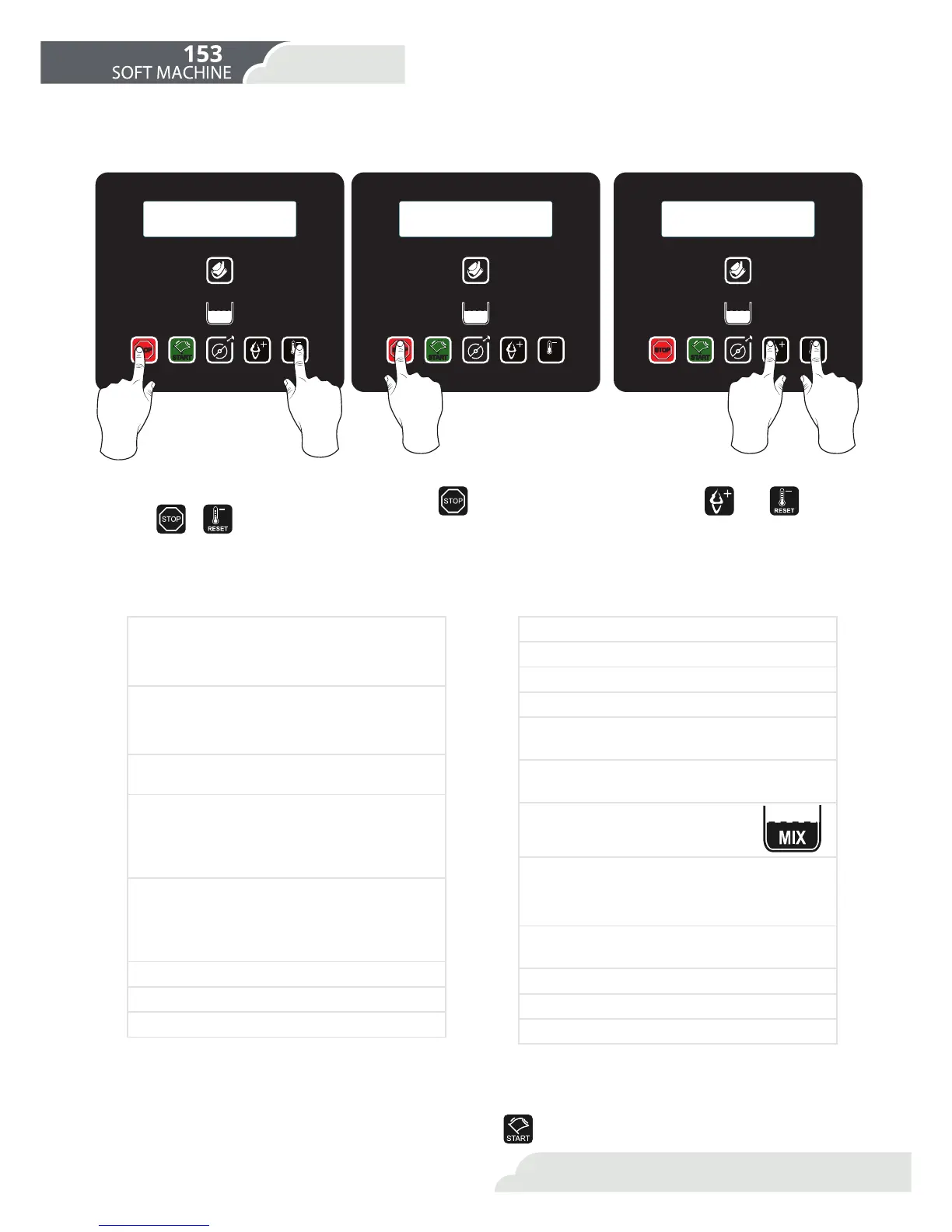
+RZFDQΖHQWHUWKHXVHUPHQXDQGKRZFDQΖQDYLJDWH"
Which parameters can you change?
6DYHDQG([LW0HQX
1. Enter the menu 2. See parameters 3. Change parameter value
You can enter the user menu by
pressing
+
at the same
time for 3”.
With the button, you can view
the parameters that you wish to
use.
With the and buttons,
you can change the value of the pa-
rameter.
ΖQRUGHUWR6DYHDQGH[LWPHQXLWLVVXɝFLHQWWRSUHVV .
1. HOT 1
0D[&RQVLVWHQF\RILFHFUHDPOHIWF\OLQGHU
ΖQFUHDVLQJWKLVQXPEHULQFUHDVHVWKHKDUGQHVV
of the ice-cream.
2. HOT 2
0D[&RQVLVWHQF\RILFHFUHDPULJKWF\OLQGHU
ΖQFUHDVLQJWKLVQXPEHULQFUHDVHVWKHKDUGQHVV
of the ice-cream.
3. Overrun 1
$PRXQWRIDLUOHIWF\OLQGHU
4. HOB Hot Block
Ice-cream ready message left cylinder)
ΖQFUHDVLQJWKLVQXPEHUGHFUHDVHVWKHFRQVLVWHQ-
cy of the ice-cream when appears the message:
Ice-cream ready to serve.
5. HOB Hot Block 2
Ice-cream ready message right cylinder)
ΖQFUHDVLQJWKLVQXPEHUGHFUHDVHVWKHFRQVLVWHQ-
cy of the ice-cream when appears the message:
Ice-cream ready to serve.
6. Hours
7. Minutes
'D\RIWKHZHHN
9. Day of the month
10. Month
11. Year
12. Language
13. Time of commencement
of production
14. Time of commencement
of conservation
15. Enable Beep Level
(QDEOHRUGLVDEOHWKHDFRXVWLF
VLJQDOZKHQWKHZDUQLQJDSSHDUV
16. Active side
1-left cylinder
2-right cylinder
3-both cylinders
17. Overrun 2
$PRXQWRIDLUULJKWF\OLQGHU
18. Automatic Conservation
19. Cleaning alarm hour
20. Cleaning alarm minutes
RESET
MIX
STOP
START
RESET
MIX
STOP
START
RESET
MIX
STOP
START
19
5.3 User menu
User menu
5.Warnings and
adjustments



 To Next Page